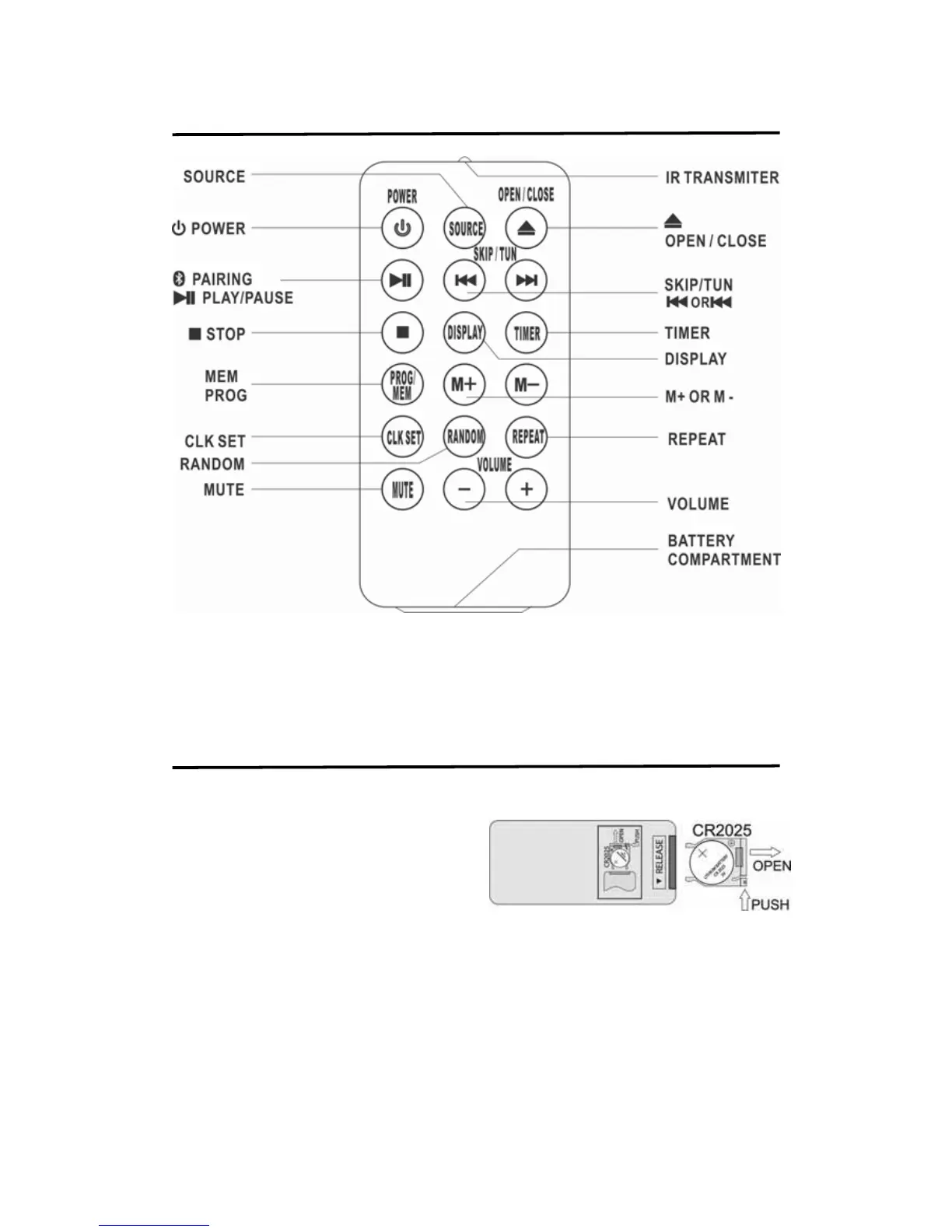
REMOTE CONTROL LOCATION
NOTE:
1. Remove spacer tab before using this unit for first time .
2. Press the button of the remote to pointing the main unit remote senor area to fully
control the main unitl.
INSTALL / REPLACE REMOTE BATTERY
TO INSTALLING / REPLCING REMOTE BATTERY
1. Pull the battery door at the back of the unit
as shown figure.
2. Insert the battery in the battery door with
“+" positive facing up. Only CR2025 3V
lithium battery should be used.
3. Insert the battery door with new battery
back into the unit.
BATTERY WARNING:
1. Make sure the correct polarity of battery to be installed.
2. Make sure you dispose of batteries properly (refer to your local regulations).
3. Do not open batteries.
4. Do not dispose of batteries in fire.
5. Do not heat up batteries.
6. Do not expose batteries to water.
7. Do not change or recharge batteries.


 To Next Page