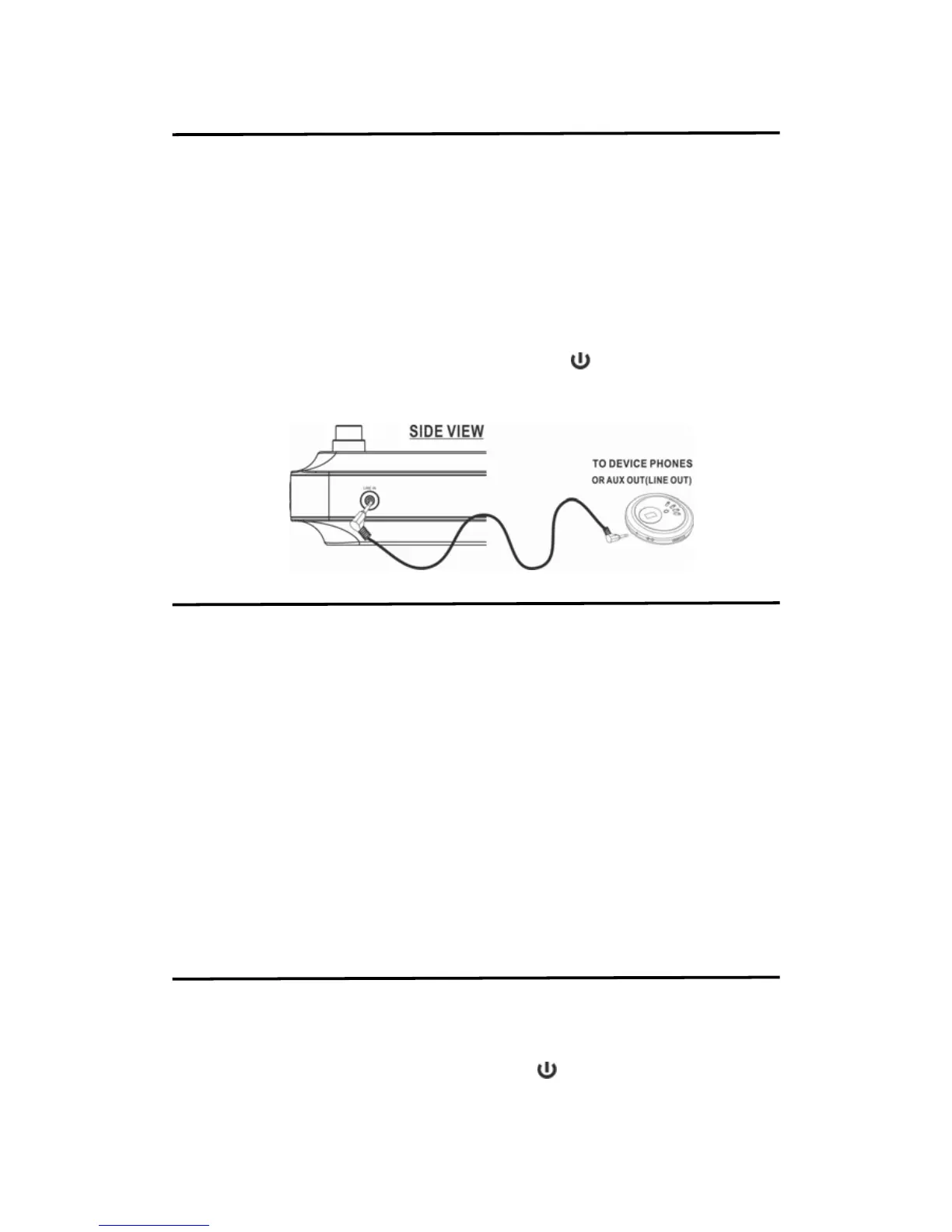
USING LINE IN (AUX IN) JACK
You can play any portable or external audio device with a standard 3.5mm stereo audio cable
(not included) via the LINE IN jack on the unit.
1. Plug one end of a standard 3.5mm stereo audio cable into the earphone or line-out jack on
your external device and plug the another end of the audio cable into the unit's LINE IN
jack.
2. Turn on the unit and press the SOURCE button to select LINE IN mode and LINE IN icon
will appear on the display,
3. Turn on and play your external audio device.
4. Press the VOLUME buttons to set the speaker volume level. You may need to adjust the
volume on your external device as well.
5. To stop the LINE IN playback, press the SOURCE button once to change back to RADIO /
Bluetooth / CD mode or turn off the unit by pressing the
button. Please remember to
turn off your external device.
6. Remember to turn off your external audio device after playback.
SETTING THE CLOCK
TO SET TIME MANUALLY
In first time, the display will show 12:00 or 0:00 when you connected the power adapter. You
can set the time following below steps.
1. Press and hold the CLK SET button on the unit or remote for 2 sec. until the 12h show on
the display.
2. Press the SKIP / TUN buttons to select 12h or 24h hour format.
3. Press the CLOCK SET button gain that the hour digit flashes.
4. Press the SKIP / TUN buttons to set the correct hour (hold the button for faster advance).
5. If setting to 12h hour format, Please remember to set the correct AM or PM time the
AM/PM Indicators appear to the left of the time display.
6. Press the CLOCK SET button gain. Press the SKIP / TUN buttons to set the correct
minute (hold the button for faster advance).
7. Press the CLOCK SET button again to confirm the manual clock setting (or no button
pressed within 15-20 seconds to exit the manual setting mode and auto saving the
setting.
USING TIMER
1. Press the TIMER button repeatedly to adjust the timer in increments of 10. (180max,
10min)
2. Press the SKIP / TUN buttons to adjust the timer in increments of 1. (ie. 1-9 or 31-39)
3. After the set time has expired, the unit will sound an alarm.
4. To cancel the alarm after it has sounded, press the
button once.
5. To cancel the timer before the alarm has sounded, press the TIMER button repeatedly
until it is set to “00”.


 To Next Page