EasyManua.ls Logo

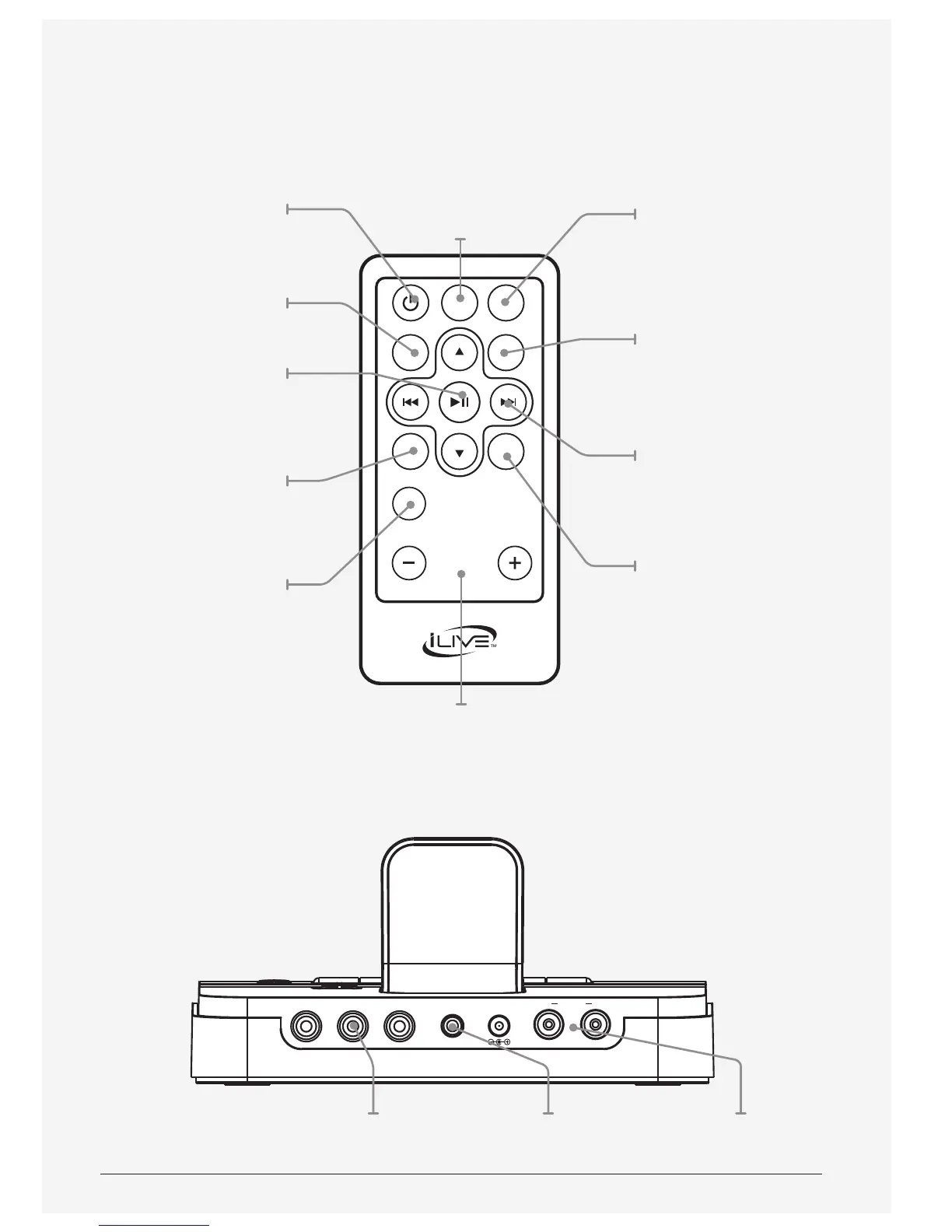
iLive ISDB752B - Remote Control and Connections; Remote Control Button Functions; Unit Input and Output Ports

iLive ISDB752B
12 pages
Print Icon
To Next Page IconTo Next Page
To Previous Page IconTo Previous Page
Loading...
Customer Support: 1-888-999-4215
7
DC IN 13VY Pb/Cb Pr/Cr
R LSPEAKER
OUT
LINE IN
VOLUME
SOURCE
SHUFFLE
MUTE
ENTERMENU
REPEAT
VIDEO
Volume
Press to adjust
the volume.
Mute
Press to mute
the volume.
Source
Press to switch
between Line
in, iPod and
Bluetooth modes.
Enter
Press to make
a selection.
Skip/Search
Press to skip between
tracks, or press
and hold to search
through tracks.
Shue
Press to play a
random track.
Note: The Menu/
Repeat/Shue/Video/
Enter buttons are
only for iPod mode.
Power
Press to turn the
unit on or o.
Menu
Press to access
the menu.
Play/Pause
Press to play or
pause a track.
Repeat
Press to repeat
a track.
Video
Press to output
iPod video to a
connected television.
Speaker
Connections
Line InComponent Out

Related product manuals