18
OTHER WAYS TO PLAY
Bluetooth Wireless
The speaker can also connect to devices via Bluetooth. Follow the steps below to
pair to a Bluetooth enabled device.
» Power on the speaker and press the Mode button to select Bluetooth Mode.
» Press and hold the Pair button to begin pairing. The LED indicator will begin
blinking blue as it searches for a device.
» Be sure your phone’s Bluetooth is enabled. Your phone should automatically
detect the speaker, open your Bluetooth settings, and select ISWFV387.
» When connected, the indicator on the speaker will turn solid blue, and a voice
prompt will sound from the speaker. The speaker is now connected. Use the
controls on your phone to select and begin playing audio.
Note : Please wait for the LED to switch to ashing white, indicating the speaker is
standing by in Wi-Fi mode then press the mode button to change to another mode.
Aux In
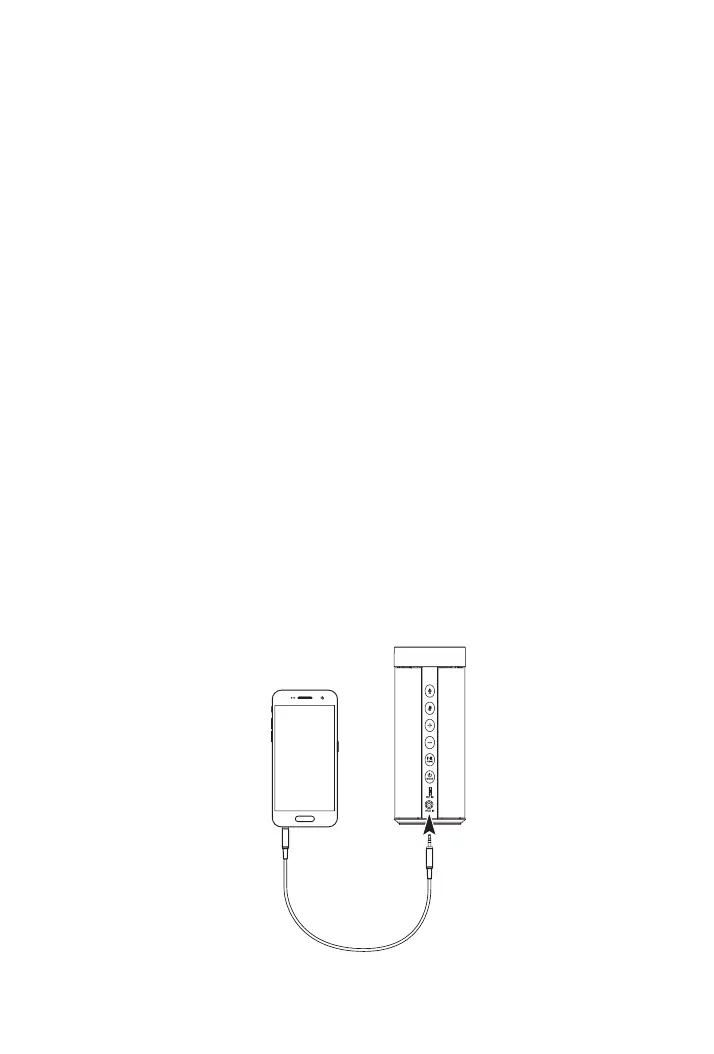
Requires a 3.5mm audio cable (included).
» Power on the speaker and press the Mode button to select Aux In Mode,
indicated by a solid green LED light. .
» Connect a 3.5mm audio cable to the Aux In on the unit and the audio
output/headphone jack on an audio device.
» Audio played through the connected device will now be heard through the
speakers. Use the controls on the connected device to play, pause, or skip
selected tracks.


 To Next Page