16
C C
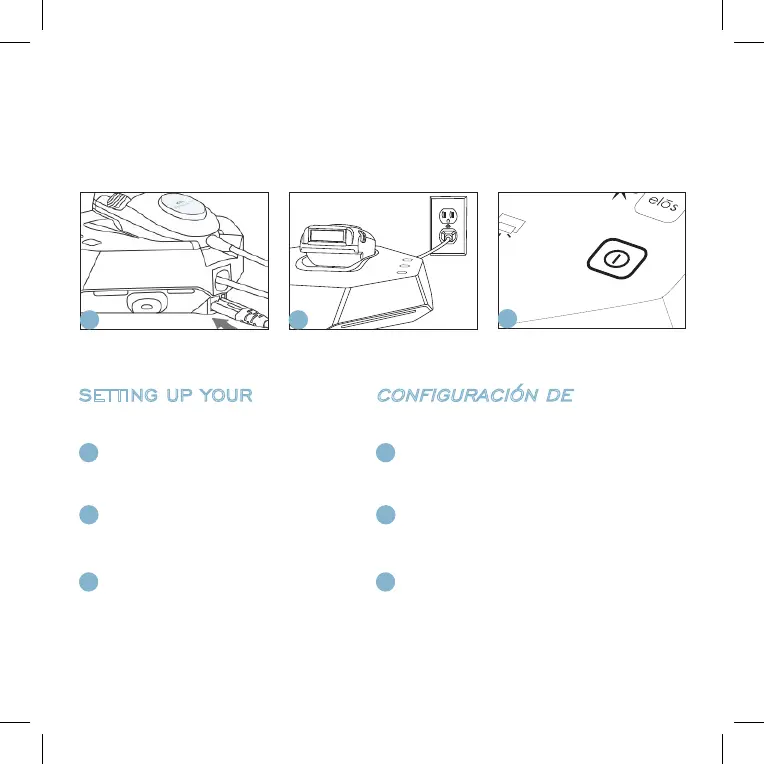
Connect the power cord into the back of the
base unit.
Conecte el cable de alimentación al dorso de la
unidad base.
Connect the power cord to an electrical outlet. Make
sure that the applicator is placed inside its cradle.
Conecte el cable de alimentación al tomacorriente de
pared. Asegúrese de que el aplicador esté colocado
dentro de su soporte.
Press the power button to turn the system on. Wait
until the indicator light on the power button turns
green. Now the system is ready to use.
Presione el botón de encendido para encender el sistema.
Espere a que la luz indicadora próxima al botón de encendido
se torne verde. Ahora el sistema está listo para ser usado.
SETTING UP YOUR
iluminageTOUCH
CONFIGURACIÓN DE
iluminageTOUCH
USING YOUR iluminageTOUCH FOR THE FIRST TIME/
USANDO SU
iluminageTOUCH
POR PRIMERA VEZ
A
A A
B
B B


 To Next Page