26
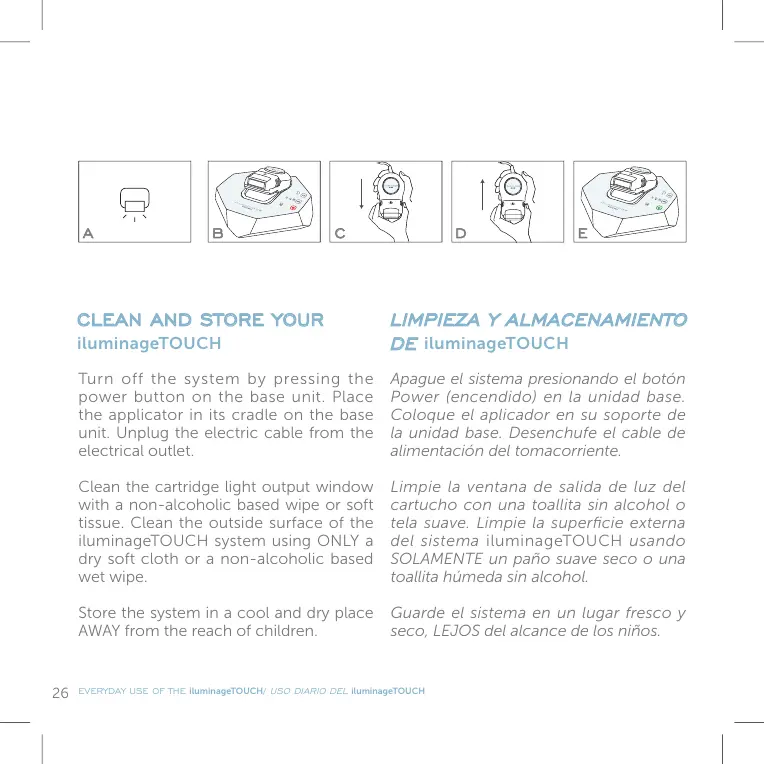
Turn off the system by pressing the
power button on the base unit. Place
the applicator in its cradle on the base
unit. Unplug the electric cable from the
electrical outlet.
Clean the cartridge light output window
with a non-alcoholic based wipe or soft
tissue. Clean the outside surface of the
iluminageTOUCH system using ONLY a
dry soft cloth or a non-alcoholic based
wet wipe.
Store the system in a cool and dry place
AWAY from the reach of children.
Apague el sistema presionando el botón
Power (encendido) en la unidad base.
Coloque el aplicador en su soporte de
la unidad base. Desenchufe el cable de
alimentación del tomacorriente.
Limpie la ventana de salida de luz del
cartucho con una toallita sin alcohol o
tela suave. Limpie la superficie externa
del sistema iluminageTOUCH usando
SOLAMENTE un paño suave seco o una
toallita húmeda sin alcohol.
Guarde el sistema en un lugar fresco y
seco, LEJOS del alcance de los niños.
CLEAN AND STORE YOUR
iluminageTOUCH
LIMPIEZA Y ALMACENAMIENTO
DE
iluminageTOUCH
EVERYDAY USE OF THE iluminageTOUCH/
USO DIARIO DEL
iluminageTOUCH


 To Next Page