Stereo Audio System for Your iPod V10M10_IM_EN_12072007
www.i-Luv.com - 9 -
Important Notes on Batteries
To prevent battery leakage, which may result in bodily injury, property damage or damage to the unit, follow these instructions.
• Install all batteries correctly according to the polarity (+/-) as marked on the unit.
• Do not mix old and new batteries, carbon and alkaline, etc.
• Remove batteries from the unit when the device will not be used for an extended period of time.
Please dispose the used batteries properly according to your local government regulations.
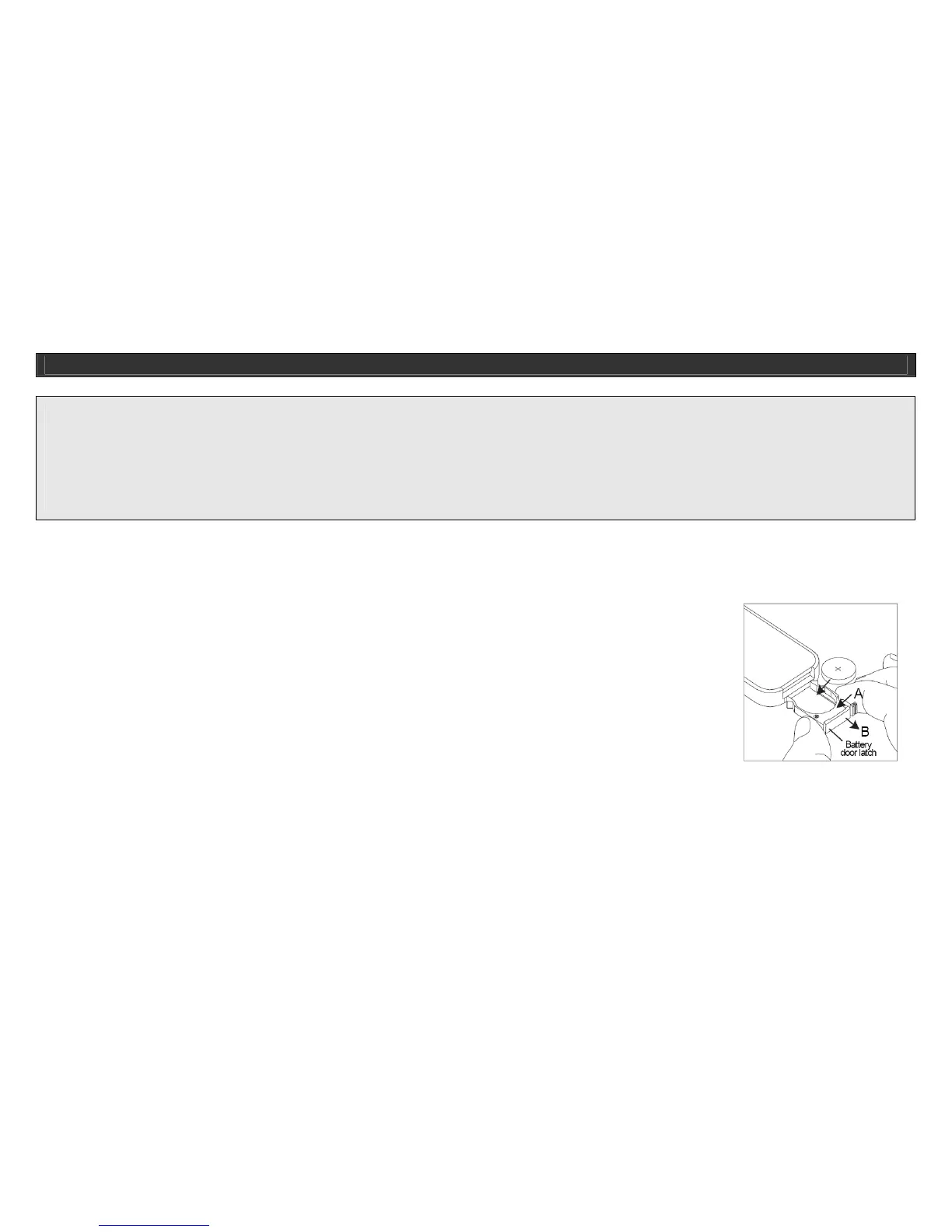
Installing the Remote Control Battery
The remote control battery has been previously installed and ready for operation for immediate use. When the remote control stops functioning, you must
replace the battery with a new one. To do so, locate the battery compartment on the side of the remote and follow the steps below:
1. Squeeze the notch labeled “Tab A” while pulling the “battery door latch B” out towards you. This will allow the battery
holder to release and pop out. Please refer to the picture on the right side.
2. Insert a “CR2025” 3V lithium battery. Make certain to follow the correct polarity, following the directions of the
corresponding symbols (+/-).
3. Secure battery and push the battery holder back into the remote control until fully inserted.
GETTING STARTED



 To Next Page