Stereo Audio System for Your iPod V10M10_IM_EN_12072007
www.i-Luv.com - 12 -
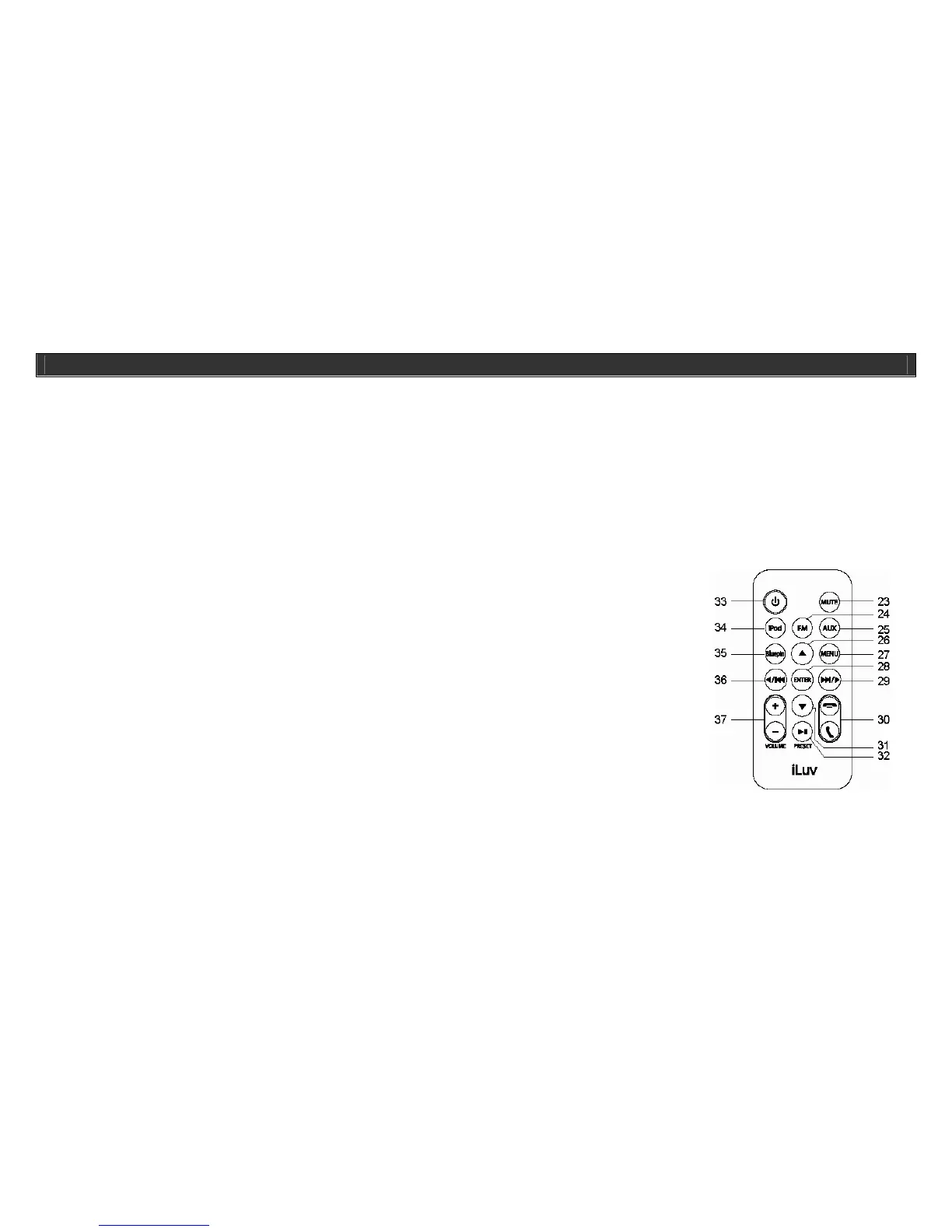
23. MUTE button: Mutes the sound; turns off the
woofer light
24. FM button: To select FM band
25. AUX Button: To select AUX IN function 26. UP button; 31. DOWN button: Up/Down iPod
navigation
27. MENU button: Menu for iPod navigation 28. ENTER button: Enter for iPod navigation
29.36. SEARCH/SKIP buttons: To set time/FM
search/Skip and search iPod functions
30. CALL/END CALL buttons: To receive, end or
reject a call
32. PRESET/PLAY/Pause button: Play or Pause on
your iPod/Preset stations on FM radio
33. POWER button: Turns the unit on/off
34. iPod button: To select iPod function 35. BluePin button: To select the BluePin receive
function
37. VOLUME +/- buttons: Increase/decrease
volume level
GETTING STARTED
Location of Controls on the Main Unit-continued
1. PRESET / PLAY / PAUSE button 2. iPod dock 3. MEMORY button
4. VOLUME +/- buttons 5. SEARCH/SKIP buttons 6. PAIRING button
7. Bluepin ON/OFF button 8. END CALL button 9. SPEAKERPHONE/CALL button
10. Headphone jack 11. MODE button 12. POWER button
13. TIME button 14. MUTE/LIGHT button 15. BluePin dock
16. AUX IN jack 17. Remote control hold 18. Back-up battery compartment
19. Battery compartment 20. FM rod antenna 21. Display Panel
22. DC IN jack
Location of Controls on the Remote Control
Note: The included remote control controls all basic functions on the i399/i398 and iPod. Aim the remote control toward the IR sensor of the main unit for the
best results.



 To Next Page