EN - 18
to add extra drying steps to a programme
in order to obtain drier dishes. The Extra
Drying Indicator (13) will illuminate.
4. Press the Start/Pause button (5) to start
the selected programme. The display
will show ‘Program Activated’.
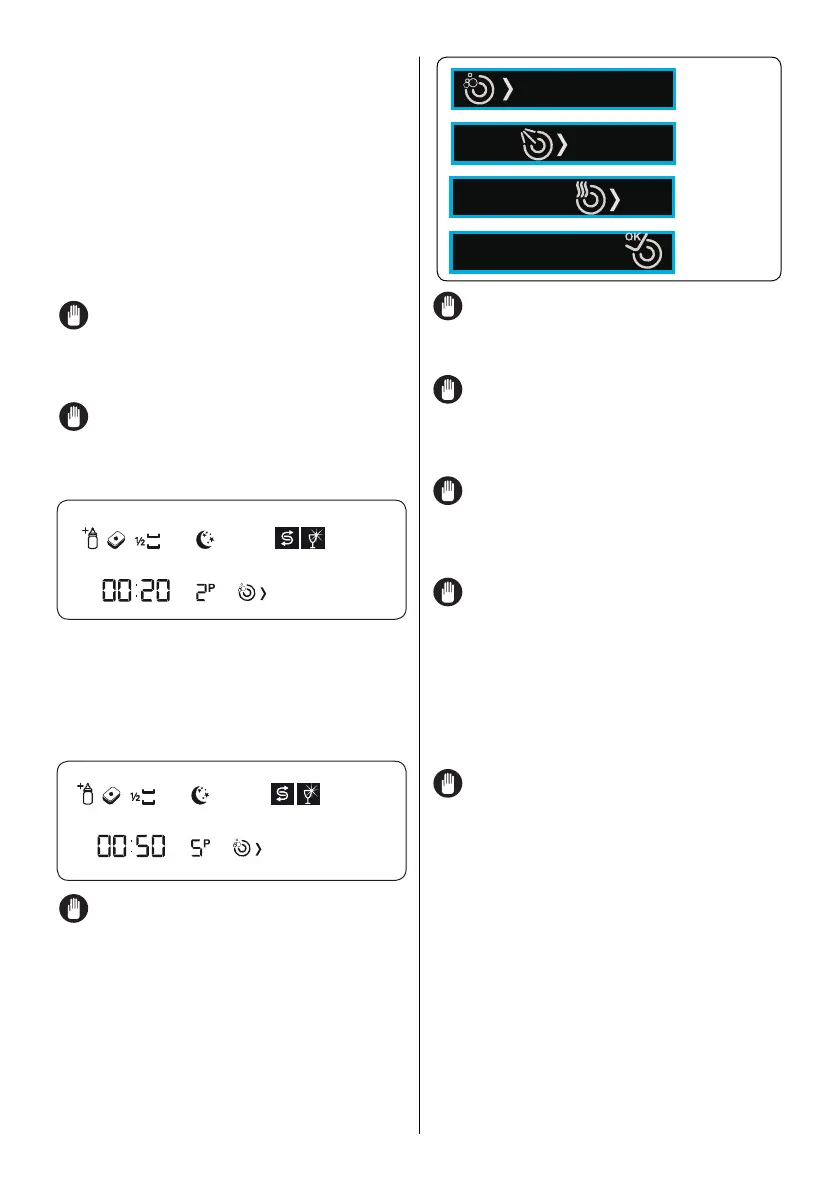
5. The display (21) will show the symbols
corresponding to the status of the
programme in operation. While the
Drying symbol is on, the machine will
remain silent for 40 to 50 minutes.
NOTE: When there is insufficient
softening salt, the Salt Lack Warning
Symbol (14) will illuminate to indicate the
salt chamber needs filling.
NOTE: When there is insufficient rinse
aid, the Rinse Aid Lack Warning symbol
(15) will illuminate to indicate the rinse aid
chamber needs filling.
Program Activated
When a programme starts, the Display
Information Line (20) will show the selected
programme name, the Remaining Time
Indicator (18) will show the washing time
remaining, and the Programme Number
Indicator (19) will show the number of the
selected programme.
Super 50'
NOTE: Do not open the door of the
machine while it is operating. If you need
to, press the Start/Pause button first. The
display will show ‘Program Paused’. You
can then open the door. Take care when
opening the door as steam will come out of
the dishwasher. To resume the programme,
close the door and press the Start/Pause
button, ‘Program Activated’ will show on the
display.
NOTE: Leave the door of your
machine slightly open at the end of a wash
programme to speed up drying.
NOTE: If the door of the machine is
opened or the power is cut during operation,
the programme will continue when the door
is closed or the power returns.
NOTE: If a power cut occurs or if
the door is opened during drying, the
programme will end.The machine will be
ready for selecting a new programme.
NOTE: A programme may take a
different time to complete than that initially
indicated depending on the water hardness.
Your machine performs a water softening
process depending on the mains water
hardness. The total time of the programme
also depends on the room temperature, the
mains water temperature and the amount of
dishes in the dishwasher.
NOTE: Do not open the door before the
End Cycle symbol illuminates.
Option Compatibility
A programme may be adjusted according
to your preferences by adding additional
functions to the wash programme.The
additional functions are not suitable for
every programme. Please find below the
functions suitable for the programmes. The
function indicator will not illuminate if it is
not compatible with a programme.



 To Next Page