EN -19
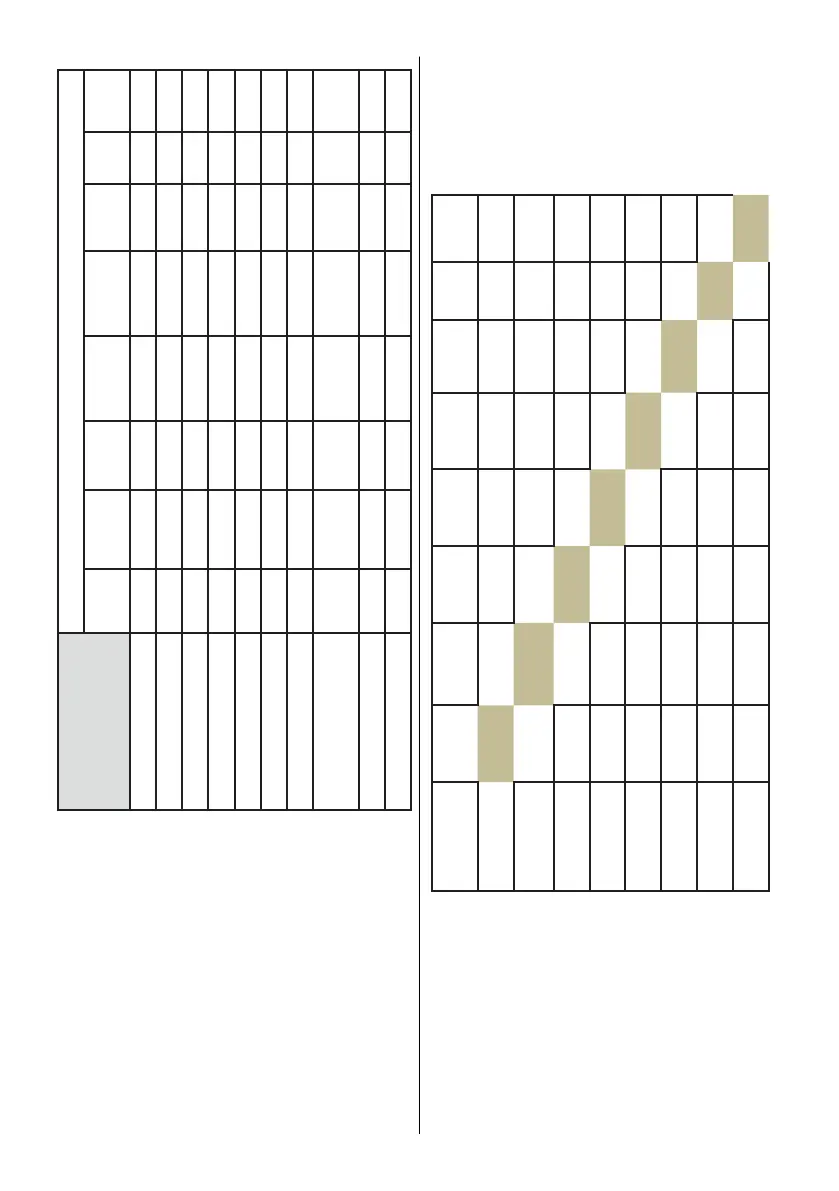
PROGRAMS OPTIONS
Delay
Start
Half Load
(3 modes)
Tablet ChildLock ExtraFast Extra
Hygiene
Extra
Silent
Extra
Drying
Prewash - - - - -
Jet Wash 14 - - - - -
Quick 30’ - - - -
Eco 50°C -
Dual Wash
Super 50‘ - -
Daily 60
Auto Intensive
60°/70°C
- -
Auto Normal 50-60°C - -
Auto Delicate 30-50°C - -
“-“ Function cannot be selected.
“
√” Function can be selected.
** Programmes are indicated generally and
may differ among models.
Adding Functions to a Programme
1. Select the appropriate wash
programme for your dishes using the
Up and Down Selection buttons.(6, 7).
2. Press the Option button (3) to enter the
Additional Functions menu.
3. Navigate to the desired additional
function using the Up and Down
Selection buttons (6, 7).
4. Press the Confirmation button (2) to
activate the additional function indicator
(8, 9, 10, 11, 12, 13).
5. Press the Start/Pause button (5)
to start the selected programme.
‘Programme Activated’ will appear on
the display.
Options Delay
Start
Half Load
(3 modes)
Tablet Child
Lock
Extra
Fast
Extra
Hygiene
Extra
Silent
Extra
Drying
Delay Start OK OK OK OK OK OK OK
Half Load ( 3
modes )
OK OK OK OK OK OK OK
Tablet OK OK OK OK OK OK OK
Child Lock OK OK OK OK OK OK OK
Extra Fast OK OK OK OK - - OK
Extra Hygiene OK OK OK OK - --
Extra Silent OK OK OK OK - - OK
Extra Drying OK OK OK OK OK - OK
7.2. Changing a Programme
Follow the steps below to change a
programme while in operation.
-Press the Start/Pause button (5).
‘Programme Paused’ will show on the
display.
-Select a new programme using the Up and
Down Selection buttons (6, 7).
-Press the Start/Pause button (5) to start
the selected programme. ‘Programme



 To Next Page