USER’S MANUAL
Consider that this unit has been designed with the intention to exhibit products to
encourage your and your supplier’s sales. For best results, lighting must be
turned on during sale hours.
Our LED lighting technology allows an improved electric efficiency, reducing and
providing more operation years with regard to lighting. LED lighting is located
around the door perimeter, on the internal cabinet upper portion, or around the
perimeter of the internal cabinet.
Your unit may include a switch that allows you to turn off lighting manually. Use it
only when your business is closed. During sale schedule, this lighting technology
represents a minimum percentage of the unit’s total energy consumption.
If the unit includes an Intelligent Control Function (CIF,EMS or SCS), lighting will
be turned off automatically in savings mode. You don’t have to worry about this,
each control will turn lighting off according to unit characteristics and the
products contained in it. Just open the door to exit savings mode.
IMPORTANT: if you notice any lighting malfunction, please contact the
Imbera USA Service Department.
20
4.3 LIGHTING
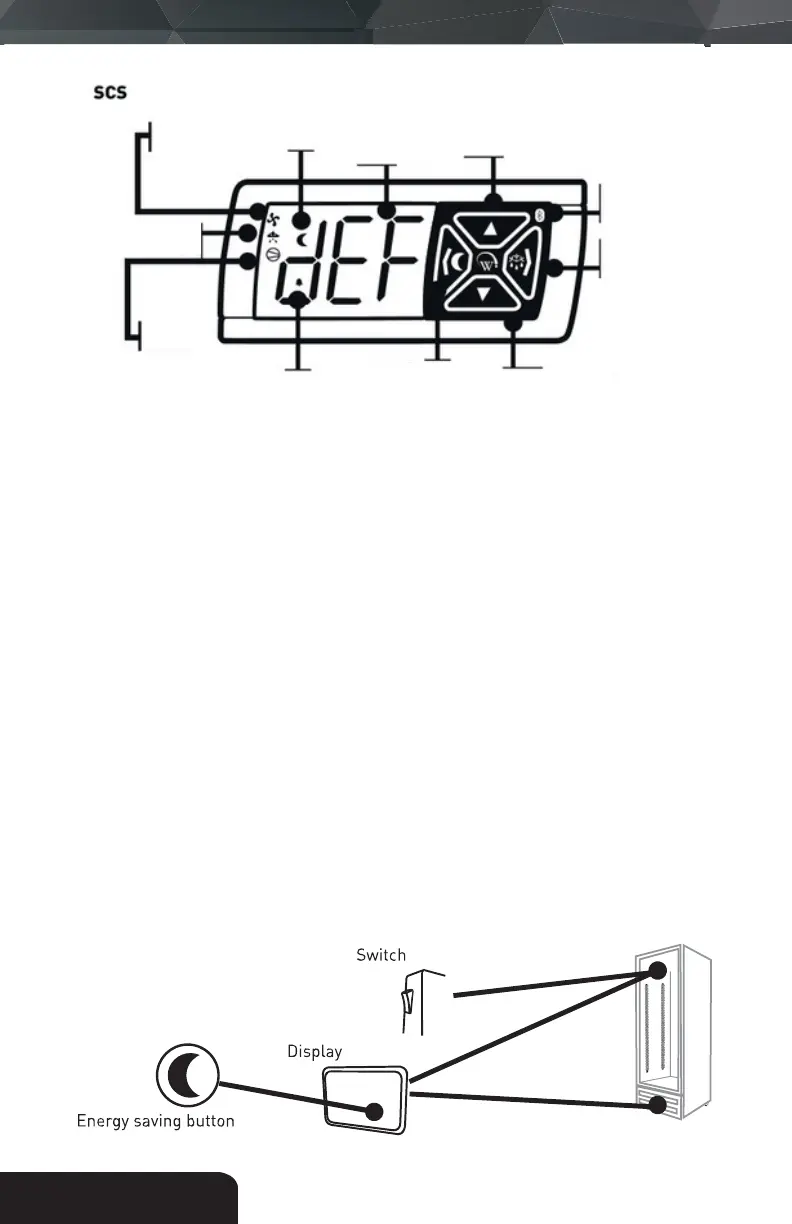
Compressor
indicator
Defrost Mode
Indicator
Fan
Indicator
Alarm
indicator
Night Mode
Indicator
Three digit
LED display
Back / Abort Button
Night Mode Button
Up Button
Defrost mode button
next / enter button
Bluetooth
Wireles
Indicator
Defrost mode
button next /
enter button



 To Next Page