34
4-1
CANCEL
LOCK
SET TEMPERATURE(°C)
AUTO
COOL
DRY
HEAT
FAN
HIGH
MED
LOW
TEMP
MODE
SWING TIMER
RESET
ON/OFF
FAN
SPEED
VENT
ECONOMIC
RUNNING
1
2
3
12
4
5
11
10
8
7
6
9
4-2
12 6 5
3 4
4
PARAMETER SETTINGS /
USE
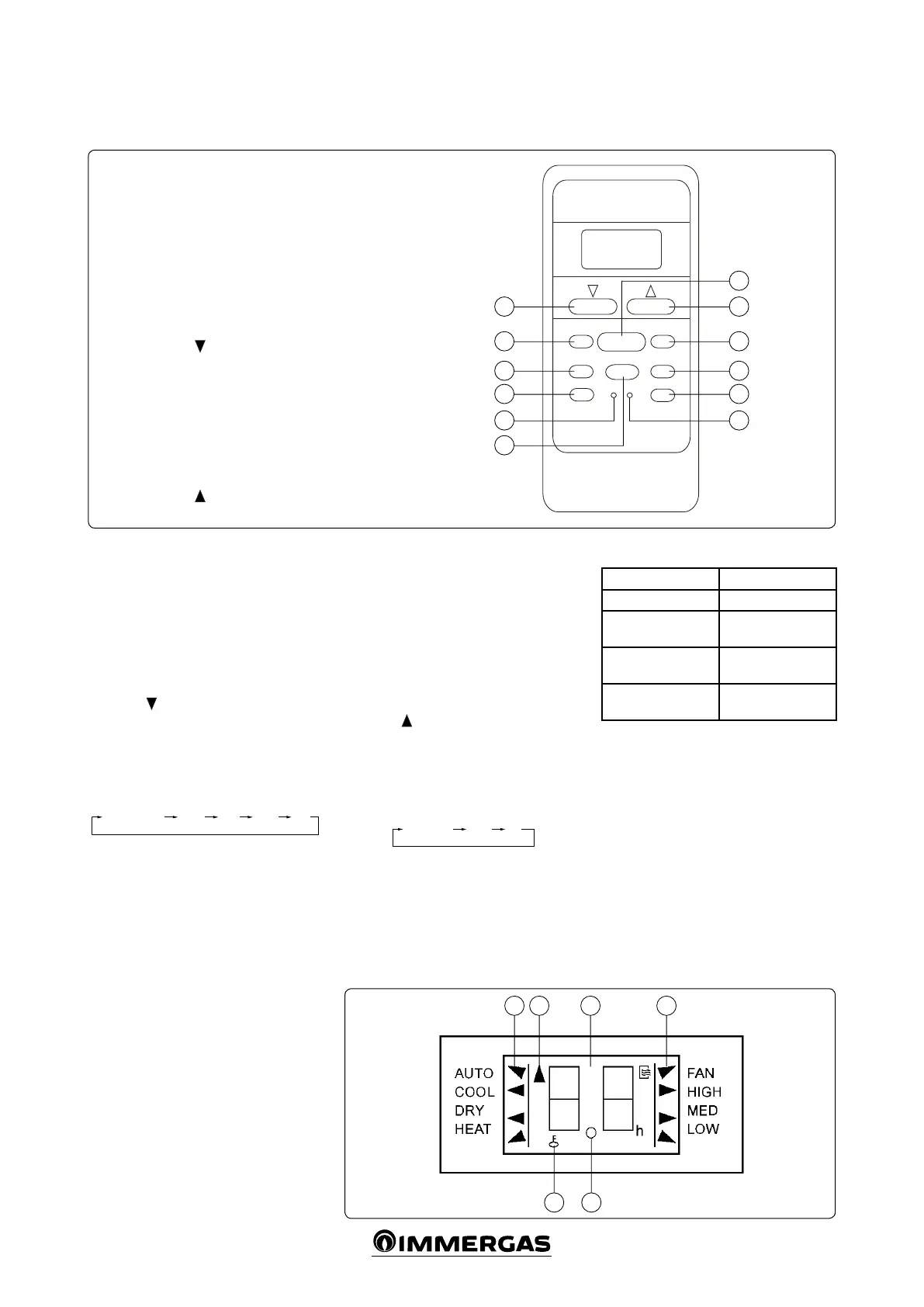
4.1 REMOTE CONTROL.
Key:
1 - TEMP key
2 - MODE key
3 - SWING key
4 - RESET key
5 - ECONOMIC RUNNING key
6 - LOCK key
7 - CANCEL key
8 - TIMER key
9 - ON/OFF key
10 - FAN SPEED key
11 - TEMP key
12 - VENT key
4.2 REMOTE CONTROL FUNCTIONS.
• Operating mode: COOL, HEAT, DRY, FAN
and AUTO.
• Clock setting: 24 hours.
• Temperature range: 17°C ÷ 30°C
• Indications of all functions on the liquid
crystal display (LCD)
Introduction to using the remote control
TEMP key
(1 Fig. 4-1): press this key to re-
duce the set temperature or to adjust the timer
(reduce the time).
MODE key
(2 Fig. 4-1): each time this key is
pressed, the operating mode changes in se-
quence AUTO, COOL, DRY, HEAT and FAN as
shown below:
AUTO (COOL) COOL DRY HEAT FAN
Note: the heat function is only active for models
with a heat pump.
SWING key
(3 Fig. 4-1): press this key to start
or stop automatic movement of the ns/deec-
tors.
RESET key
(4 Fig. 4-1): aer pressing this key,
all set functions will be cleared and the remote
control returns to the default or initial settings.
ECONOMIC RUNNING key
(5 Fig. 4-1): press
this key to start the energy saving operation.
LOCK key
(6 Fig. 4-1): press this key to lock the
settings. Press it a second time to unlock them.
CANCEL key
(7 Fig. 4-1): press this key to can-
cel the settings.
TIMER key
(8 Fig. 4-1): this key is used to set
the fan coil’s switching on and o times (pro-
grammed on/o times).
ON/OFF key
(9 Fig. 4-1): press this key to turn
the fan coil on. Press it again to turn the fan coil
o.
FAN SPEED key
(10 Fig. 4-1): this key is used
to select the fan speed in the sequence below:
AUTO, LOW, MED and HIGH and then AUTO
again.
TEMP key
(11 Fig. 4-1): press this key to in-
crease the set temperature or to adjust the timer
(increase the time).
VENT key
(12 Fig. 4-1): press this key to set the
ventilation mode. Press the VENT key repeat-
edly and the set functions change according to
the following sequence:
4.3 TECHNICAL SPECIFICATIONS.
Model R51/E
Voltage 3.0V
Minimum CPU volt-
age
2.0V
Reception distance
8 m (with 3V it can
reach 11 m)
Environmental con-
ditions
-5°C ~ + 60°C



 To Next Page