26
INSTALLERUSERMAINTENANCE TECHNICIAN
3.5 PROGRAMMING THE P.C.B.
e boiler is prepared for possible programming
of several operation parameters. By modifying
these parameters as described below, the boiler
can be adapted according to specic needs.
To access the programming phase, press the
"Summer/Winter" (4) and “Reset” (5) buttons
simultaneously for 8 seconds.
once the menu has been accessed, it is possible
to scroll through the three sub-manus present
(s, p, t) by pressing the “Summer/Winter” (4)
button for 2 seconds.
Use the "DHW regulator" selector (2), to select
the parameter and rotate the "CH regulator" (1) to
Id
Parameter
(ref. 17)
Parameter Description
Range
(ref. 21 Fig.
2-1)
Default
S0
Minimum CH
output
e boiler also has electronic modulation that adapts the boiler potentiality to the eective
heating demand of the house. en the boiler works normally in a variable gas pressure
eld between the minimum heating output and the maximum heating output depending
on the system's heating load.
N.B.: the boiler is produced and calibrated in the central heating phase at nominal out-
put. Approximately 10 minutes are needed to reach the nominal heat output changeable
using parameter (S1).
N.B.: the selection of the “Minimum heating output” and “Maximum heating output”
parameters, in presence of a heating request, allows boiler ignition and power supply of
the modulator with current equal to the value of the respective set value.
0 - 60 %
Set ac-
cording
to factory
inspection
S1
Maximum CH
output
0 - 99 % 99
S2
Gas type selec-
tion
e setting of this function is used to adjust the boiler so that it can operate with the
correct type of gas
nG - Methane
lG - LPG
Ci – China
e same
as the type
of gas being
used
S3 Boiler type
Establishes the boiler type and its functioning mode
0 = combi
1 = 24 kW storage tank
2 = 28 kW storage tank
3 = 32kW storage tank
0 - 3 0
S4
Power
block
Establishes the power at which the boiler must switch on 0 - 50 %
Set ac-
cording
to factory
inspection
modify the value according to the range available.
With the menu active on the indicator (17) the
parameter n° is displayed while indicator (21)
displays the parameter value.
Press the "Reset" button (5) for 2 seconds to
memorise the variation of the parameters
Memorisation is displayed by the ashing indica-
tors (17 and 21).
Exit the programming phase by waiting for 2
minutes or by pressing the "Summer/Winter"
(4) and “Reset” (5) buttons simultaneously for
5 seconds.
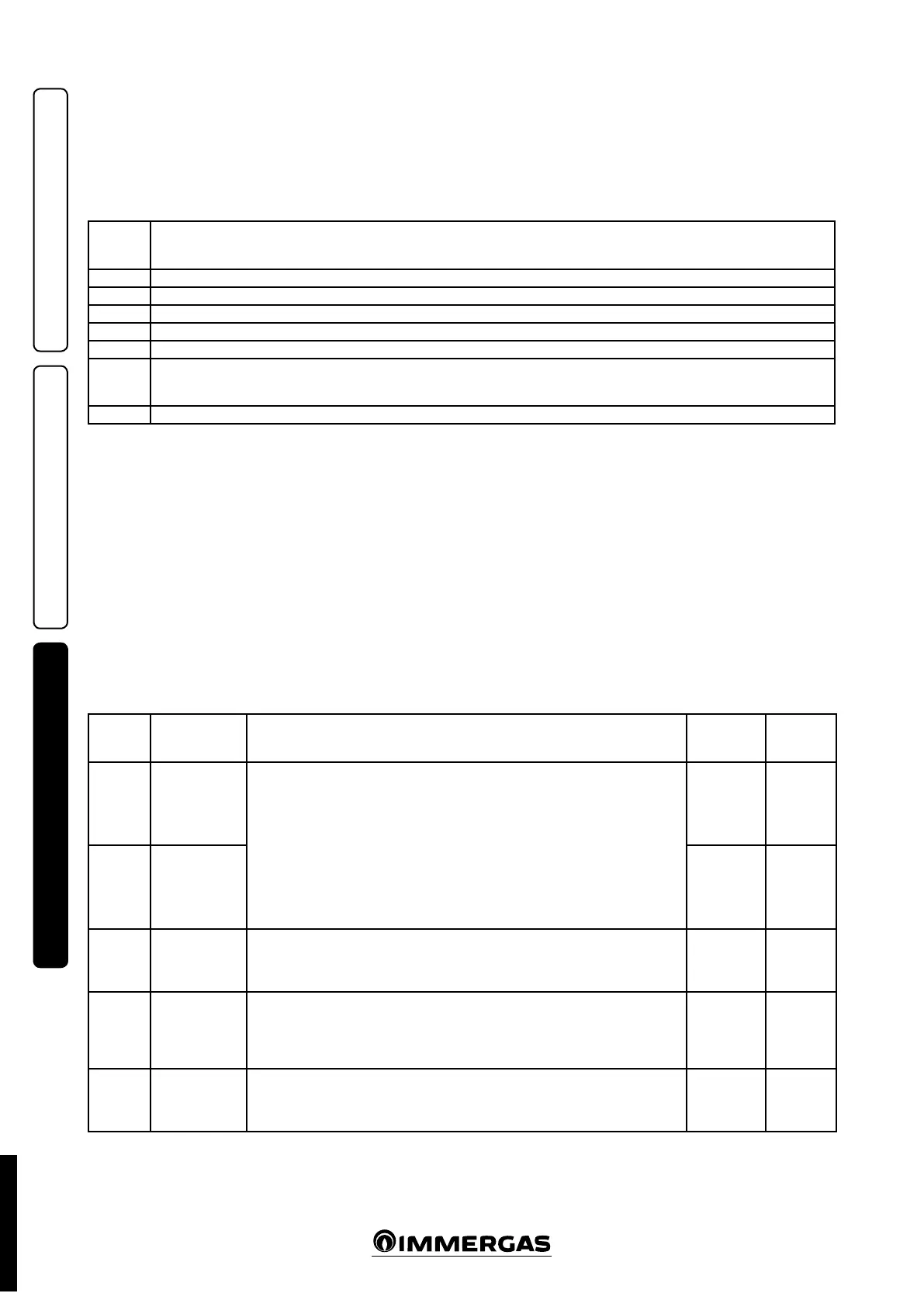
3.4 INFORMATION MENU.
Pressing the " Summer/Winter" button (4) for 4
seconds, the “Information menu” is activated,
which allows to display some boiler functioning
parameters.
Press the "Reset" button (5) to scroll the various
parameters.
To exit the menu, press the "Summer/Winter"
button (4) again for 4 seconds or wait for 120
seconds.
With the menu active on the indicator (17) the
parameter n° is displayed while indicator (21)
displays the parameter value.
Id
Parameter
(ref. 17)
Description
d1 Displays the ame signal (uA)
d2 Displays the primary exchanger output instant heating ow temperature
d3 Displays the instant output temperature from the DHW exchanger
d4 Displays the temperature set for the central heating set (if remote control is present)
d5 Displays the temperature set for the DHW set (if remote control is present)
d6
Displays the external environment temperature
(if the external probe is present)
If the temperature is below zero, the value is displayed ashing.
d7 Display the temperature of the inlet DHW.
STD.002998/004



 To Next Page