Installation Background
Module Power (or lack of)
Back when FatShark placed the first Dominator V1 goggles on the market, many moons ago, Mr.
Shark had the foresight to include an expansion bay to allow modules to be changed. This spawned a
whole industry in 3rd party receiver modules, covering not only the 5.8GHz band, but also the 2.4 and
1.3GHz bands.
What wasn’t foreseen was how power hungry 2017’s receiver modules would be, and that the
electronics in most of the goggles are not happy providing enough current to power these modules.
Depending upon the goggles used, the rapidFIRE may require an auxiliary power board in order to
supply power to the module.
Installation Details
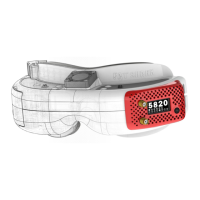
For Attitude v3, v4, or Dominator HDOs
For these goggles, installation is plug-and-play, no aux power board required.
1) Remove the goggle rx bay door
2) Insert the module carefully into the connector, ensuring that it is not offset, or slid into the
gap between the connector and the goggle shell
3) Finish by attaching the appropriate goggle-bay door (noting of course that the Attitude and
Dominator use different doors)
4) Go Fly


 To Next Page