EasyManua.ls Logo

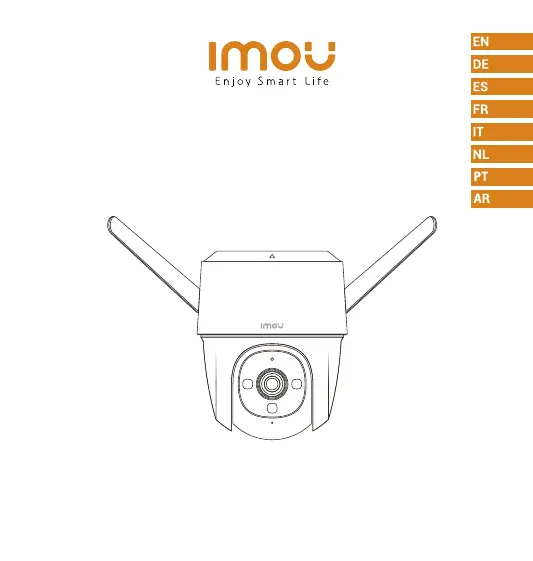
IMOU IPC-S42FP-0360B-imou - User Manual

IMOU IPC-S42FP-0360B-imou
73 pages
Print Icon
To Next Page IconTo Next Page
Loading...
Quick Start Guide
www.imoulife.com
Cruiser

Questions and Answers

  • C
    Christina BarkerAug 8, 2025
    What to do if my IMOU Security Camera is offline?
    • J
      Jeremy ValdezAug 8, 2025
      If your IMOU Security Camera is offline, verify that the distance between the camera and the router, and the camera and your smartphone, is within 5 meters during the connection. Also, check the router's Wi-Fi configuration, ensuring the channel is set to auto and the mode to 11bgn mixed. Finally, examine the indicator status. If it's solid green, check if the router can connect to the Internet and restart the camera if the network is connected.
  • S
    Shelley CrawfordAug 12, 2025
    How to connect IMOU Security Camera to a new Wi-Fi network?
    • T
      Travis AustinAug 12, 2025
      To connect your IMOU Security Camera to a new Wi-Fi network: if the camera is online, go to Device Details > Network Config in the app to change the Wi-Fi connection. If the camera is offline, reset the camera and configure it again.
  • J
    Jacob NguyenAug 18, 2025
    Why does my IMOU Security Camera take so long to connect?
    • H
      hernandezelizabethAug 18, 2025
      If your IMOU Security Camera takes too long to connect, ensure that the distance between the camera and the router, and the camera and your smartphone are both within 5 m (16.4 ft) during the connection. Additionally, check the Wi-Fi configuration of the router: Select the channel to auto, and the mode to 11bgn mixed.
  • J
    Joseph LaraAug 22, 2025
    What to do if IMOU Security Camera cannot boot up?
    • C
      Carolyn RussellAug 22, 2025
      If your IMOU Security Camera won't boot up or isn't working as expected, check the LED indicator status. If the light is not green, press and hold the reset button for 10 seconds to reset the camera.
  • G
    galvarezAug 28, 2025
    Where are IMOU Security Camera recorded videos saved?
    • B
      barrettkellyAug 28, 2025
      If you have activated cloud storage and installed a micro SD card, the recordings will be saved to both the card and the cloud. If cloud storage is deactivated, the recordings are saved to the SD card. Videos recorded during live view or playback are saved on your phone.
  • M
    Matthew DuncanSep 1, 2025
    What happens when the micro SD card is full on my IMOU Security Camera?
    • N
      Noah HardingSep 1, 2025
      When the micro SD card in your IMOU Security Camera is full, the system will overwrite the previously recorded videos. Be sure to save any important information in time.

Summary

Package Content

Camera Introduction

Download the APP

Tips for Wireless Performance

Advice on ensuring optimal wireless performance by minimizing obstacles and interference.

Add Device to the APP

Installing Camera

Ceiling Mount Installation

Instructions for mounting the camera using the ceiling mount method, including components.

Wall Mount Installation

Instructions for mounting the camera using the wall mount method, including components and steps.

Pole Mount Installation

Instructions for mounting the camera on a pole, including required accessories and steps.

Safety and Power Information

Troubleshooting

Device Not Booting or Working

Steps to troubleshoot device startup issues, including checking LED status and performing a reset.

Reconnecting to Wi-Fi Network

Guidance on reconnecting the camera to a different Wi-Fi network via the app or by resetting.

Slow Connection Issues

Tips to resolve slow connection times, focusing on distance, router settings, and Wi-Fi configuration.

SD Card Full Behavior

Explanation of how the system manages storage when the micro SD card is full, overwriting old recordings.

Recorded Video Storage Locations

Information on where video recordings are stored, distinguishing between cloud, SD card, and local phone storage.

Device Offline Troubleshooting

Troubleshooting steps for an offline device, based on LED indicator status and network checks.

IMOU IPC-S42FP-0360B-imou Specifications

General IconGeneral
ModelIPC-S42FP-0360B-imou
TypeSecurity Camera
RAM128 MB
Lens3.6mm
Video CompressionH.265/H.264
Frame RateUp to 25/30fps
Digital Zoom16x
Micro SD Card SlotUp to 256GB
Power SupplyDC 12V/1A
WeatherproofIP67
Motion DetectionYes
Image Sensor1/2.8" Progressive CMOS
Night VisionUp to 30m
AudioBuilt-in Microphone & Speaker
Wi-FiIEEE802.11b/g/n
Ethernet10/100Mbps
Operating Temperature-30°C to +60°C (-22°F to +140°F)
Mobile AppIMOU
Resolution2560x1440

Related product manuals