EasyManua.ls Logo

IMOU LOOC - Device Ports and LED Indicator Status; External Ports and Buttons; Understanding LED Indicator States

IMOU LOOC
50 pages
Print Icon
To Next Page IconTo Next Page
To Previous Page IconTo Previous Page
Loading...
Note:
The pattern of the LED indicator is included in the following table.
LED Indicator Status
Device Status
Operating properly
Network connection failed
Booting
Device malfunction
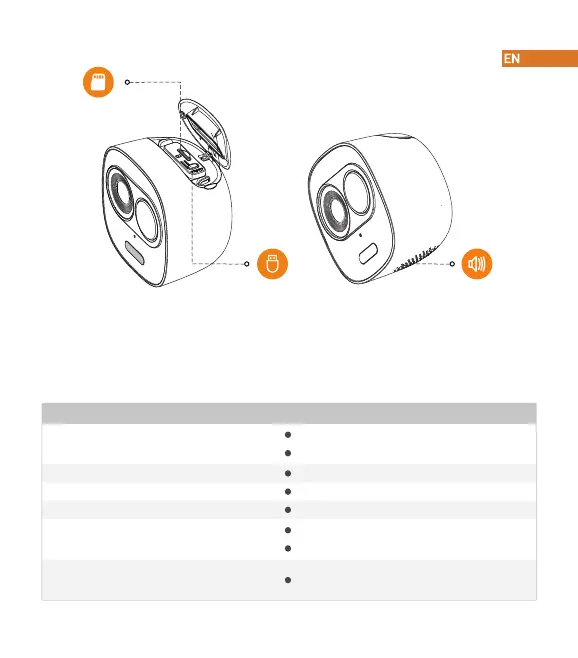
Micro SD Card Slot
Reset Button Built-in Speaker
The top cap can be opened with the pry bar from the accessory kit.
Press the Reset Button for 10 seconds to reset the camera.
Red light on
Green light flashing
Green light on
Red light flashing
Light off
Powered off/LED turned off
Rebooting after reset
Waiting for network
Firmware updating
Green and red light
flashing alternately

Related product manuals