28
OPERATING MANUAL
E
4. IMAGES
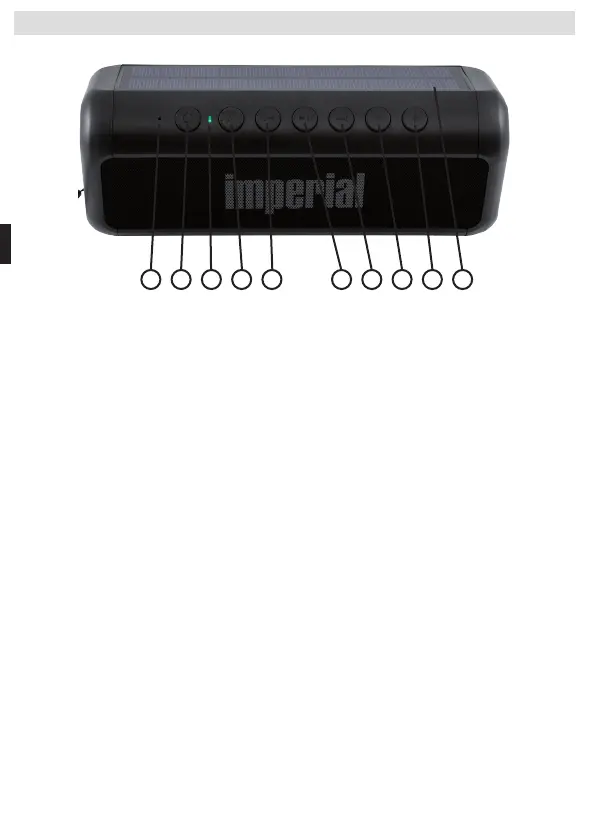
1 2 3 4 6 7 8 95
10
1. Microphone
Microphone for hands-free function
2. On/Off button
Press the button for 2 seconds to switch the device on or o. Briey
press this button to switch between the individual operating modes
3. Indicator LED
Indicates dierent operating states.
Flashes blue: device in Bluetooth pairing mode. Searching for a Blue
tooth connection
Lights blue: Bluetooth connection successfully established.
Lights green: device is being charged via USB port or via solar panel.
The green LED goes out when the speaker is fully charged.
Flashes red: battery is almost empty. Device must be charged.
4. Hands-Free Function
Briey press this button to accept an incoming telephone call if the
speaker is connected to a mobile telephone or smartphone via
Bluetooth.
5. Previous Track
Briey press the button to select the previous track when playing
back a file via the SD card or Bluetooth device.
6. Play/Pause
Briey press this button to pause or resume music playback.
7. Next Track
Briey press the button to select the next track when playing back
a file via the SD card or Bluetooth device.
8. Decreasing the Volume
Hold the button down to decrease the volume.
4. IMAGES
BDA_BAS_6_01_19.indd 28 15.02.19 12:51



 To Next Page