35
IMPERIAL BAS 6
E
5.7. Charging the Device
If the indicator LED (3) on the speaker ashes red, the internal battery is
depleted and should be charged.
Via USB
To charge the speaker, connect the device with the USB cable included in
the delivery scope to a USB charger or another USB power source.
It is recommended to use a 5 V/ 1 A USB charger. Switch o the device via
the button [2]
.
Once a voltage source is connected, the charging process for the internal
battery will start. The indicator LED will permanently light green.
Via Solar Panel
The speaker can also be charged via the built-in solar panel.
This allows you to charge the device independently of a power source using
sunlight or another light source.
Switch o the device via the button (2)
and point the solar panel towards
the incoming sunlight or another strong light source.
If there is sucient light, the indicator LED will permanently light green.
If the light intensity is insucient for charging, the LED will ash green in ra-
pid succession. In this case, change the position of the radio to increase the
incidence of light on the solar panel in order to achieve an ideal charging
result.
5.8. Using the Device as a USB Power Bank
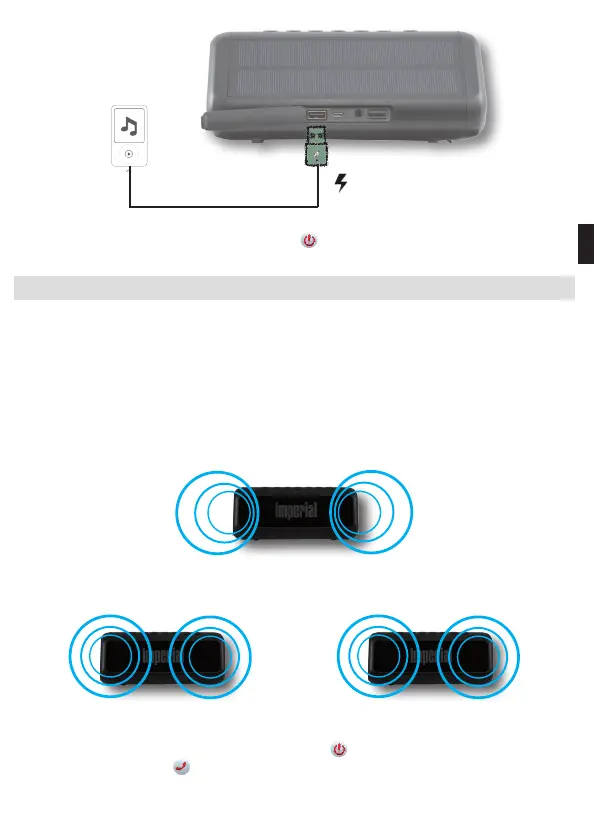
You can use the speaker as a USB power band.
To do this, connect a device that you would like to charge via the
USB port (11).
Switch on the device via the button (2)
.
The charging process will begin.
5.9. TWS
TWS stands for true wireless stereo
(wireless playback of true stereo sounds).
In TWS mode, the BAS 6 can connect wirelessly to a second BAS 6 via Blu-
etooth, with one speaker taking over the right and the other the left audio
channel of a stereo system. This creates, via two paired speakers, a true,
synchronous, wireless stereo sound with rst-class sound quality.
left channel
Normal operation
right channel
TWS Mode
left channel
right channel
To run TWS mode, you need 2 BAS 6 speakers.
Switch on both speakers via the button (2)
.
Press the button (4)
on both devices at the same time.
An acoustic signal will indicate the connection of the two devices.
BDA_BAS_6_01_19.indd 35 15.02.19 12:52


 To Next Page