complet, avant la première mise en service.
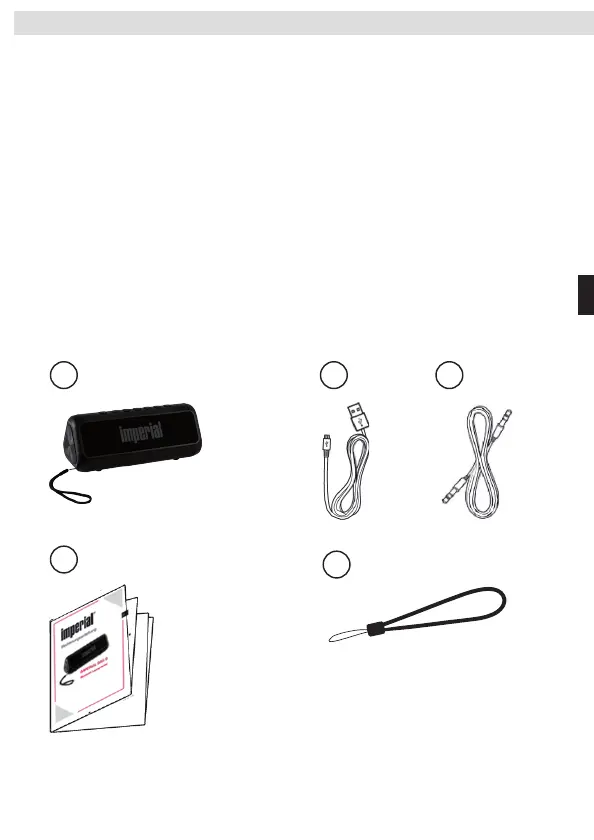
1. BAS 6
2. Câble d‘alimentation USB
3. Mode d‘emploi
4. Dragonne
5. Câble audio 3,5 mm
ResetHole:Whensystem
halted, press the button
via thin metal stick,force
toresetandturnitoff/on.
PowerKey:longpressfor2secondspower
on/off
Shortpress:play/pause,whenBluetooth
disconnected,shortpresstoreconnect,
whenincomingcalls,shortpresstoanswer
thephone.
Longpress:Rejectcall,shortpresstoend
thecall
NextSong/VOL+:Shortpressnextsong,
longpressVOL+.
PreviousSong/VOL-:
Shortpressprevious
song,longpressVOL-.
Hangropehole
Bluetooth/ModeKey:longpressBluetooth
disconnected, short press mode switch
(Bluetoothmode,TFcardmode).
USBinterface:Datatransmission,charging.
TFcardslot:InsertaTFcardwithmusicfiles,
can playthe audio files,connecttoPC, can
readorcopyTFcarddata.
16FunctionKey
English
Bluetoothconnection
Open the phone, tablet or other devices Bluetooth
connectivity,entertheBluetoothdevicesearch,when
search Bluetooth device "bv160", then confirm the
connection.
1
Bluetoothconnectionsuccessandplay
2
1.Ifnecessary,input“ 0000”andpress
confirmationtoconnect.
2.TheBluetoothspeakerwillautomatically
reconnect the last connected device
(Bluetooth is turned on) without the
needtore-searchforpairedBluetooth.
Longpressfor2secondspoweron/off
Long press 2 seconds power on voice
prompts, the blue light starts to flash,
longpress2secondspoweroffthevoice
promptsonetimeandbluelightoff.
1
InsertaTFcardandturnonthedevice
InsertaTFcardwithmusicfilesinto
thecardslot,longpressthePower
switchtoturnspeakeron.
1
Shortpress,autoplaytheaudiofiles,blue
LED indicatorturns blue during playing, short
presspauseandblueLEDindicatorslowflash.
SwitchtoTFcardmusicplaybackmode
2
connectingspeakerandmobilephone
During Bluetooth music playback, music
will pausewhen phone calls, short press
answerthecallandpressitagain
toendthecall,longpresstorejectthecall.
1
2
Bluetooth
Bluetooth
OFF
Dev ices
BV160
Notcon nected
BV160
DisconnectBluetooth
Whenspeakerand device connected,longpresstodisconnect
Bluetooth,thenthespeakercanbefound,LEDbluelightbegintoquick
blink,withdisconnectwarningtone.
3
BluetoothDevicesre-connection
AfterBluetoothdevicedisconnected,ifyouneedtoreconnect,onlyneedto
shortpresstoreconnectthelastplaybackdevice.
4
copymusic
Tip:Pleasechargethespeakerfirstifithasn’tbeenusedforalongtime.
SpeakerwillautomaticallyturnoffafterdisconnectBluetoothwithoutTF
cardorPauseplaybackfortenminutes.
chargingthespeaker
1
Tip:BluetoothspeakerssettheBluetoothmodetothefirstmode,soyouneedtoswitchtoTFcard
modebeforeplayTFcardaudiofile.whenspeakerison,inserttheTFcardautomaticallyplayTF
cardaudiofiles.
Whensuccessmatched,blueLEDlightison,then
youcanplaymusicinyourphone,tabletPCorother
Bluetoothdevicesconnectedwithspeaker,blueLED
lightsisonduringplaying,pauseplayLEDlightblink.。
Turnoffthespeaker,inserttheTFcard,connectthespeakertoPCwith
theUSBcableviaMicroUSBinterface,pressthePowerbuttontheenter
card reader mode, and then you can copy music files to the TF card,
shortpressexitcardreadmodethenenterBluetoothmode.
YoucanconnectthespeakertoPCwiththeprovidedUSBcableandcharge
thespeakernomatterit’spoweron/off.Itisrecommendedtobuyaseparate
DC5V1AUSBchargerorother5V1Achargerformobilephoneandcharge
thespeakerthroughindoor
outlet.
17PowerON/OFF
English
18ConnecttootherBluetoothdevice
English
19CTFcardmusicplaybackmode
English
20Hands-freecall
English
21Enteringcardreader/chargingmode English
••••• •••••••
PortableBluetoothSpeaker
外观参数
外部接⼝
MICROUSB接⼝,TF卡插槽
产品规格
W87×D33×H62(mm)
产品净重
155g(含内置锂电池)
产品类型
便携式蓝⽛⾳箱
喇叭系统
输出3W,1.5⼨单⾳圈内磁喇叭
⾳量调节⽅式
⻓按左右键为调节⾳量VOL-/VLO+
4.2
基本参数
蓝⽛版本
存储类型
⽀持⼤容量不超过32GTF卡
电源供应
内置3.7V600mAh锂电池
⽂件格式
MP3、WMA、WAV、三种
功能⽀持
输出功率
3WTHD=10%
频率响应
技术参数
USB规格
USB2.0兼容USB1.1
充电时间
⾳频播放时间
⾳频中等⾳量4⼩时以上
语⾳通话
⽀持双向通话功能
⽀持TF卡⾳乐播放
⽀持蓝⽛播放
⽀持TF读卡器数据拷⻉,⽀持(关机后插⼊电脑识别)
100Hz-20KHz
TF卡播放
蓝⽛播放
TF读卡器
蓝⽛回连
⽀持蓝⽛⼀键回连功能
DC5V1mA以上电源充电约1.5-2⼩时
复位孔:死机状态下
细⾦属按压,强制复
位关机
电源键:⻓按2S为开机/关机。
短按为:播放/暂停.蓝⽛断开时,短按
为回连蓝⽛功能.来电时,短按为接听,
⻓按为:拒接,接通后再短按为挂断
电话。
下⼀曲/⾳量加:
短按下⼀曲,⻓按⾳量加。
上⼀曲/⾳量减:
短按上⼀曲,⻓按⾳量减。
挂绳孔
蓝⽛/模式键:⻓按为蓝⽛断开,短
按为模式切换.(按蓝⽛模式>TF模
式)的顺序切换。
USB插⼝:数据传输、充电
TF卡插⼝:插⼊TF卡播放卡中的⾳
频,或连接电脑读写卡中的内容。
蓝⽛连接
打开⼿机、平板电脑或其它设备蓝⽛连接功能,进⼊
蓝⽛设备搜索,当搜索到蓝⽛设备“BV160”,请点连
接确认。
1
蓝⽛连接成功并播放
2
1、如有必要,请输⼊“0000",并按确
定连接。
2、蓝⽛⾳箱会⾃动回连关机前最后
⼀个连接设备(处于打开状态)⽆需
重新搜索配对蓝⽛。
⻓按2秒开关机
⻓按2秒开机语⾳提⽰后,蓝灯亮起开始闪
烁,⻓按2秒关机语⾳提⽰⾳⼀次蓝灯灭。
1
插⼊TF卡并开机
正确向卡槽插⼊存有⾳乐⽂件的
TF卡,⻓按电源开关开机后,语⾔
提⽰。
1
短按模式切换键,⾳箱语⾳提⽰,⾳箱将
播放
TF存储卡内⾳乐⽂件,播放时LED蓝灯常
亮,暂停时LED蓝灯慢闪。
切换到TF卡⾳乐模式播放
2
⾳箱与⼿机蓝⽛连接中
1
断开蓝⽛设备
⾳箱与设备连接状态下,⻓按即可断开与当前蓝⽛连接,此时⾳箱
处于可发现状态,LED蓝灯开始快闪,断开提⽰⾳。
3
蓝牙设备回连
蓝⽛设备断开后,如需要重新连接,只要短按即可回连上⼀次
配对的播放设备
。
4
温馨提⽰:蓝⽛⾳箱将蓝⽛模式设置为第⼀模式,所以播放TF卡⾳乐必须要切换到TF卡模
式;如⾳箱处于开机状态中,插⼊TF卡即⾃动播放TF卡内容。
配对成功后,连接成功语⾳提⽰,LED蓝灯常亮,此时
你可以在⼿机或平板电脑等蓝⽛设备中选择⾳乐⽂
件进⾏播放了,播放时LED蓝灯常亮,暂停时慢闪。
USERMANUAL
4产品参数
简体中⽂
15ProductParameters
Externalinterface
Productspecifications
Wetweight
BasicParameters
Producttype
Speakersystem
VolumeControl
BluetoothVersion
Storagetype
Powersupply
TechnicalParameters
Outputpower
FrequencyResponse
USBSpecs
ChargingTime
PlayTime
Functions
Fileformat
VoiceCall
TFCard
Bluetooth
CardReader
BluetoothRe-connection
Appearance
TFcardslot,MicroUSBinterface
W87XD33XH62(mm)
155g(includingli-ionbattery)
PortableBluetoothamplifier
Output3W,1.5inchinsidemagnetictrumpetwith
singlevoicecoil
Longpressleft/rightbuttonVOL-/VOL+
4.2
MAX32GBTFcard
Built-in3.7V600mAhli-ionbattery
3WTHD=10%
100Hz-20KHz
USB2.0,compatibleUSB1.1
DC5V1Aaround1.5~2hours
Mediumvolumemorethan4hours
MP3,WMA,WAV
Supporthandsfreecall
SupportTFcardmusicplay
SupportBluetoothplay
SupportTFcarddatacopy
SupportBluetoothonekeyre-connection
English
5按键功能
简体中⽂
6电源开/关机
简体中⽂
Bluetooth
Bluetooth
OFF
Dev ices
BV160
未连接
BV160
7连接其他蓝⽛设备
简体中⽂
8TF卡⾳乐模式播放
简体中⽂
9免提通话
简体中⽂
●
请在常温环境中存放以及使⽤本产品;
●
请勿将本产品⻓期暴露在⾬中或潮湿环境中;
●
请勿丢掷,避免因跌落造成产品损坏;
●
请勿⾃⾏拆解、修理和改造本产品;
●
请使⽤⾳箱额定电压的电源充电器充电;
●
⻓时间处于⾼⾳量下可能会造成听⼒损伤,收听⾳频,尤其是时间较⻓时,
应避免⾳量过⾼;
●
擅⾃拆卸将使保修失效。
1.注意:如果电池更换不当会有爆炸危险,只能⽤同样类型或等效类型的电池来更换
2.电池不得暴露在诸如⽇照、⽕烤或类似过热环境中的警告。
1使⽤产品前注意事项
2产品标配
3产品特点
4产品参数
5按键功能
6电源开/关机
7链接其它蓝⽛设备
8TF卡⾳乐模式播放
9免提通话
10读卡器/充电模式
11 常⻅问题
简体中⽂
12Mattersneedattentionbeforeusing
13Packingcontent
14Features
15ProductParameters
16FunctionKey
17Poweron/off
18ConnecttootherBluetoothdevice
19CTFcardmusicplaybackmode
20Hands-freecall
21Enteringcardreader/chargingmode
22FAQ
English
Failedtoconnect
manytimes
discontinuities
appearswhen
playback
Problems Settlement
1.Restartthespeaker
Cannotpoweron
1.checkiftheBluetoothdeviceisoutofthevaliddistance,
orthereisblockbetweenspeakerandBluetoothdevices.
1.CheckiftheMicroSDcardformatright(thespeakersup
portedmicroSDformatisFAT32)
2.Ifneeded,pleaseinputpasscode“ 0000”
2.CheckthefilesstoredinMicroSDcardareMp3,WMA,WAV
1.Checkthespeaker'svolume
2.Checkifthespeakerisonmuteorpause
1.Pleaseresetthespeakerbypressingtheresethole
MicroSDcard
errorFormaterror
Nosoundwhen
play
22FAQ
English
1产品使⽤前注意事项
简体中⽂
USBcharging/datacable1pc
2
Usermanual1pc
4
Speakerunit1pc
1
◎SupportBluetoothplayback
◎SupportTFcardmusicplayback
◎SupportTFcardreader
◎Supporthands-free
◎SupportTFcardMP3\WMA\WMAaudioformatplayback
Rope1Pc
3
13Packingcontent
English
14Features
English
12Mattersneedattentionbeforeusing
English
USB电源线/数据线1条
2
说明书1份
4
⾳箱主机1台
1
◎⽀持蓝⽛播放
◎⽀持TF卡⾳乐播放
◎⽀持TF卡读卡器数
◎⽀持双向通话功能
◎⽀持TF卡MP3、WMA、WAV⾳频格式播放
挂绳1条
3
2产品标配
简体中⽂
3产品特点
简体中⽂
● Please use and store this product at room temperature
● Do not expose this product to rain or wet conditions
● Do not throw and drop this product to avoid product damage
● Do not self-dismantling, repair and transform the product
● Do not use chemical solvent cleaning the product
● Please don't arbitrarily discarded or placed the lithium battery in the fire in order to
avoid the risk of explosion
● Long time high volume may cause hearing impairment, please adjust the volume
appropriately when listening,especially for long time listening.
Note: Improper battery replacement may cause explosion, ony replace
①.
with same or equivalent battery
. Don't expose the battery to sunlight, fire or excessive heat
②
尺寸:80*104mm 材质:128g铜版纸 折页
2
拷⻉歌曲
⾳箱充电
1
⾸先⾳箱关机状态下,插⼊TF卡使⽤随机附赠的USB数据线,连接⾳箱
MICROUSB接⼝,另⼀端连接电脑;然后⾳箱开机⾃动进⼊读卡器模式,
即可拷⻉⾳乐⽂件存⼊TF存储卡。短按模式键退出读卡器模式进
⼊蓝⽛模式.
⽆论⾳箱开机还是关机状态,使⽤产品附赠的数据线与电脑连接,都可
以对产品进⾏充电。当然,建议您也可以另购DC5V1A的USB充电头
或其它⼿机⽤的5V1A以上充电设备在室内插座上对⾳箱进⾏充电。
正在充电时,LED红灯常亮;充满电红灯灭。
10读卡器/充电模式
简体中⽂
多次连接配对不
成功
故障
解决⽅法
1、关闭⾳箱重新开机
2、如果你的设备需要通⾏码,请输⼊0000
TF卡出错,格式
错误
1、检查TF卡格式是否正确(⾳箱⽀持TF卡格式为FAT32)
2、TF卡内⽂件是否为WAV、WMA、MP3
播放时⽆声
1、检查⾳箱⾳量是否有调节
2、检查⾳箱是是否处于静⾳或暂停状态
⾳乐播放出现断
⾳
1、连接设备是否超出有效连接距离,或⾳箱同连接设备
之间有障碍物
1、请检查,细⾦属按压复位孔,再开机是否正常
⽆法开机操作⽆
反应
11常⻅问题
简体中⽂
使⽤⼿机进⾏蓝⽛⾳乐播放中,⼿机来电时
⾳乐会暂停,随即响起来电铃声,语⾳提⽰
只需短按接听通话,⻓按拒接,接
通后短按为挂断电话。
温馨提⽰
如⻓时间未使⽤产品,请先充电再使⽤!
不连蓝⽛,不插TF卡或TF卡暂停播放时,则⼗分钟后⾃动关机。
••••• •••••••
Porta bleBlu etoothSp eaker
USERM ANUAL
••••• •••••••
Porta bleBlu etoothSp eaker
USERM ANUAL


 To Next Page
 Loading...