30
OPERATING MANUAL
E
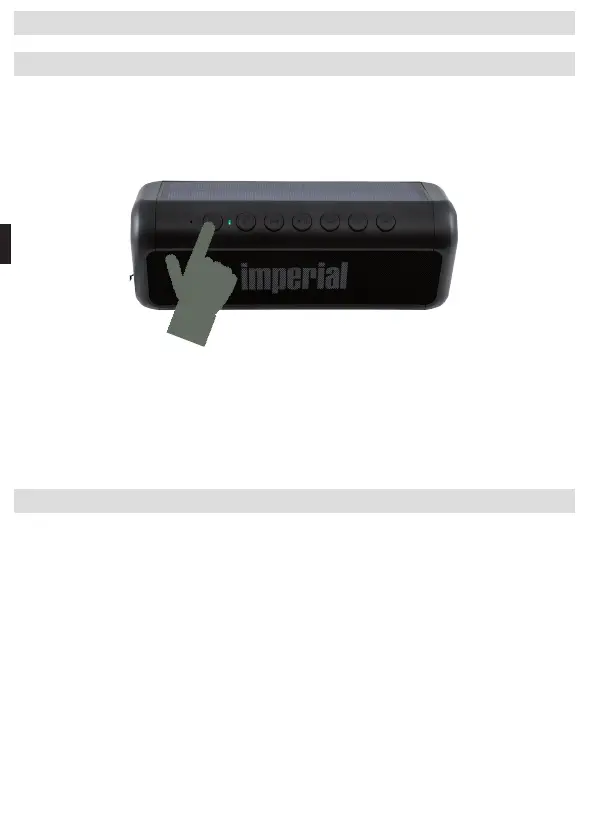
5.1. Switching [the Speaker] On / Off
Hold the ON/OFF switch (2) down for approx. 2 seconds.
The device will switch on. A brief tone will sound.
The indicator LED (3) will start to flash.
The device will be in Bluetooth mode and will search for available Bluetooth
devices.
To switch o the device, hold the ON/OFF switch (2) down again for approx.
2 seconds.
5.2. Establishing a Bluetooth Connection
To establish a Bluetooth connection with a Bluetooth-enabled device, please
proceed as follows:
Switch the BAS 6 on via the ON/OFF switch (3).
The blue indicator LED will flash.
Open the Bluetooth settings on your tablet or smartphone and start a
search for Bluetooth devices.
After the search has been completed, please select the device IMPERIAL
BAS 6 from the list and establish a connection.
5. OPERATION
If a password prompt appears on your tablet or smartphone, please enter
the password 0000.
After you have established the connection, the indicator LED will perma-
nently light blue. You can now play music les from your smartphone or
tablet via the speaker.
The next time the speaker is switched on, it will automatically connect to the
tablet or smartphone last connected. A new search is only required if you
would like to pair the speaker with another device.
Note:
The device automatically switches o after 10 minutes if no Bluetooth con-
nection was established during this time.
5.3. Changing the Volume Level
Halten Sie die Taste (9) gerückt um die Lautstärke zu erhöhen.
Halten Sie die Taste (8) gerückt um die Lautstärke zu verringern.
BDA_BAS_6_01_19.indd 30 15.02.19 12:51



 To Next Page