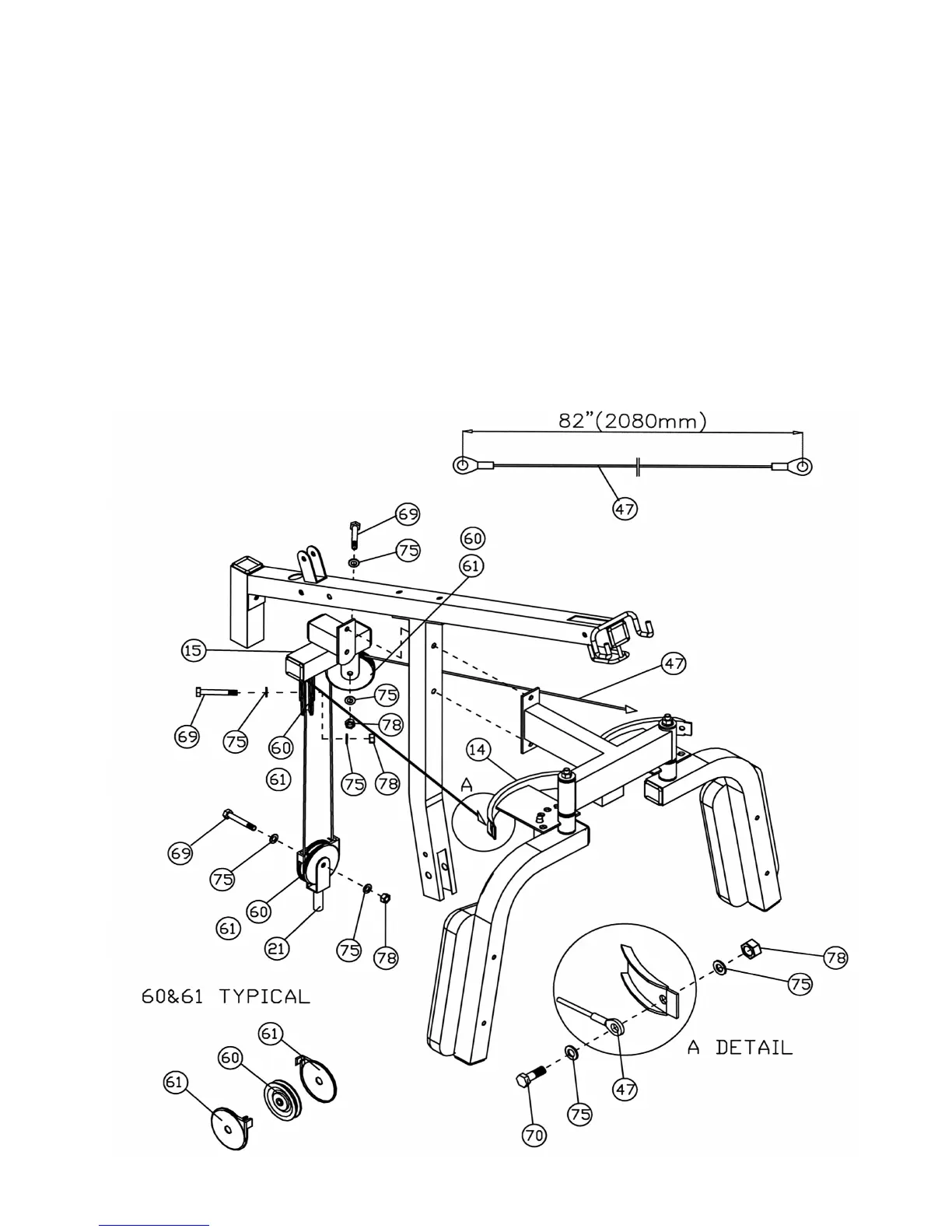
STEP 6 (See Diagram 6)
A.) Attach one end of the 82” Butterfly Cable (#47) to the Butterfly Cable Guide (#14). Secure
it with one M10 x 1” Hex Bolt (#70), two ∅ 13/16” Flat Washers (#75), and one M10
Aircraft Nut (#78). (See A Detail)
B.) Draw the Cable (#47) to the bracket underneath the Butterfly Pulley Frame (#15). Attach
Pulley (#60) and two Pulley Covers (#61) to the Cable. Align the hole on the Pulley to the
bracket and secure it with one M10 x 1 ¾” Hex Bolt (#69), two ∅ 13/16” Flat Washers
(#75), and one M10 Aircraft Nut (#78).
C.) Pull the Cable downward and attach a Pulley (#60) and two Pulley Covers (#61) in the
mid-span. Attach a Single Floating Pulley Bracket (#21) to the Pulley and secure it with
one M10 x 1 ¾” Hex Bolt (#69), two ∅ 13/16” Flat Washers (#75), and one M10 Aircraft
Nut (#78). Let the Single Floating Pulley Bracket (#21) hanging for now.
D.) Draw the Cable upward to the Butterfly Pulley Frame (#15) and install another Pulley.
E.) Attach the other end of the Cable to the other Cable Guide.
DIAGRAM 6
9




 To Next Page