5
B. Operating Environment
Please make sure that the environment is adequate for the InBody270 installation. This equipment is designed
for indoor use. If installing outdoors, the following requirements must be fullled.
C. Installation Instructions
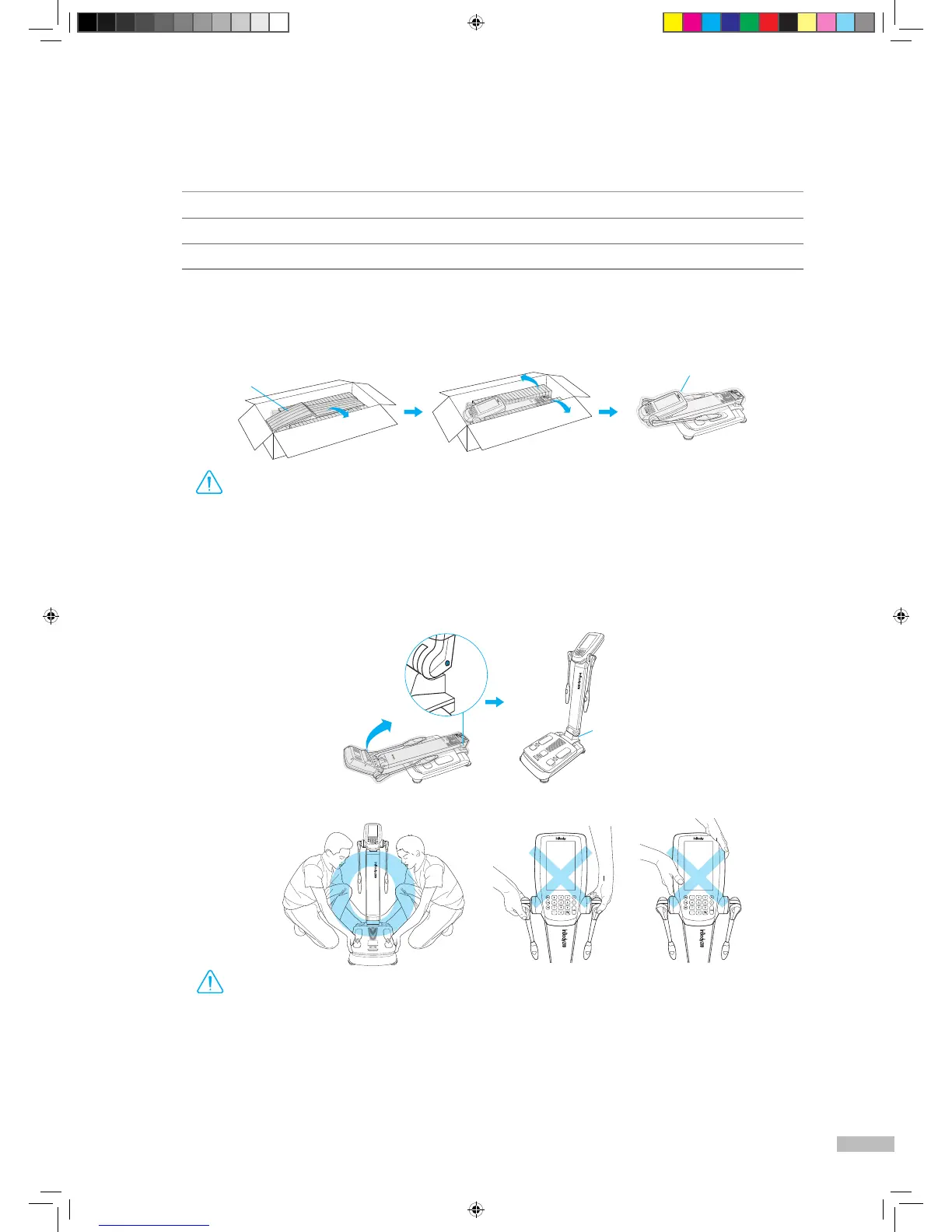
1. Open the packing box of the InBody270 and remove the packing pads. Then take the InBody270 out of
the box.
2. While holding the upper part lock button, raise the upper part of the InBody270 and remove the polyethylene
foam cover.
•
If you have any problems installing your InBody270, please contact InBody for assistance.
•
Do not transport the equipment by holding the screen portion or the joints of the hand electrodes.
•
Keep the packing materials provided for repacking the equipment in the future. Other wastes should be
disposed of according to relevant laws and regulations.
DANGER
NOTECAUTION
참 조 주 의참 고 주 의
Caution
•
Using the InBody270 on carpet may cause static electricity, which could damage the equipment. If installing
the InBody270 on carpet is unavoidable, please use an antistatic mat.
•
Install the InBody270 on a leveled, non-vibrating surface. Installing the equipment on an uneven surface
may cause the examinee to fall down. Test results may also be inaccurate.
•
Never clean the hand and foot electrodes with liquid spray or detergent directly. The equipment may corrode
and/or malfunction if the liquid or detergent leaks inside. Use the InBody Tissue when cleaning the InBody270.
DANGER
NOTECAUTION
참 조 주 의참 고 주 의
Caution
Temperature range
10 ~ 40℃ (50 ~ 104℉)
Relative humidity 30 ~ 75% RH
Atmospheric pressure 70 ~ 106kPa
*
Please refer to the following illustrations to properly transport the equipment.
Polyethylene foam cover
Packing pads
Hinge
270_manual_ENG_B_150608.indd 5 2015. 6. 8. 18:45


 To Next Page