6
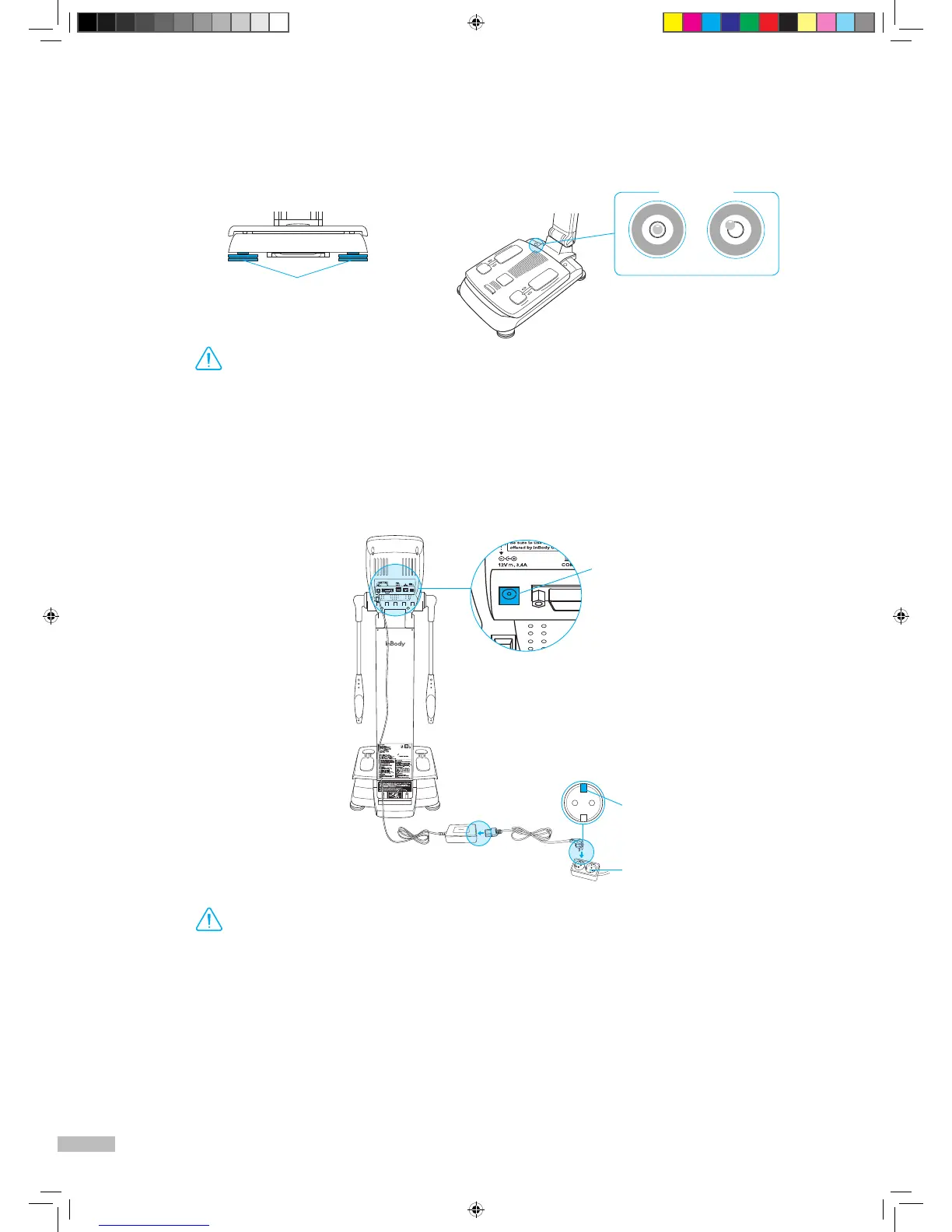
3. Level the InBody270 by rotating the leveling screws under the footplate to the left and right so that the
air bubble is centered.
*
Leveling the equipment is necessary for accurate measurement of weight. There are a total of 4 leveling screws.
4. Connect the adapter (
❷
) to the power input port, which is located on the rear panel (
❶
). Connect the adapter (
❷
)
to the power cord (
❸
). Plug the power cord (
❸
) into a grounded 3-socket outlet.
*
The InBody270 can be used in connection with other equipment such as a stadiometer, a blood pressure monitor, data management
software called Lookin’Body, or a barcode reader. For more information, please refer to 'I. InBody270 Installation E.Connecting Printer,
Thermal Printer, Stadiometer, Blood Pressure Monitor, Barcode Reader and SD400' in User's Manual.
Leveling screws under the footplate
•
Avoid injuring your hands when rotating the leveling screws under the footplate.
Warning
•
Do not place the InBody270 in a location making it difficult to disconnect the power cord.
•
Do not plug in or pull out the power cord with wet hands. There is a risk of an electric shock.
•
Always use an outlet connected to the power (AC 100 - 240 V). Using other power rated outlets may result in
fire or malfunction.
•
When using a power surge protector, make sure that the outlet or the extension cable has adequate power capacity.
•
Do not disassemble or modify the equipment including internal parts without written consent from the
manufacturer. This may cause electric shock or injury, product malfunction, inaccurate results, and will
void the manufacturer’s warranty.
❶
InBody
Power input port
Rear panel
❸
❷
Grounded outlet
3-socket outlet
270_manual_ENG_B_150608.indd 6 2015. 6. 8. 18:45


 To Next Page