12
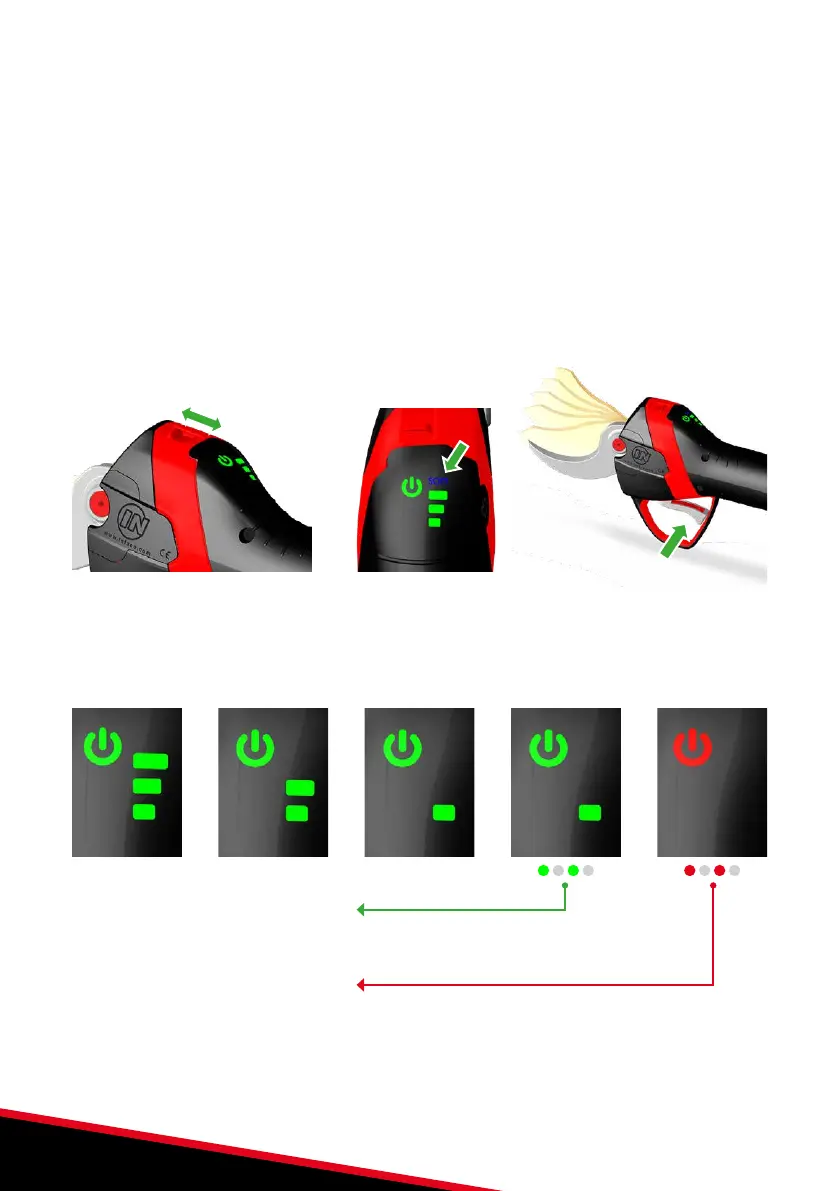
NORMAL or SOFT mode
There is a choice of two operating modes:
• "NORMAL” mode: the pruning shears operate at maximum speed for optimum blade
closing time.
• "SOFT” mode: provides a softer blade control feel. The cutting speed is reduced by
about 15%. This mode is strongly recommended when learning to prune.
1. To switch from one mode to the other, quickly operate the half-opening
switch 6 times (3 on and 3 off), the SOFT LED will light or go out depending
on the initial state.
2. Press the trigger to check the mode change.
3x
Battery charge level
The battery charge level is indicated by the 3 LEDs on the pruning shear charge indicator.
100%100% < 70%< 70% < 40%< 40% < 10%< 10% 0%0%
Battery low state:
When the last LED flashes, the battery charge is less than 10%.
Battery flat state:
When the battery is completely flat, the pruning shears stop. The power supply LED switches to
quickly flashing and the 3 charge indicator LEDs switch off. The battery must be recharged when in
this state (see page 14).


 To Next Page