28
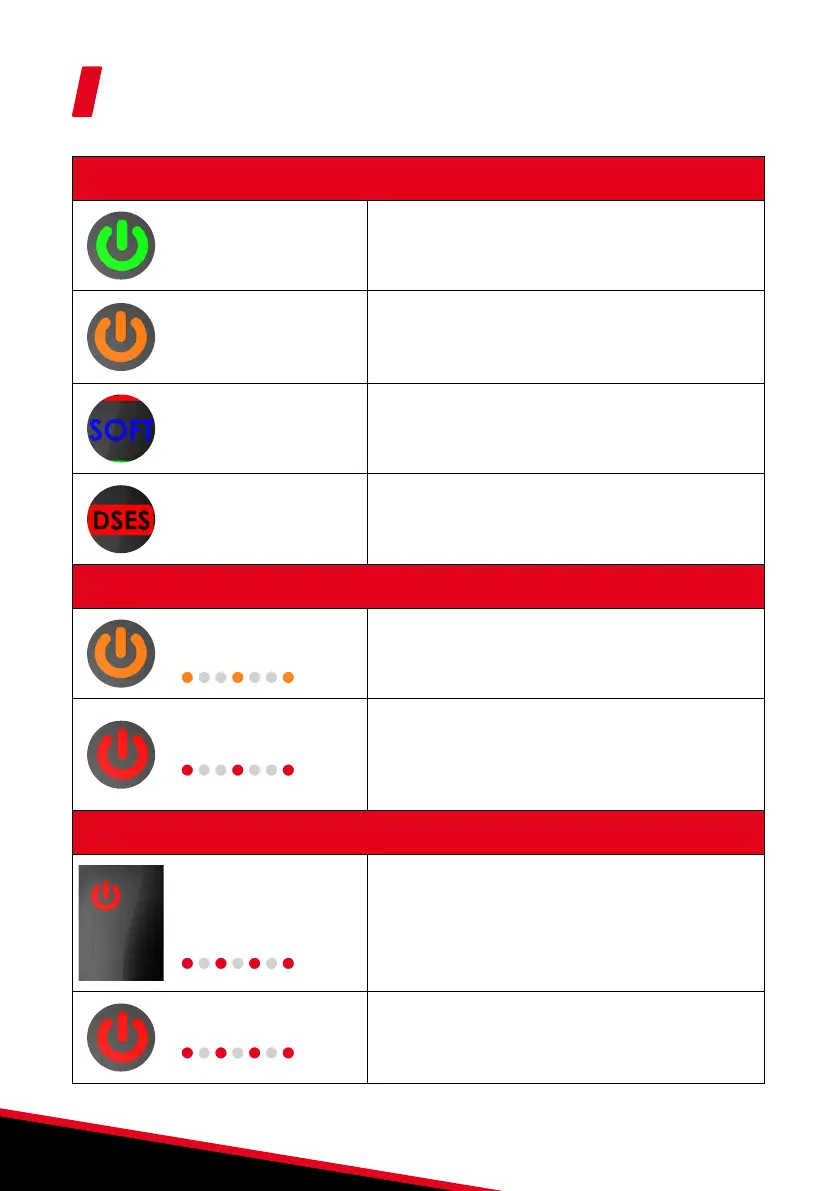
LED indications
Indication (the pruning shears are operational)
Green LED on (not
flashing).
The device is running normally.
Orange LED on (not
flashing).
Excessive work: Sharpen the blade.
If the problem persists, the kit being used may not be
suitable for the work being carried out. Contact your
dealer to get personalized advice.
SOFT LED steady blue
SOFT mode active
DSES LED steady red
Safety system inactive or defective:
• Check that there was no bad initialization
• The system is temporarily or permanently inactive
Safety (Temporary pruning shear shut down)
Orange LED flashing
slowly
5 consecutive blocking cuts:
After a 5 second pause, the pruning shears automatically
return to normal operation.
Red LED flashing slowly
High pruning shear temperature: Leave the pruning
shears powered on. The pruning shears automatically
switch to normal operation as soon as the device
is ready to use again. The bar graph continues to
indicate the battery charge level.
Battery flat (the pruning shears stop working)
Fast flashing red LED +
charging indicator off
Battery flat: Red flashing power LED and charge
indicator off mean that the battery is flat. The battery
must be recharged when in this state (see page 14).
Red LED flashing slowly
Device fault: If the pruning shears show a fault, turn
them off and back on again. If the problem persists,
contact your dealer. The bar graph continues to
indicate the battery charge level.


 To Next Page