19
Setting the adjustable blade opening OR adjustable blade
overlap ratio
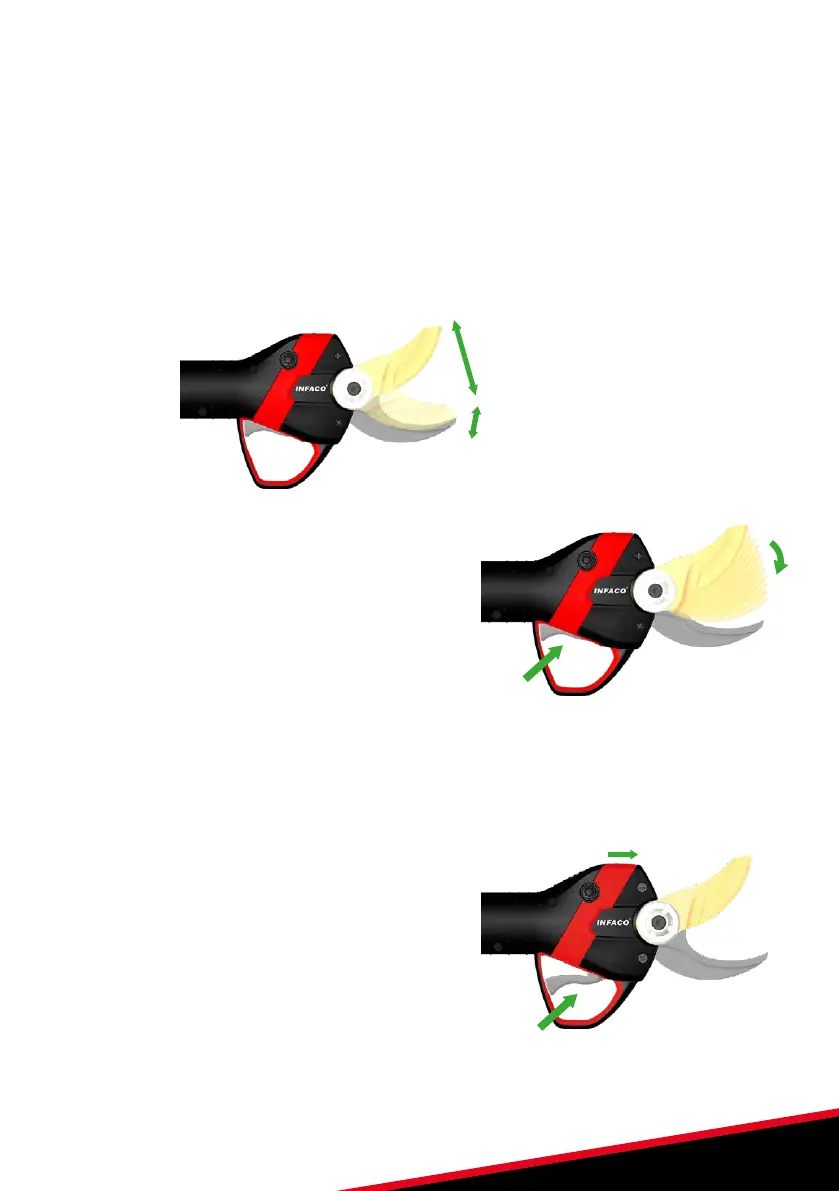
Once the pruning shears are in “settings” mode, the adjustable blade opening OR adjustable
blade overlap ratio can be set. The pruning shears have pre-set blade positions:
• 10 adjustable blade opening positions.
• 10 adjustable blade overlap positions.
Adjustable blade
opening zone.
Adjustable blade
overlap zone.
1. Once the pruning shears are in “settings”
mode, press and hold the trigger to get the
first pre-set adjustment position.
2. Successively press the trigger to move from
position to position.
3. If you overshoot the required position, release the trigger to return to the open blade
position and begin the procedure from the beginning.
4. Once the adjustable blade opening or adjustable blade overlap ratio has been set, keep
the trigger on the position.
5. Confirm the position by switching the
adjustable blade opening switch (1 on or 1 off).
6. The pruning shear LEDs must be steady
green to confirm the validation. The pruning
shears are ready for normal use.
1x


 To Next Page