Contact Infiltrator Water Technologies 1-800-221-4436 for additional technical and product information.
7
AQUAWORX MARC OPERATING INSTRUCTIONS
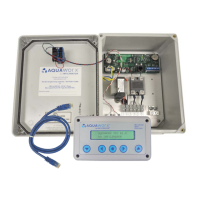
FIGURE 6: IPC PANEL WITH THE MARC
IV. Controller Menu Functions
Below is a list of menu functions available to the user.
See Figure 7 for complete MARC menu mapping.
SIMPLEX = The “SIMPLEX” panel user may access the
above menus in addition to the following menus:
A) VIEW STATUS “A”
B) VIEW EVENTS
C) MANUAL RUN “A” OR “B”
D) ACTIVATE SETTINGS
E) PUMP “A” SETTINGS
F) TIME SETTINGS
G) SD CARD SETTINGS
H) LOGIN
RJ45 Cable
Connection to MARC
DUPLEX = The “DUPLEX” panel user may access the
above menus in addition to the following menus:
• STATUS “B”
• MANUAL “B”
• PUMP “B” SETTINGS
RJ45 Cable Connection to
Circuit Board
MARC


 To Next Page
 Loading...