Contact Infiltrator Water Technologies 1-800-221-4436 for additional technical and product information.
6
AQUAWORX MARC OPERATING INSTRUCTIONS
I. General
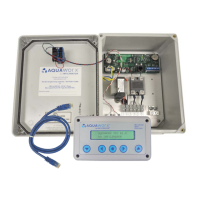
The MARC is a handheld device that is specifically
designed to program the Aquaworx IPC Panel product
line. The MARC has the ability to mount inside the IPC
Panel making it readily available for that individual panel.
Alternatively, it can be removed for use with multiple
panels. Removing the MARC has an additional benefit of
minimizing the ability of unauthorized persons to inadver-
tently adjust the system settings. The MARC connects to
and communicates with the panel using a standard RJ45
cable (included). The MARC includes a SD memory card
slot, allowing the user to capture and download system
events and settings onto a removable card. This provides
the operator with a history of system function, which is
critical to troubleshooting and maintaining a pump-driven
system.
FIGURE 5: THE MARC
Tracking SD-card slot
for event download
LCD text display
(2 line, 20 character)
Sturdy ABS enclosure
RJ45 Cable 3’ length
Simplex/Duplex and
backwards compatible
8-pin (RJ45) connector for easy
plug-in / disconnect
Enter
-/Left
Select
+/Right Cancel
II. MARC Plug-in and Start-up
1. Plug RJ45 cable into bottom of MARC unit.
2. Plug other end of RJ45 cable into panel connector.
3. LCD screen will display.
NOTE: The MARC receives its power from the IPC Panel
and does not have a power source of its own.


 To Next Page
 Loading...