Controls (In Detail) Continued
3. VOLUME Control (2)
Simply
tum
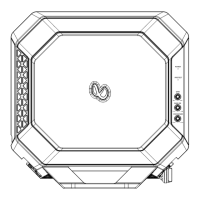
the spindle knob (2) to increase or decrease volume. Current volume setting
is briefly indicated on the display panel form 00 to 45.
4. MODE Selection
(3)
Press MODE button (3) to cycle through available program sources as follows:
RADIO --> CD
-->USB
--> AUX --> BT MUSIC.
Note: A valid USB drive must be inserted into the USB port in order for that mode to appear.
5. MUTE button (7)
Simply press MUTE button (7) to mute sound output. Press it again to resume sound output.
6. CLOCK/TIME Adjustment
In Radio mode, press DIS button (14) once to display the time.
A. Press and hold the DIS (14) button until time flashes on the display.
B. Tum VOL knob (2) clockwise to set hour.
C. Tum VOL knob (2) counter-clockwise to set minute.
D. Press the DIS (14) button again quickly to accept the adjusted time.
If
no button is pressed within 5 seconds, then the unit would automatically accept
the adjusted time without further intervention from the user.
7. LOUD Control
When listening to music at low volume levels, this feature will boost the bass and treble
response. This action will compensate for the reduction in bass and treble performance
experienced at low volume. Press the LOUD button (16) once to
tum
LOUD ON, LOUD
icon would appear on the display panel. Press the LOUD button (16) once again to
tum
LOUD OFF, and LOUD icon would disappear from display panel.
9


 To Next Page