_,.,
Radio Operation
'I'
1.
Radio Operation
@0@
: i
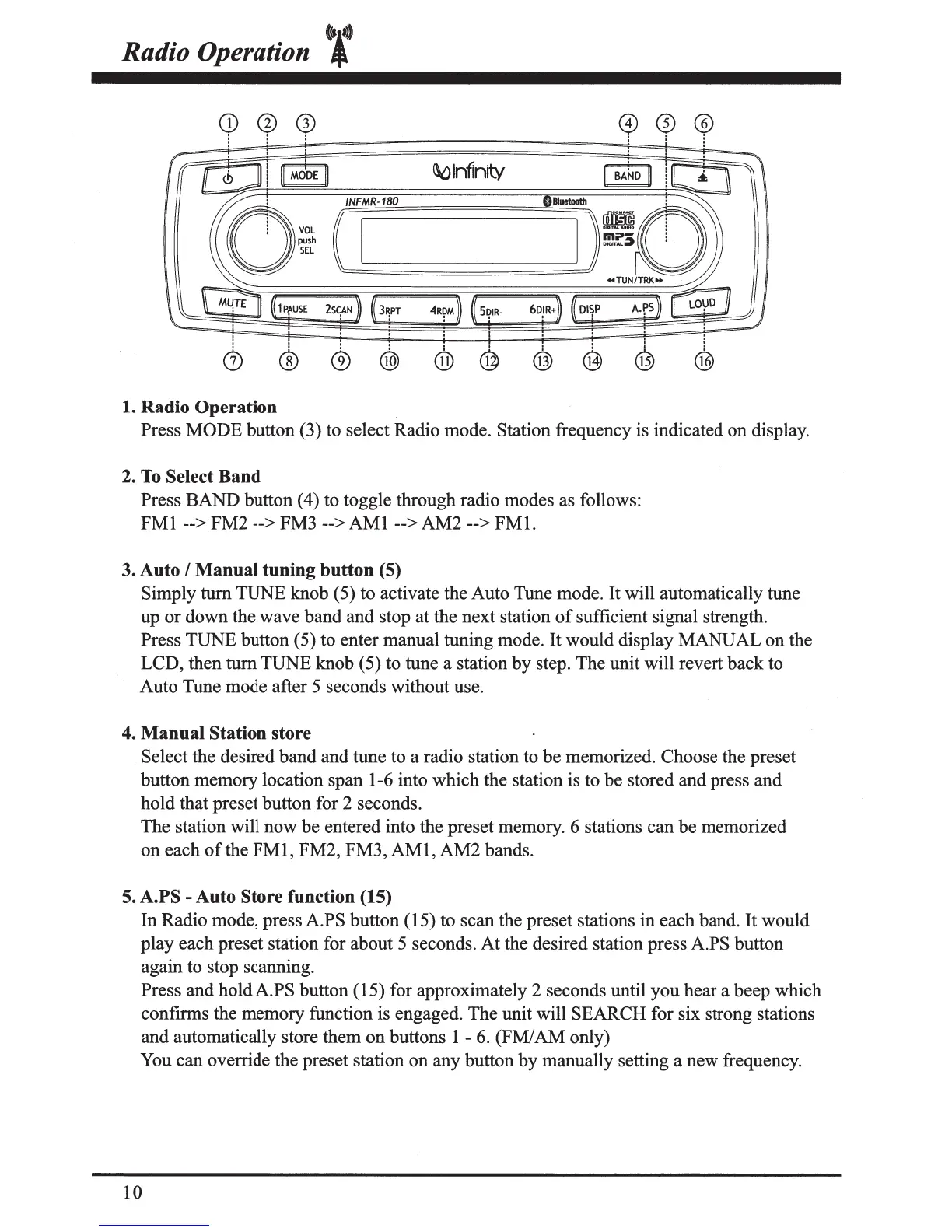
Press MODE button (3) to select Radio mode. Station frequency is indicated on display.
2.
To
Select Band
Press BAND button (4) to toggle through radio modes as follows:
FMI
--> FM2 --> FM3
-->AMI-->
AM2 -->
FMI.
3. Auto I Manual tuning button (5)
Simply tum TUNE knob ( 5) to activate the Auto Tune mode.
It
will automatically tune
up or down the wave band and stop at the next station
of
sufficient signal strength.
Press TUNE button (5) to enter manual tuning mode.
It
would display MANUAL on the
LCD, then
turn
TUNE knob (5) to tune a station by step. The unit will revert back to
Auto Tune mode after 5 seconds without use.
4. Manual Station store
Select the desired band and tune to a radio station to be memorized. Choose the preset
button memory location span I-6 into which the station is to be stored and press and
hold that preset button for 2 seconds.
The station will now be entered into the preset memory. 6 stations can be memorized
on each
of
the
FMI,
FM2, FM3,
AMI,
AM2 bands.
5. A.PS
-Auto
Store function (15)
In Radio mode, press A.PS button ( I5) to scan the preset stations in each band.
It
would
play each preset station for about 5 seconds.
At
the desired station press A.PS button
again to stop scanning.
Press and hold A.PS button ( I5) for approximately 2 seconds until you hear a beep which
confirms the memory function is engaged. The unit will SEARCH for six strong stations
and automatically store them on buttons
I-
6.
(FM/AM only)
You can override the preset station on any button by manually setting a new frequency.
IO


 To Next Page