Radio Section Operation
1.
To
Select Radio mode
There are two ways to select Radio mode.
- By repeat press SOURCE button.
- By press TUNE UP/DN button at Main Source screen and press SEL knob when
Raclio
leon selected. (Note: highlight movement indicated by the icon background
change
to
two tone orange.)
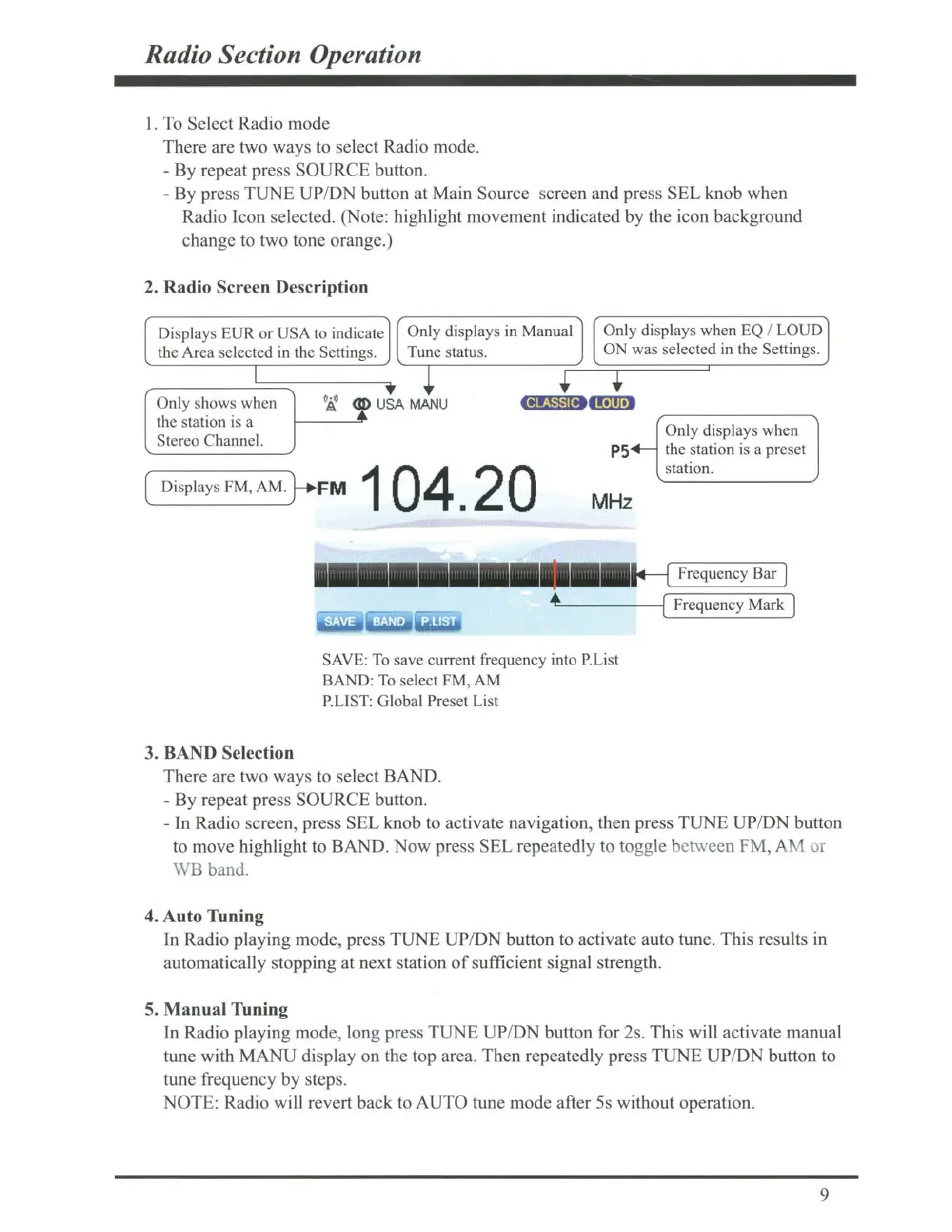
2. Radio Screen Description
Displays EVR
or
USA to indicate
Only displays in Manual
Only displays when
EQ
I LOUD
the Area selected in the Settings. Tune status.
I
Only shows when
og
<f
U
~
the station is a
~
SA
MANU
Stereo Channe
l.
( Displays
FM
,
AM.}+
FM
1
04.20
•
ON was selected
in
the Settings.
1
Only displays when
P5+-
the station is a preset
station.
MHz
Frequency Bar
c.._---
--1(
Frequency Mark J
SAVE:
To
save current frequency into
P.Li
st
BAND: To select FM, AM
P.LIST: Global Preset List
3.
BAND
Selection
There are two ways
to
select BAND.
- By repeat press SOURCE button.
- In Radio screen, press SEL knob
to
activate navigation, then press TUNE UP/DN button
to
move highlight
to
BAND. Now press SEL repeatedly to togg
le
between FM, AM
01
WB
band.
4. Auto Tuning
ln Radio playing mode, press TUNE UP/DN button
to
activate auto tune. This results in
automatically stopping at next station
of
sufficient signal strength.
5. Manual Tuning
In Radio playing mode, long press TUNE UP/DN button for 2s. This will activate manual
tune with MANU display on the top area. Then repeatedly press TUNE UP/DN button to
tune frequency
by
steps.
NOTE: Radio will revert back
to
AUTO tune mode after
Ss
without operation.
9



 To Next Page