General Function
of
Buttons
(\()Infinity
i
CD-----------------
r
··
---
--
---\--M~E
l
I
@······
· · ·
·······
t-
·-
··
····-~
.
.
----
---
----
--
DBiuetOoiif
_
___
_
®---------········
···---
...
···
:t,;:~
~
....
-
_.
,,.,
~~
~·-
-::'
c
" o":"
:
~=~~
-
7
.
:
.-
~;
.
:
,
-
,
-~-~:-
;;
··
·.:o.~-~:
.:·
: :
:
:·
,._-·_-cc.c::.:
.:cc
·
__
-
:·:cc
.
::::·:
__
:_
=~::::::.:
.
::::
.:
-:
:
:
::
:..:~-.-"'
~
,
r
--
~
l
--
-J
o/>~
r--7
E
--
1!
@------------------
-------
--
----
r~
---
-SOURCE
':,
...... ,
( : \ __
~
L+
~
.·
S
~
~N
=
G
--
~
~
.~
---·
•••....••
··················®
®························· ......
\\
....
:=:.
::.:~.:
..........
S
..
::t
==
\
A
'··································•
....
.
..
···········
··············®
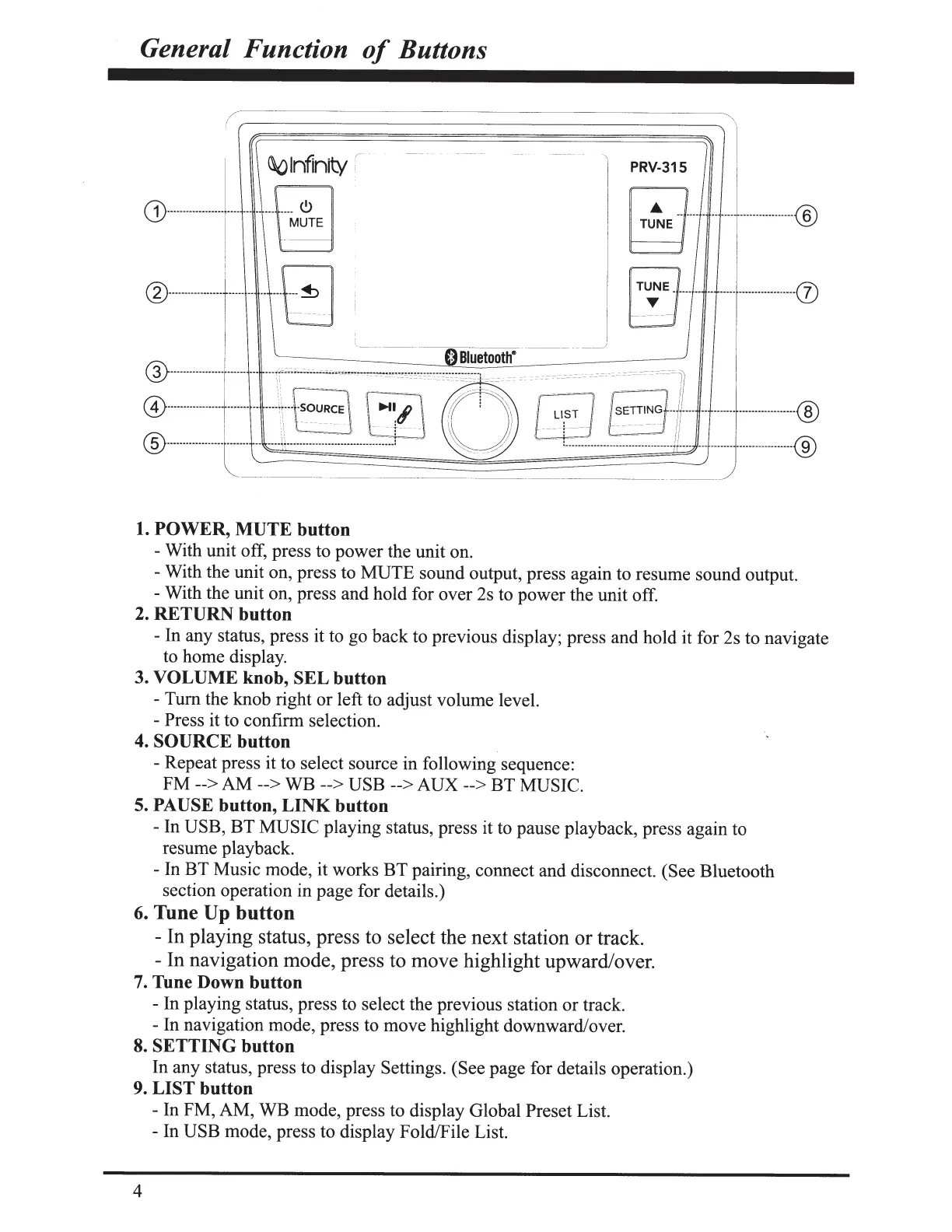
1.
POWER, MUTE
button
- With unit off, press to
power
the unit on.
- With the unit on, press to
MUTE
sound output, press again to resume sound output.
- With the unit on, press and hold for over 2s to
power
the unit off.
2.
RETURN
button
- In any status, press it to go back to previous display; press and hold it for 2s to navigate
to home display.
3.
VOLUME knob, SEL
button
-
Tum
the knob right
or
left to adjust volume level.
- Press it to confirm selection.
4.
SOURCE
button
-Repeat
press it to select source
in
following sequence:
FM
-->AM
-->
WB
-->USB
-->
AUX
-->
BT
MUSIC.
5.
PAUSE
button,
LINK
button
- In
USB,
BT
MUSIC
playing status, press it to pause playback, press again to
resume playback.
- In
BT
Music mode, it works
BT
pairing, connect and disconnect. (See Bluetooth
section operation in
page
for details.)
6.
Tune
Up
button
- In playing status, press to select the next station or track.
- In navigation mode, press to move highlight upward/over.
7.
Tune Down button
- In playing status, press to select the previous station
or
track.
- In navigation mode, press to
move
highlight downward/over.
8.
SETTING button
In any status, press to display Settings. (See page for details operation.)
9.
LIST button
- In FM, AM,
WB
mode, press to display Global Preset List.
-In
USB
mode, press to display Fold/File List.
4



 To Next Page