EasyManua.ls Logo

InFocus IN126x - User Manual

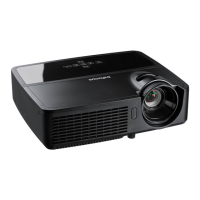
InFocus IN126x
35 pages
Print Icon
To Next Page IconTo Next Page
Loading...

Questions and Answers

  • D
    dennishornAug 10, 2025
    How to fix a fuzzy or cropped image on an InFocus IN126x?
    • S
      Stephen ScottAug 11, 2025
      If the image appears fuzzy or cropped, try adjusting your computer's 'Resolution' setting to match the projector's resolution. The location of this setting varies depending on your operating system.
  • M
    Mr. Charles RamosAug 17, 2025
    What to do if my InFocus IN126x Projector says 'Signal out of range'?
    • L
      Luis MossAug 17, 2025
      If your projector displays 'Signal out of range', you can try pressing the Auto Image button on the remote. Additionally, adjust your computer's refresh rate; this process varies depending on your operating system. You might also need to set a different resolution on your computer.
  • K
    Karen SmithAug 23, 2025
    How to center the image on my InFocus IN126x Projector screen?
    • V
      Veronica OdomAug 23, 2025
      To center the image, physically move the projector and adjust its height. For finer adjustments, navigate to Advanced Menu > Image > PC... menu to adjust the horizontal or vertical position.
  • A
    Ashley JohnsonAug 28, 2025
    How to display desktop icons on my InFocus IN126x Projector from my laptop?
    • S
      Sarah FrenchAug 28, 2025
      If only your laptop’s background appears, change the Multiple Display setting to 'Duplicate these displays'. Note that the exact location of this setting varies depending on your operating system.
  • T
    Tricia Poole PhDSep 4, 2025
    What to do if there is no start up screen on my InFocus IN126x Projector?
    • J
      Jamie MartinezSep 4, 2025
      If you don't see a start-up screen, ensure the power cord is securely plugged into the projector. Then, press the Power button, S-VIDEO, or USB-B.

InFocus IN126x Specifications

General IconGeneral
ResolutionXGA (1024 x 768)
Contrast Ratio15000:1
Audio2W speaker
Projection TechnologyDLP
ConnectivityHDMI, VGA, USB, RS232
Zoom Ratio1.1x
Video CompatibilityNTSC, PAL, SECAM
Noise Level29 dB
Power Consumption230W

Related product manuals