78
NETWORK menu
Item Description
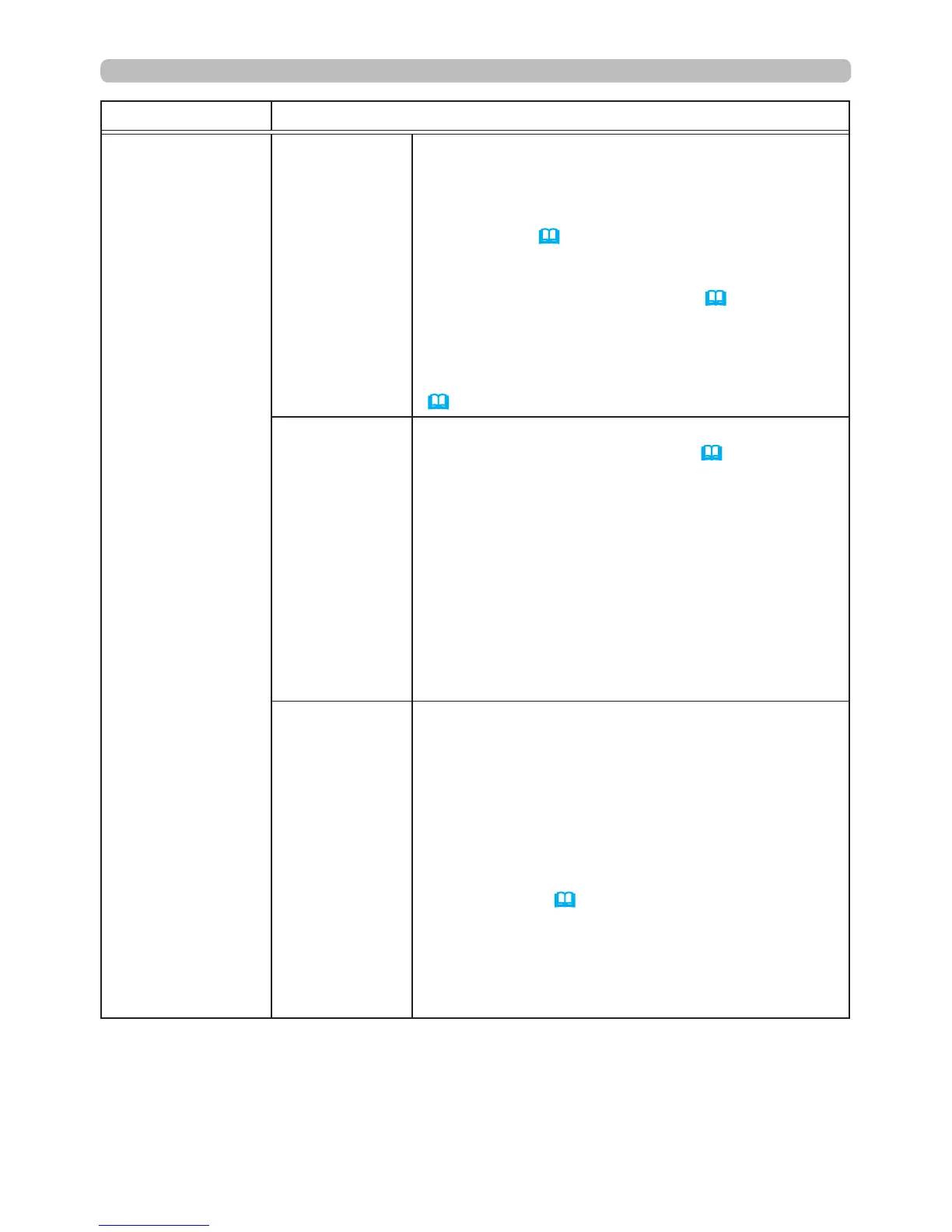
WIRELESS
SETUP
(continued)
DATE AND
TIME
Use the ▲/▼/◄/► buttons to enter the Year (last
two digits), Month, Date, Hours and Minutes.
• When this item is set, TIME DIFFERENCE in the
WIRED SETUP menu will be overwritten with the
same setting (
82
).
• When SNTP is enabled, the projector will
override this setting and retrieve DATE AND TIME
information from the Time server. (3.1.8
Date/
Time Settings in the Network Guide
)
• If STANDBY MODE in the SETUP menu is set
to SAVING and the projector is turned off (or AC
power is turned off), this setting will be reset.
(
56
).
CH
Use the ▲/▼ buttons to select the wireless LAN
channel to be used when MODE (
76
) is set to
ADHOC. Select the item based on your computer
settings.
The channels 1 to 11 are available. To save the
setting, press the ► button.
• Available channels will vary per country. In
addition, a wireless network card may be required
based on the country.
• This item can only be selected when MODE
is set to ADHOC. When MODE is set to
INFRASTRUCTURE, the channel is automatically
selected.
ENCRYPTION
Use the ▲/▼ buttons to select the encryption
method to be used.
WPA2-PSK(AES)
ó
WPA2-PSK(TKIP)
OFF WPA-PSK(AES)
WEP 64bit
ó
WEP 128bit
ó
WPA-PSK(TKIP)
To save the setting, press the ► button.
• When MODE (
76
) is set to ADHOC, WPA-PSK
and WPA2-PSK are disabled.
• If IEEE802.11 n is used while MODE is set to
INFRASTRUCTURE, TKIP and WEP are disabled.
Communication will switch automatically to
IEEE802.11 b/g unless OFF or AES is selected.
(continued on next page)





 To Next Page