Setting up the LitePro 580
LitePro 580 User’s Guide 11
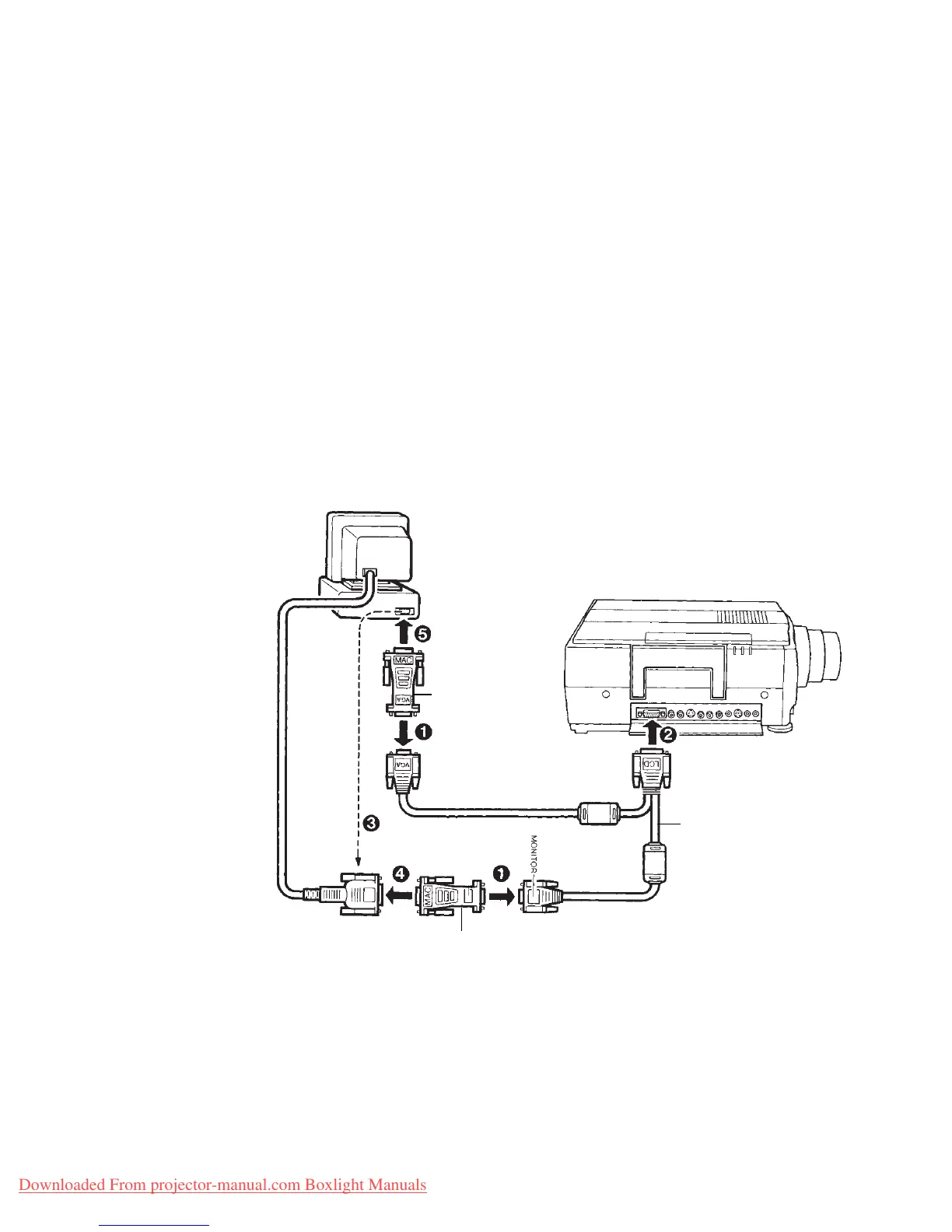
Connecting a Macintosh desktop computer
1. Attach one Mac adapter to the VGA connector and one Mac
adapter to the MONITOR connector of the VGA cable.
2. Plug the LCD connector on the VGA cable into the projector’s
Computer port.
3. Unplug the monitor cable from the computer’s monitor port.
4. Plug the monitor cable that you just removed into the MONITOR
connector (with the Mac adapter) on the VGA cable.
5. Plug the VGA connector (with the Mac adapter) on the VGA
cable into the computer’s graphics port.
6. Tighten the thumb screws on all the connectors to ensure proper
grounding.
7. Turn on the projector, monitor, and computer.
VGA Cable
Mac Adapter
Mac Adapter
Downloaded From projector-manual.com Boxlight Manuals


 To Next Page
 Loading...






