11
Connecting a Video Player
If your video device (VCR, DVD player, video camera) uses a
round, one-prong composite video connector, use the composite
audio/video (A/V) cable provided. The end with 2 connectors
attaches to the projector, the other end attaches to the video
device.
•
If your video device uses a round, four-prong S-video con-
nector, use an S-video cable. S-video generates a higher
quality image.
1
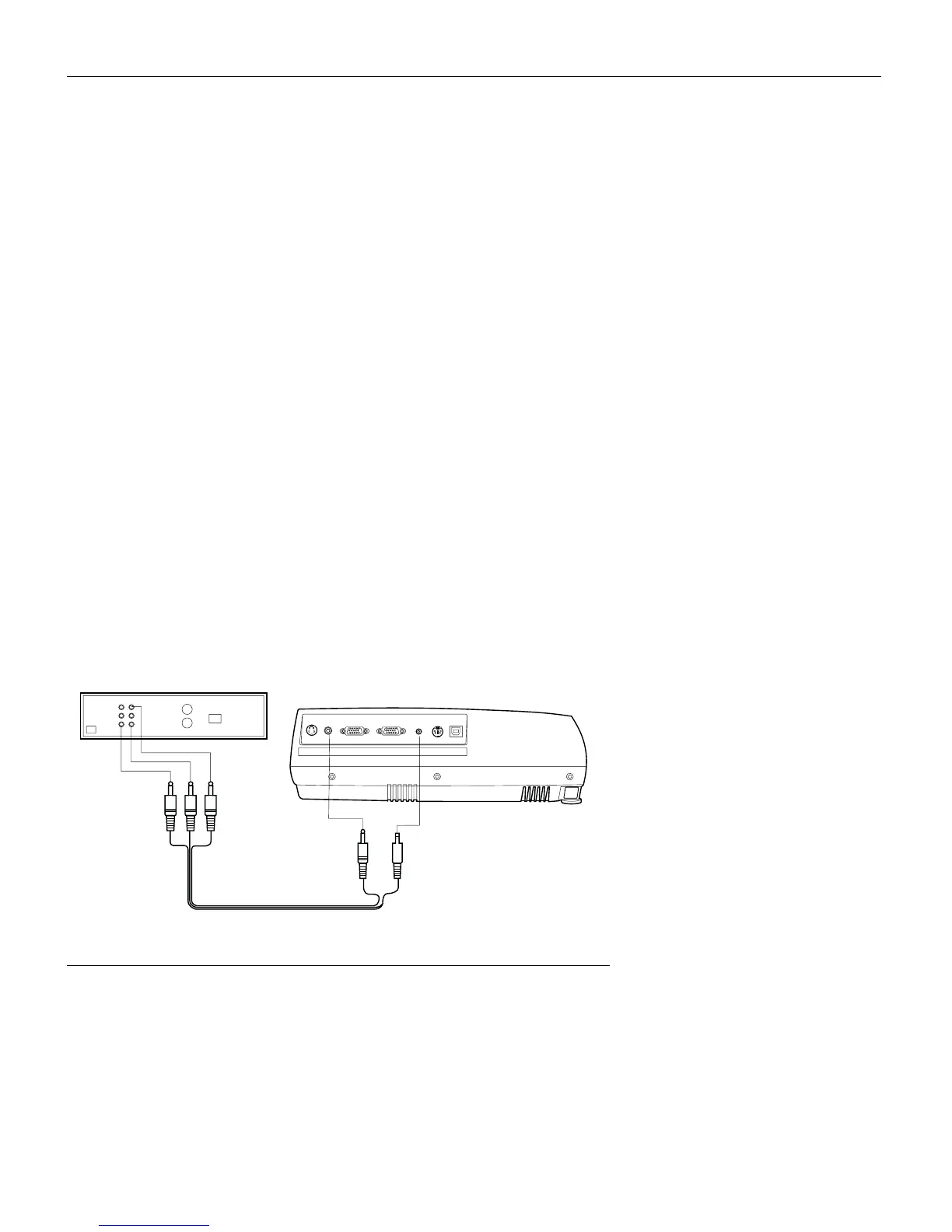
Plug the A/V cable’s round yellow connector into the “video-
out” connector on your video device (Figure 7). This connec-
tor may be labeled “To Monitor.”
•
If you’re using an S-video cable, connect the round black
connector to the “S-video out” connector on the video
device.
2
Plug the other yellow connector into the “Video” connector on
the projector.
•
If you’re using S-video, plug the other end of the cable into
the “S-Video” connector on the projector.
F
IGURE
7
Connecting the projector to a VCR using the A/V cable
S-Video
Video
Computer VGA
Monitor VGA
Audio in
PS2/RS-232
USB
A/V cable



 To Next Page