EasyManua.ls Logo

inform PDSP31010 - Liquid Crystal Display (LCD) and User Menu

inform PDSP31010
60 pages
Print Icon
To Next Page IconTo Next Page
To Previous Page IconTo Previous Page
Loading...
31
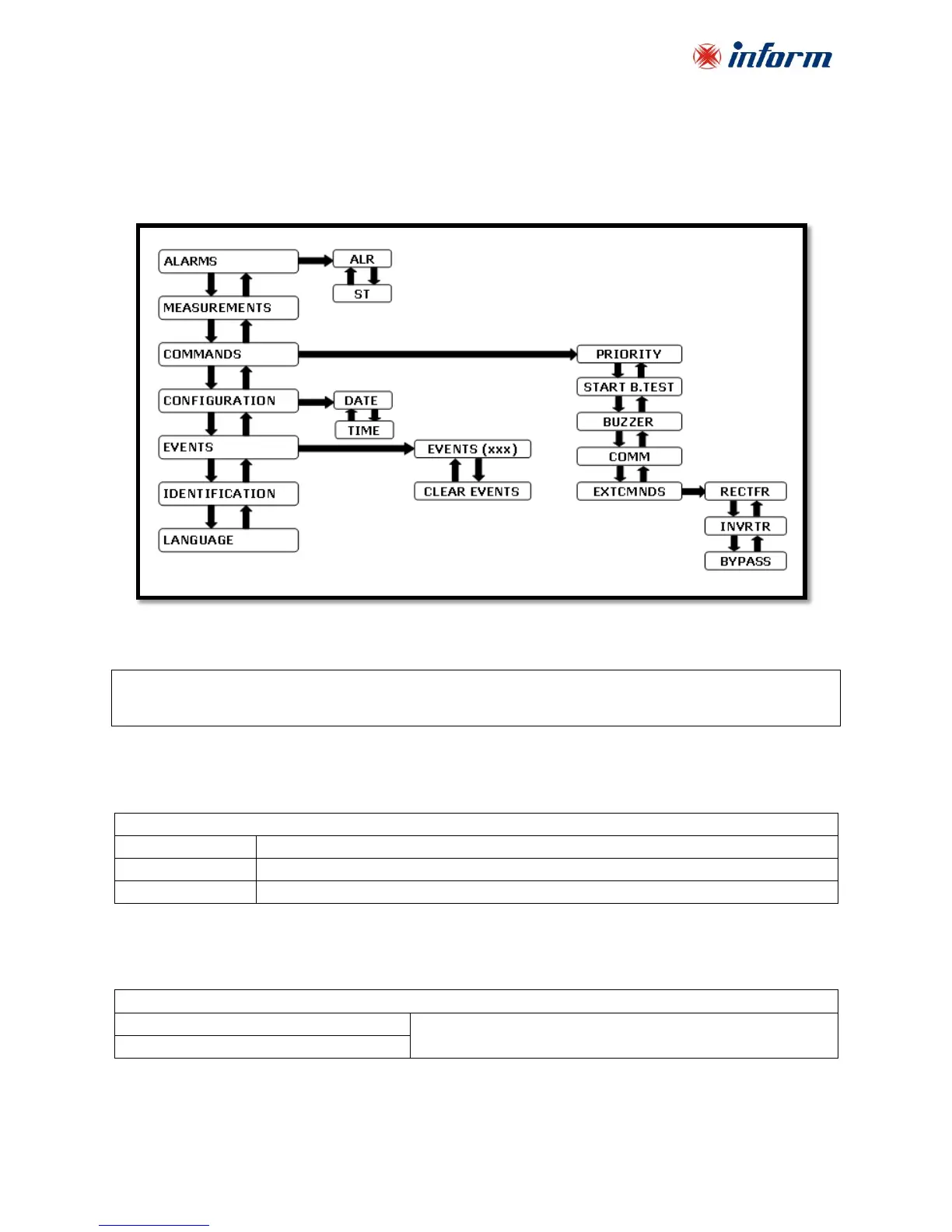
6.1.3. Liquid Crystal Display (LCD) and User Menu
LCD provides detailed information about device status, alarms and measurements. It also enables
the operator to manage the UPS. All information, commands and configuration parameters are
given in a menu, which has the following structure:
LCD consists of two lines and has the following structure:
“OPERATING MODE” or “VSECFLR”
“MENU or PARAMETER NAME”
If there is no voltage on the output, VSECFLR message is displayed on the upper line.
Operation mode parameter is one of the notations below:

OPERATING MODE NOTATIONS
NORMAL
Normal mode
BYPASS
Bypass mode
BATT
Battery mode
Menu and parameter descriptions are given below:
ALARMS MENU
ALR
=
“XXXXXXXXXXXX”
12 digit service codes.
Note these numbers before referring technical service.
ST
=
“XXXX-XXXXXXXX”

Related product manuals