SUPERVISOR PASSWORD
The ‘Supervisor Code’ is designed to limit access to the ‘Supervisor Functions’ configured for
certain transaction types or access to certain ‘Function Codes’ on the terminal to those who have
access to the code.
If you forget your code, please contact the Helpdesk who will be able to provide you with a
temporary code to allow you to reset it to a new value.
Default Supervisor Code is 999999
MENU SCREENS
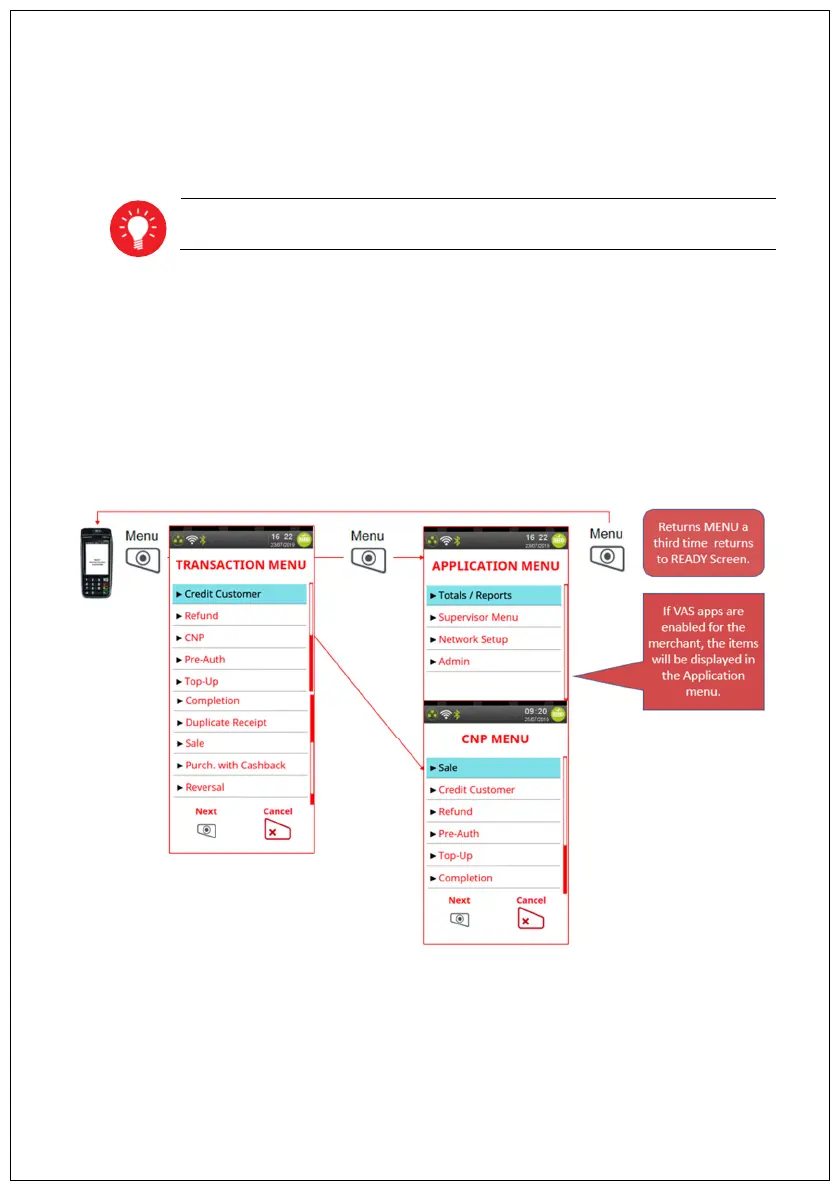
The menu screens allow users to select Transaction types as well as perform supervisor functions
on their Terminal. Additional actions can be selected directly by entering their Function Code on the
HELPDESK menu.
Once the selected action is completed the terminal will return to READY Screen.
Pressing the Cancel Key will allow users to go back one level or return to Idle from the top level
(Transaction) menu


 To Next Page
 Loading...