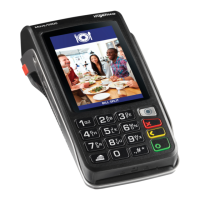
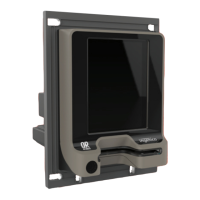
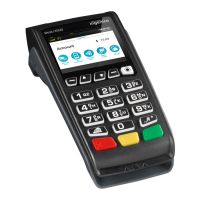
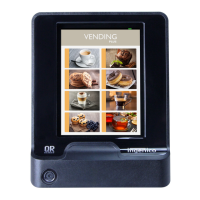
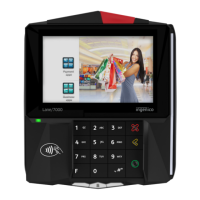
The Ingenico Move 3500 is a portable point-of-sale (POS) terminal designed for processing various types of transactions. It features a compact design with a physical keypad, a display screen, and integrated card readers for different payment methods. The device is branded for Standard Bank, indicating its use within their merchant services ecosystem.
Function Description
The primary function of the Move 3500 is to facilitate payment transactions, including purchases, refunds, and balance enquiries. It supports multiple card types and transaction methods:
- Contactless Transactions: This allows for quick payments by tapping a contactless card or device to the terminal screen. It's suitable for transactions up to R5,000, with those between R200 and R5,000 requiring a PIN entry and online verification. Offline contactless transactions are available for amounts under R200.
- Credit Card Transactions (Swipe): For credit cards without a chip, or in cases where the chip reader is not used, cards can be swiped through the magnetic stripe reader. This method supports both purchase and refund transactions, including options for "Straight" and "Budget" purchases if the amount exceeds R300.
- Chip Card Transactions (Insert): Modern chip cards are inserted into the chip card slot for secure processing. This method also supports both purchase and refund transactions, requiring PIN entry for cardholder verification.
- Debit Card Transactions (Swipe or Insert): Debit card transactions can be processed by either swiping or inserting the card, depending on the card type. These transactions require the customer to select an account type (Cheque or Savings) and enter their PIN.
- Balance Enquiry: Cardholders can check their debit card balance by swiping or inserting their card, selecting the account type, and entering their PIN. The balance is displayed on the screen and can be cleared by pressing the cancel (red) key.
- Cancellations: Transactions can be cancelled if they are still within the same batch, requiring a Supervisor PIN for authorization.
- Banking Functions: The terminal offers banking-related functionalities such as "Cash-Up" and "Cash-Up History." The "Cash-Up" function allows merchants to generate a summary of transactions for a specific batch, while "Cash-Up History" provides a record of previous cash-ups.
- Reprint Receipt: The device can reprint the last successful transaction receipt or a specific receipt if the transaction is still in the current batch and has not yet been batched.
Usage Features
The Move 3500 is designed for ease of use with a clear menu structure and intuitive button layout:
- Terminal Menu: Accessed by pressing the Enter (Green 'O') key, the menu provides options for various transaction types (Purchase & Refunds, Contactless, Credit Card Transactions, Chip Card Transactions, Debit Card Transactions), as well as administrative functions (Cancel, Balance Enquiry, Payment, Payment Reversal, Cash Withdrawal, Purchase & Cash, Auth Only, Auth Cancel, Auth Override).
- Transaction Flow: For purchases, the process typically involves entering the amount, confirming it, and then performing the card action (tap, swipe, or insert) followed by PIN entry if required. Refunds follow a similar flow but require a Refund PIN and entry of the refund amount.
- Keypad and Buttons: The device features a standard numeric keypad for entering amounts and PINs. Dedicated buttons include:
- Menu Button: To access the terminal menu.
- Cancel Button (Red): To cancel an operation or clear the screen.
- Correction Button (Yellow): To correct entries or reboot the terminal when held with the full stop button.
- Accept or Enter Button (Green): To confirm entries or turn the device on.
- Portability: As a portable terminal, it can be easily moved to the customer for transaction processing.
- Charging: The device charges by placing it on a charging base, which connects to a standard AC (220v) wall power socket. An indicator on the screen shows charging status.
- Transaction Batching: It is recommended to keep the number of transactions in a batch as low as possible to improve performance. The device will prompt the user when the transaction file is almost full or full, indicating that a batch upload is needed. The transaction threshold is 200 transactions.
Maintenance Features
Proper maintenance is crucial for the longevity and optimal performance of the Move 3500:
- Cleaning: The terminal should be kept clean and free of dust, dirt, or grime to prevent damage to the keyboard, thermal print head, chip reader, and magnetic strip reader. Liquids should not be poured onto the hardware to avoid electrical shorts.
- Power Protection: The electronic components are sensitive to power fluctuations, failures, and lightning. It is important to ensure the terminal is connected to a clean power source and disconnected during severe lightning storms.
- Paper Roll Replacement: The device includes a thermal printer for receipts. To replace the paper roll:
- Hold the terminal and use two fingers to lift the printer cover release.
- Unstick the end of the new paper roll and carefully place it into the printer compartment.
- Hold the free end of the paper and the terminal, then close the printer cover firmly until it locks.
- While the idle screen is displayed, press and hold the Yellow button to feed the paper correctly.
- Paper Specifications: Only paper rolls that are 57mm wide and 40mm in diameter should be used. Using incorrect sizes can damage the terminal. The required paper type is thermal paper.
- SIM Card Usage: The terminal uses a GSM DATA only SIM card provided by MTN or Vodacom, specifically provisioned for banking data transactions. This SIM card cannot be used in a standard cellular telephone. Removing the SIM card and placing it in another device will result in it being blocked by the network operator, incurring a cost for replacement. The SIM card provides 3Mb of data traffic per month; excessive data usage can also lead to blocking.
- Physical Handling: The POS device is a sensitive electronic instrument. Physical abuse or dropping the terminal can cause damage and lead to unpredictable operational behavior.

 Need help?
 General

 To Next Page