Falcon User Manual
Mode Switch Button
9
2021 INKEE Falcon All Rights Reserved
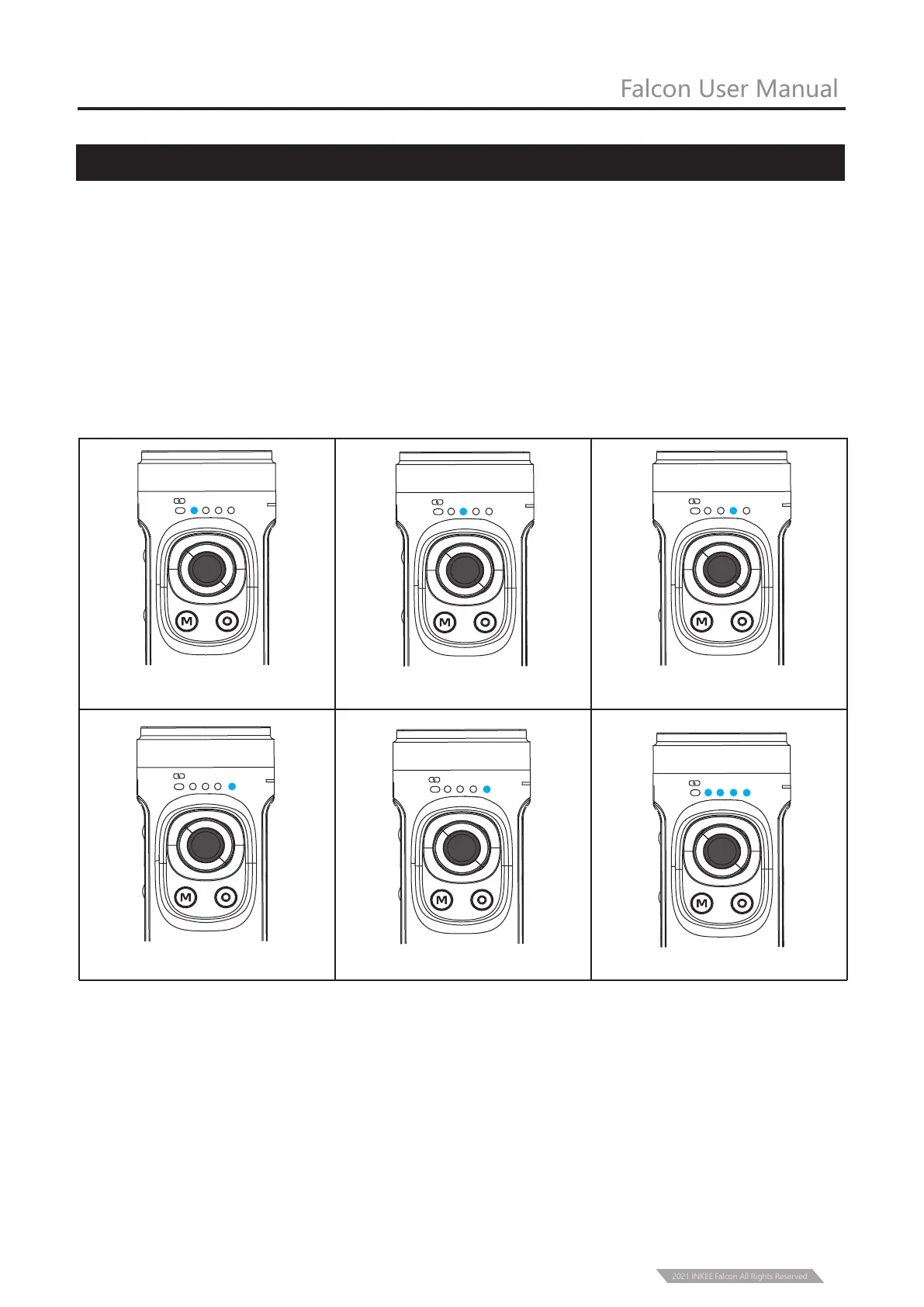
2、The current mode of the stabilizer can be identified by the status of the indicator light.
① Single click to switch PF-HL-FPV mode.
② Double click to enter vertical shooting mode, double click again to ener Flashlight Mode.
Single click to exit to HL mode.
③ Long press the Trigger Button to enter GL Mode(Lock Mode), release to back to previous
mode(GL Mode works only under PF or HL Mode).
1、Illustration
PF Pan Following
HL Pan/Tilt Following FPV Three axis all Following
PF HL FPV
FL
PF HL FPV
FL
PF HL FPV
FL
Vertical Mode
(the indicator light flashes)
Lock Mode
Mode Flashlight Mode
HL FPV
FL
PF HL FPV
FL
PF HL FPV
FL
PF



 To Next Page