Falcon User Manual
4
2021 INKEE Falcon All Rights Reserved
Balance Adjustment
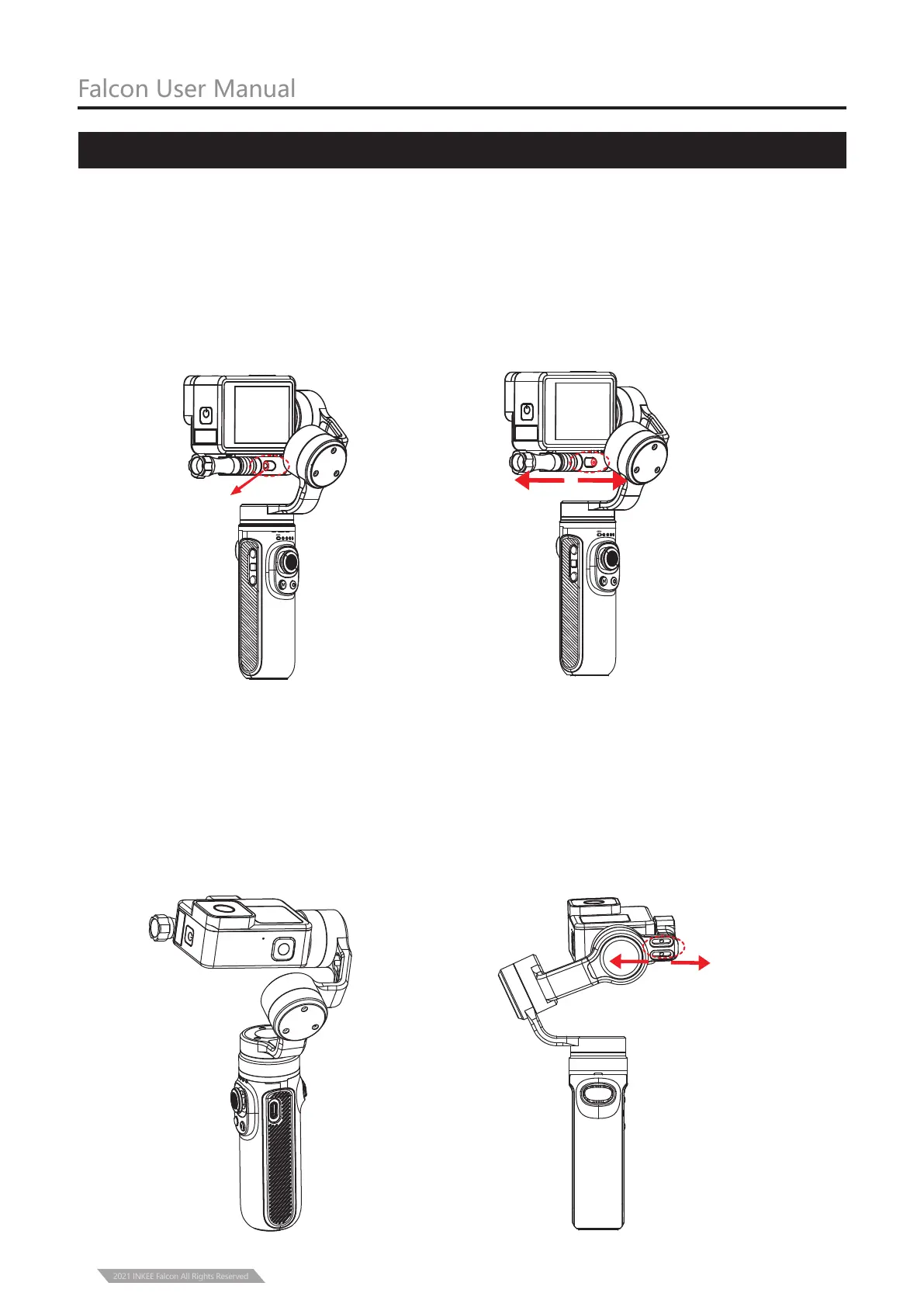
Determine the center of gravity of the camera. If the camera tilts to the left, it means that
the center of gravity of the camera is to the left. Loosen the left and right balance
adjustment locking screw ①, and move the mounting base and the camera to the right
until it can keep level with the ground when it is still; If the camera is tilted to the right,
move the mounting base and the camera to the left until it is horizontal with the ground
when it is still, and then tighten the screw.
1. Left and Right Balance Adjustment Lock
PF
HL
FPV
FL
PF HL
FPV
FL
①
Flip the camera so that the lens is vertically up. Determine the center of gravity of the camera.
When the camera lens is tilted forward, the mounting base and the camera should be moved
backward until it can keep level with the ground when it is still, and then the screw can be
tightened; If the camera lens is tilted backward, the mounting base and the camera should
be moved forward until it can keep level with the ground when it is still, and then the screw
can be tightened.
2.Front and Rear Balance Adjustment



 To Next Page