
 Need help?
Do you have a question about the InMotion C1 Pro and is the answer not in the manual?
Guides users through downloading the INMOTION App, activating the scooter, and preparing for the first ride.
Details the steps for charging the e-scooter and lists important safety warnings related to charging.
Offers essential safety advice for riding, covering conditions, handling, and avoiding hazards.
Covers important precautions for riding on motorways, handling, carrying, and using electronic devices while riding.
Details essential pre-ride checks, responsibilities for other riders, insurance, and adherence to local regulations.
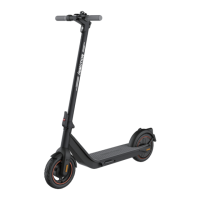
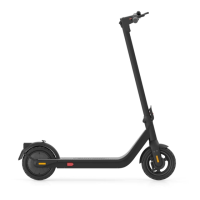
The INMOTION AR Pro E-Scooter is a recreational device designed for personal transportation, offering a blend of convenience, safety, and performance features. It is intended for use on flat pavement or level ground without bumps and obstacles, making it suitable for urban commuting and leisure rides.
The E-Scooter operates with an electric motor, providing an efficient and eco-friendly mode of transport. It features a throttle for acceleration, a brake lever for deceleration, and a headlight for improved visibility, especially in low-light conditions. The scooter is equipped with a dashboard that displays essential information such as speed, battery level, and current riding mode. A power button allows for easy power on/off, and a head unit clip and mount secure the handlebar and stem. The folding mechanism enables compact storage and portability, while the kickstand provides stable parking.
The INMOTION AR Pro E-Scooter offers multiple riding modes to suit different preferences and skill levels. The "D" (Drive) mode is suitable for general riders with a maximum speed of 25 km/h. For more skilled riders, the "S" (Sports) mode offers a higher maximum speed of 35 km/h. There is also a "Pedestrian" mode, limiting the speed to 6 km/h, ideal for navigating crowded areas. The scooter's speedometer displays real-time speed, and the battery level is indicated by five bars, with the last bar flashing to signal a low-battery condition. The light icon on the dashboard indicates when the headlight is on.
To ensure a safe first ride, the scooter requires activation via the INMOTION App. Until activated, the scooter maintains a riding speed of 5 km/h and does not allow switching between ride modes. This activation process guides new riders through essential safety instructions and helps them become comfortable with the scooter's basic operation.
The scooter is designed for easy assembly, with clear instructions provided for unfolding the stem, fastening the folding wrench, and installing the handlebars. Riders are advised to wear an approved helmet, elbow pads, knee pads, and other protective gear to minimize injury risk. Before riding, it's crucial to check the power level and charge the scooter if the battery is low. To start, riders stand on the footrest with one foot and push off with the other to begin gliding. The motor engages only when the scooter reaches 3 km/h for safety. Slowing down involves releasing the throttle and gently holding the braking lever, avoiding sudden braking.
The folding and carrying features enhance the scooter's practicality. To fold, the scooter is powered off, the stem is held, the locking button is pressed, and the lever is pulled to bend the handlebar stem towards the footrest. The stem is then pulled, and the folding ring is attached to the locking clip on the mudguard, securing it in a folded position. The scooter can be carried by holding the handlebar stem.
Maintaining the INMOTION AR Pro E-Scooter is straightforward, focusing on cleaning, charging precautions, and proper storage. For cleaning, the body of the scooter can be wiped with a damp cloth. For persistent stains, toothpaste and a toothbrush can be used, followed by wiping with a damp cloth. It is crucial to ensure the scooter is turned off, the charging cable is disconnected, and the rubber cap is closed during cleaning to prevent water damage to electronic components. Harsh chemicals, alcohol, petrol, kerosene, or high-pressure water jets should be avoided to prevent serious damage.
Charging precautions are vital for battery longevity and safety. The scooter should not be charged in wet environments, and the optimal ambient temperature for charging is 0–40°C. It is important to keep the scooter out of reach of children and animals and away from flammable materials during charging. Only the original INMOTION charger and battery pack should be used. The battery should not be charged or used if it is damaged or flooded, and the charge port cover should be tightly closed when not in use or after charging. Charging indoors is recommended. After each use, fully recharging the battery helps extend its useful life, as completely draining it can cause permanent damage. The battery should not be opened, and nothing should be inserted into the charging port. Local environmental protection laws for battery recycling should always be followed.
For storage, the scooter should be kept in a cool, dry place when not in use, avoiding prolonged outdoor storage. Excessive sunlight, overheating, and extreme cold can accelerate tire aging and negatively impact the life of both the scooter and its battery. The manual also advises against using non-original batteries due to safety risks and emphasizes adhering to specified temperature ranges for battery storage and charging.
Regular inspections of equipment and cleaning are recommended for a better ride experience. Before each ride, all vehicle components should be checked to ensure they are in place and securely fastened, including the handlebar, stem, tires, brakes, and screws. Any unusual sounds or alarms from the scooter should prompt an immediate stop and contact with after-sales service. The INMOTION App can also be used to diagnose issues.
 General
| Charging Time | 5-6 hours |
|---|---|
| IP Rating | IP54 |
| Category | Scooter |
| Max Speed | 25 km/h |
| Max Range | 45 km |
| Max Load | 120 kg |
| Tires | 10" Pneumatic Tires |
| Lights | Front LED headlight |


 To Next Page