4
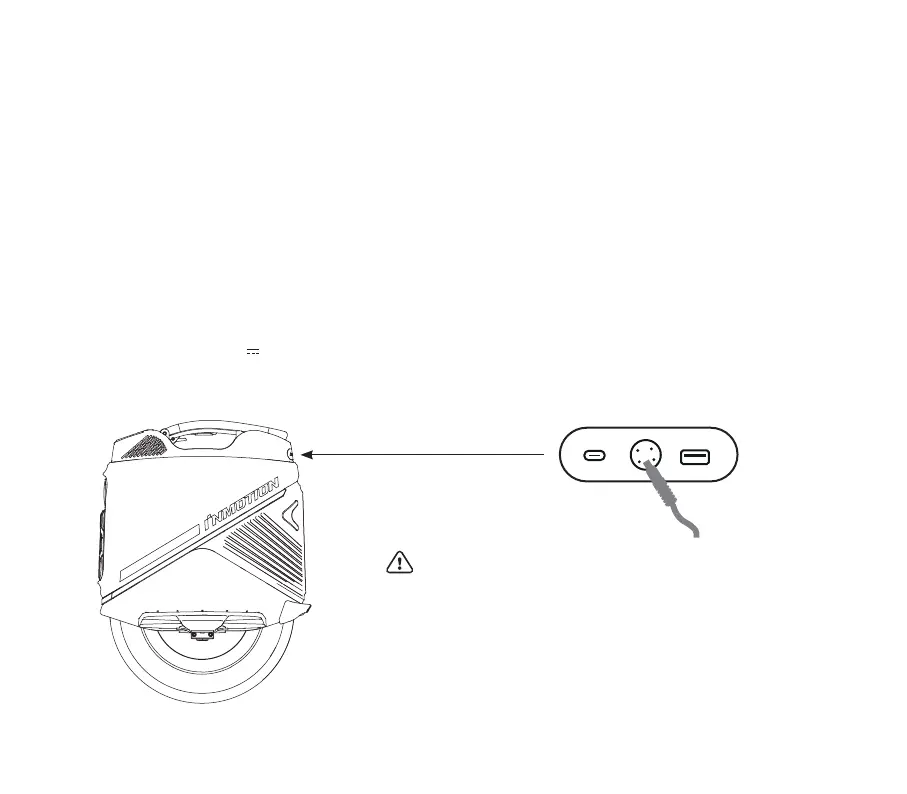
• Do not charge if there is water at the charging port or power cord.
• Please use the original adapter for charging.
• Do not charge indoors.
• Cover the lid tightly after charging.
• Do not charge if the battery is damaged or has been exposed to water.
• If not in use for a long time, it is recommended to charge once every
three months.
Warning:
Charging
The original charger is 84V 4A. The blue light indicates the power status, the green light indicates a full charge, and the red
light indicates the charging status, indicating that it is currently charging/charging complete. When both chargers are used
simultaneously, the charging time will be reduced by 50%. (The maximum input for charging the entire vehicle is 4A.)
Open
Charge cable
PRODUCT FEATURES
Power On/Off: Long press the power button to turn on the device, long press the power button to turn off the device when it
is on.
Headlight: Short press the power button to turn on/off the headlight when it is on; the headlight can be set to turn on/off
automatically in the App.
Tail Light: flashing high when braking; tail light is always on when the headlight is on.
Anti-spin Button: Press and hold the anti-flying button, the vehicle will lose balance.
Touch Screen: Get the riding data in real time and set the vehicle parameters quickly.


 To Next Page