7
Dashboard
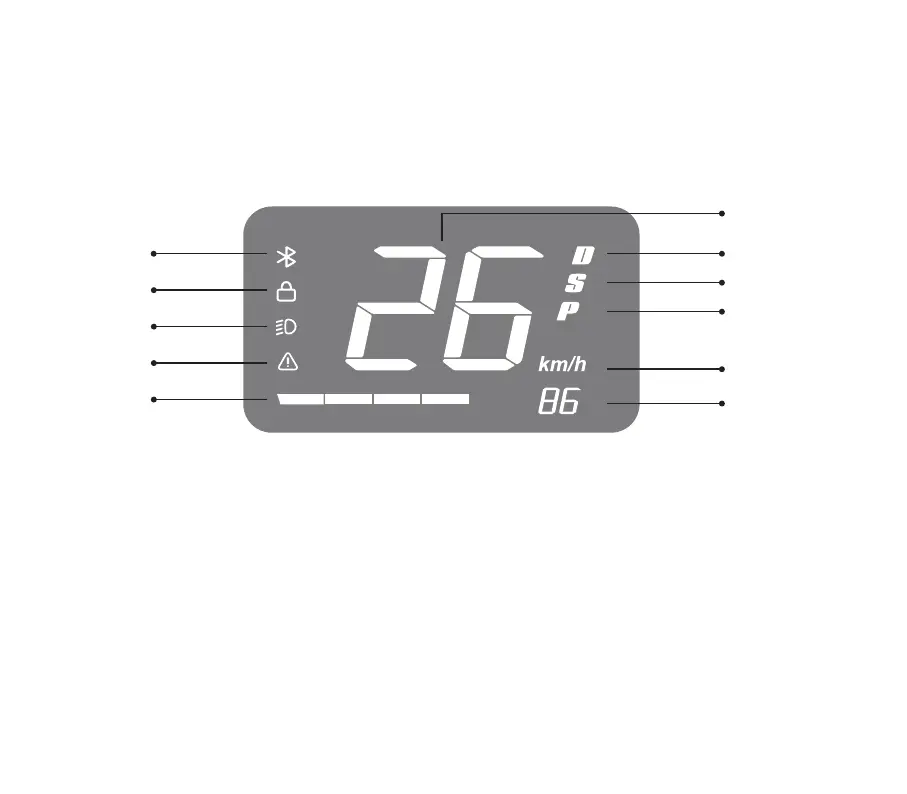
Display contents
Speed unit: Switch the display unit in the APP.
Battery level: The battery level bar and the direct number show the current battery level of the vehicle.
Lock: The APP account authenticated by the vehicle owner can lock the vehicle via APP.
Bluetooth: The icon lights up when Bluetooth is connected.
Error icon: The icon lights up when the vehicle is in fault, detailed fault information needs to connect to APP to view.
Headlight Icon: The icon lights up when the headlight is turned on.
Bluetooth
Error light
Battery
indicator
Headlight
Speed
Comfortable mode
Parking mode
Sport mode
Speed unit
Battery
Lock
%


 To Next Page