10
5. APPENDIX
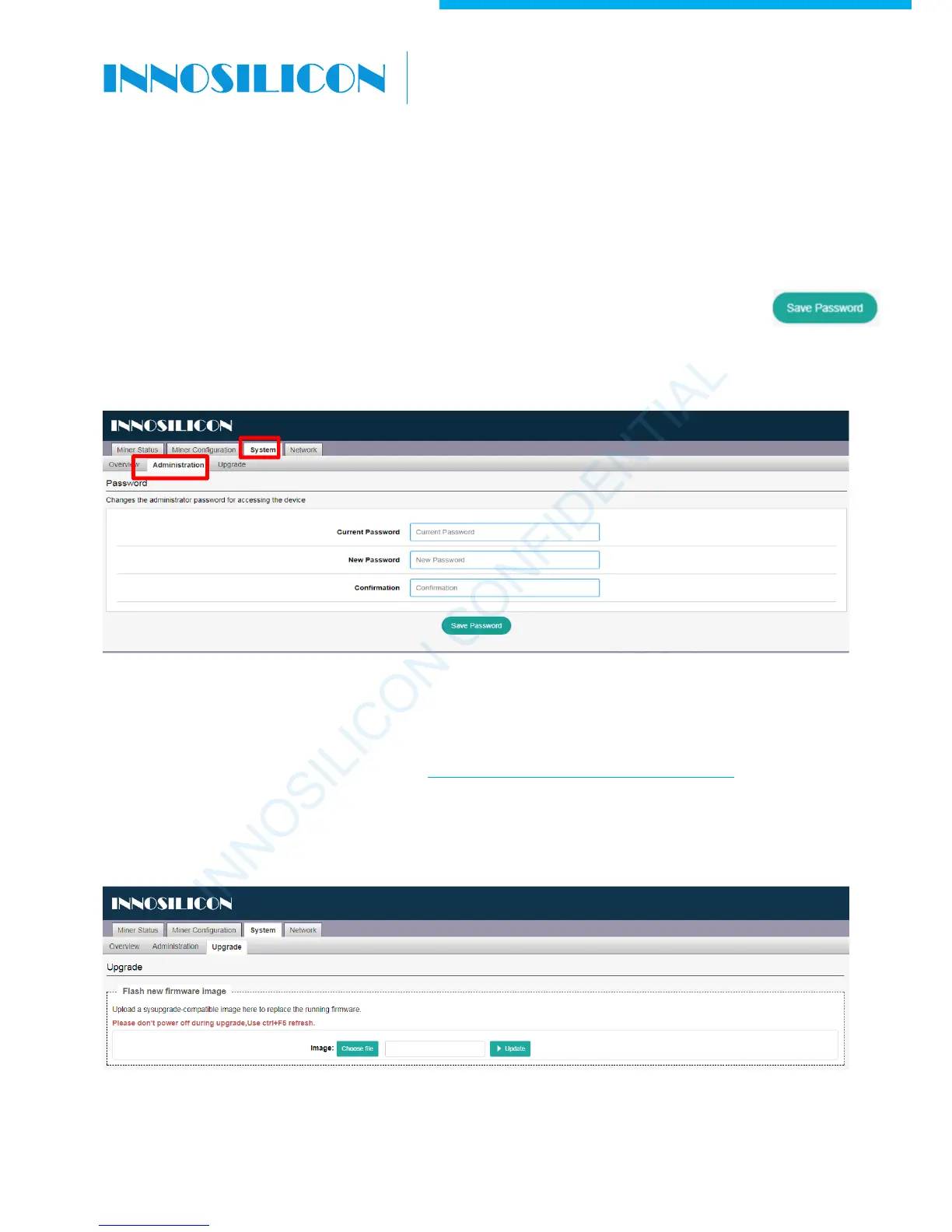
5.1 MODIFY THE LOGIN PASSWORD
Select the “Administration” interface at System, then you can modify your password. Then click
to save your new password.
Download the firmware from Support Center: http://www.innosilicon.com/html/downA4/
Then select the “Upgrade” interface at System option, click to choose the firmware you want to upgrade,
click the “update” to start the upgrade. The upgrade is success when you see the progress bar reach to
100%.
5.2 UPGRADE THE FIRMWARE
INNOSILICON CONFIDENTIAL
A6 LTCMaster
Note: As the factory reset will not reset the
password to the default password, you must
take care your new password. If you forget
the password, it can only recovered through
our paid support. (Very IMPORTANT!!!)
)
Note: Don’t power off the miner when is is
upgrading. When the progress bar reach to
100%, upgrade done and it will reboot by
itself. Then use “Ctrl+F5” to refresh.



 To Previous Page