Chrysler/Jeep OBD1 Systems
CODE RETRIEVAL PROCEDURE
3150e 69
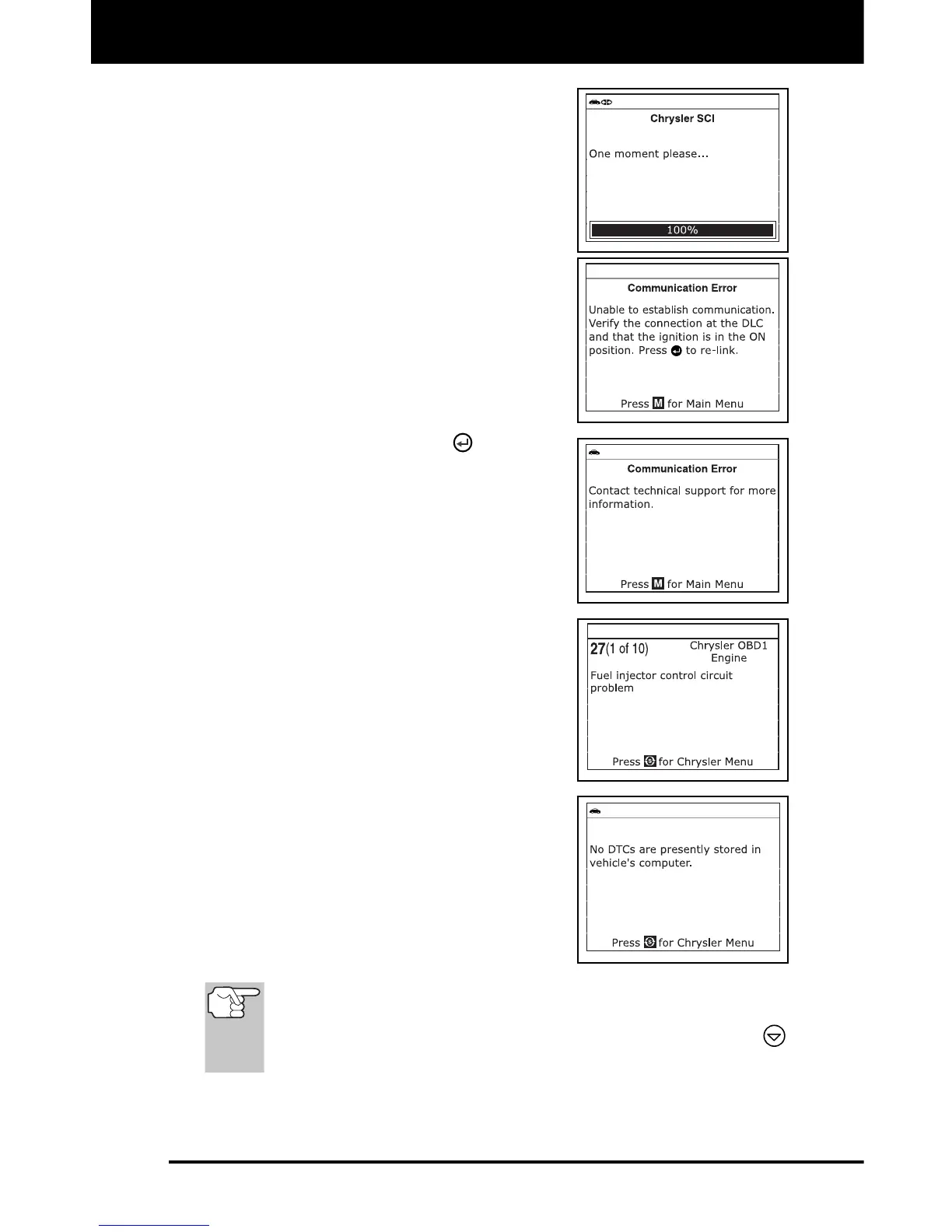
5. When the Diagnostic Tool is in the
process of retrieving codes, a “One
Moment Please...” message shows on
the Diagnostic Tool’s LCD display.
If the Diagnostic Tool fails to link to
the vehicle’s computer, a “Commu-
nication Error” message shows on
the Diagnostic Tool’s LCD display.
Do the following:
- Verify the ignition is ON.
- Check the cable connections at
the Diagnostic Tool and at the
vehicle’s DLC.
- Turn the ignition OFF, wait 10-12
seconds, then turn back ON to
reset the computer.
- Press the ENTER
button to
continue.
If the Diagnostic Tool cannot link to
the vehicle’s computer after three
attempts, the message “Contact
Technical Support” displays.
- Press the M button to return to the
Main Menu.
- Turn the ignition off, and
disconnect the Diagnostic Tool.
- Contact Technical Support for
assistance.
6. If the Diagnostic Tool was able to link to
the vehicle successfully, the Diagnostic
Tool displays the retrieved DTCs.
The Diagnostic Tool will display a
code only if codes are present in the
vehicle's computer memory. If no
codes are present, a "No DTC's are
presently stored in the vehicle's
computer" message is displayed.
7. If more than one code was retrieved
press the DTC button, as necessary, to
display additional codes one at a time.
In the case of long code definitions, a small arrow is shown in
the upper/lower right-hand corner of the code display area to
indicate the presence of additional information. Use the
button to view the additional information.
8. Disconnect the Diagnostic Tool from the vehicle and turn the ignition
key OFF.


 To Next Page