Ford OBD1 Systems
ERASING DTCs
3150e 95
10. Follow the procedures in the vehicle's service repair manual to
perform troubleshooting and repairs for Wiggle Test results.
11. The Wiggle Test will stay active as long as desired. To quit the
Wiggle Test, turn the ignition OFF and disconnect the Diagnostic
Tool from the vehicle.
ERASING DTCs
When the Diagnostic Tool's ERASE function is used to
erase DTCs from the vehicle's on-board computer,
manufacturer specific data (where applicable) is also
erased.
If you plan to take the vehicle to a service center for repair, DO NOT
erase the codes from the vehicle's computer. If the codes are erased,
valuable information that might help the technician troubleshoot the
problem will also be erased.
Erase DTC’s from the computer’s memory as follows:
1. Connect the Diagnostic Tool to the vehicle’s DLC. Press the ENTER
button to continue.
2. Turn the ignition ON. DO NOT start the engine.
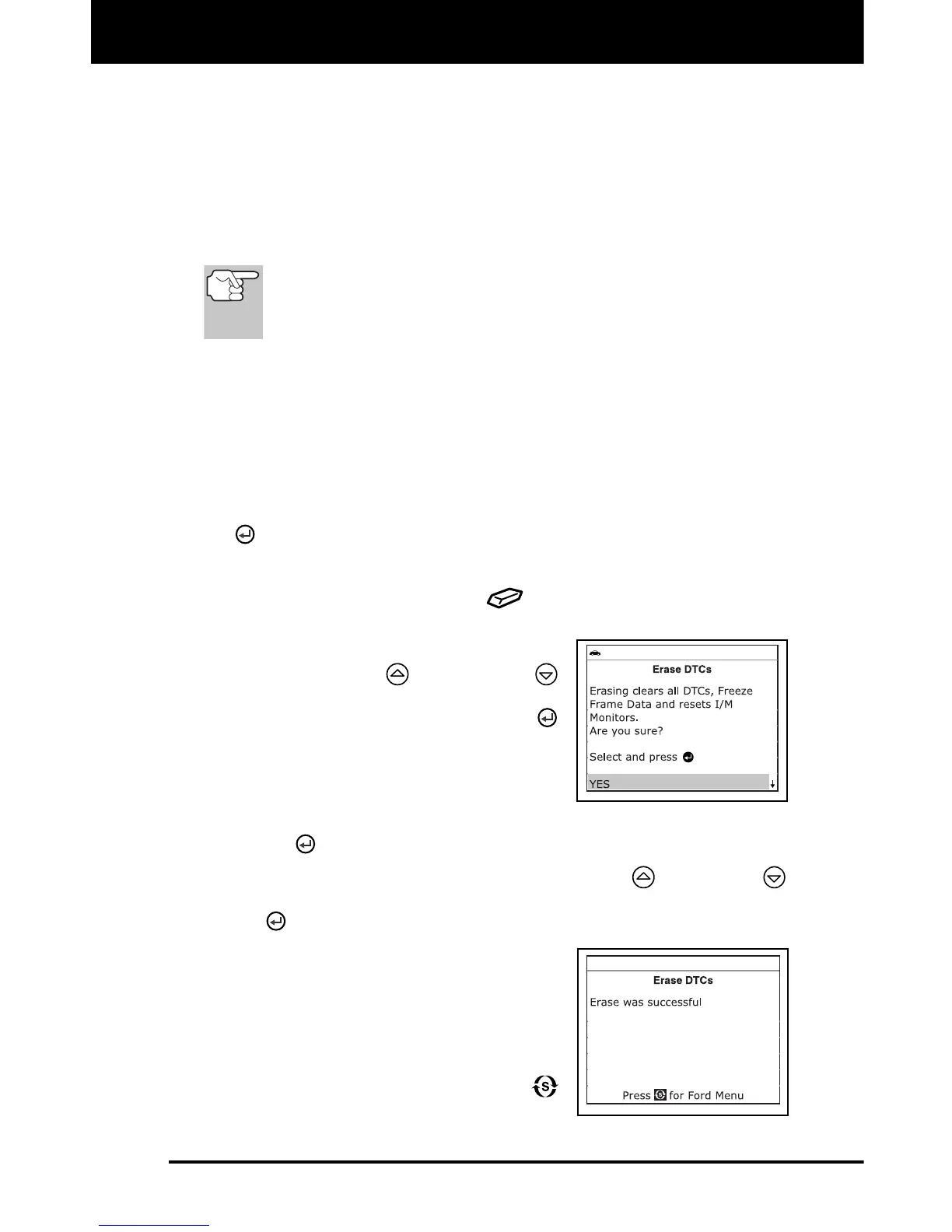
3. Press and release the ERASE
button. A confirmation message
shows on the LCD display.
If you are sure you want to proceed,
use the UP
and DOWN
buttons, as necessary, to highlight
YES, then press the ENTER
button to continue.
- Turn the ignition OFF and wait
for the on-screen prompt.
- When prompted, turn the ignition ON and press the ENTER
button to continue.
If you do not want to proceed, use the UP and DOWN
buttons, as necessary, to highlight NO, then press the ENTER
button to exit the erase function.
4. If you chose to erase DTCs, a “One
moment please…” message displays
while the erase function is in progress.
If the erase was successful, a
confirmation message shows on the
Diagnostic Tool’s LCD display.
Press the SYSTEM MENU
button to return to the Ford Menu.


 To Next Page