Chrysler/Jeep OBD1 Systems
ERASING DTCs
70 3150e
9. To prolong battery life, the Diagnostic Tool automatically shuts "Off"
after approximately three minutes of no button activity. The DTCs
retrieved will remain in the Diagnostic Tool's memory, and may be
viewed at any time. If the Diagnostic Tool’s batteries are removed,
or if the Diagnostic Tool is re-linked to a vehicle to retrieve codes,
any prior codes in its memory are automatically cleared.
10. Follow the testing and repair procedures outlined in the vehicle's
service repair manual to correct "hard" DTCs. Codes should be
addressed and eliminated in the order they were received, erasing
and retesting after each repair is made to be sure the fault was
eliminated.
ERASING DTCs
When the Diagnostic Tool's ERASE function is used to erase
DTCs from the vehicle's on-board computer, manufacturer
specific data (where applicable) is also erased.
If you plan to take the vehicle to a service center for repair, DO NOT
erase the codes from the vehicle's computer. If the codes are erased,
valuable information that might help the technician troubleshoot the
problem will also be erased.
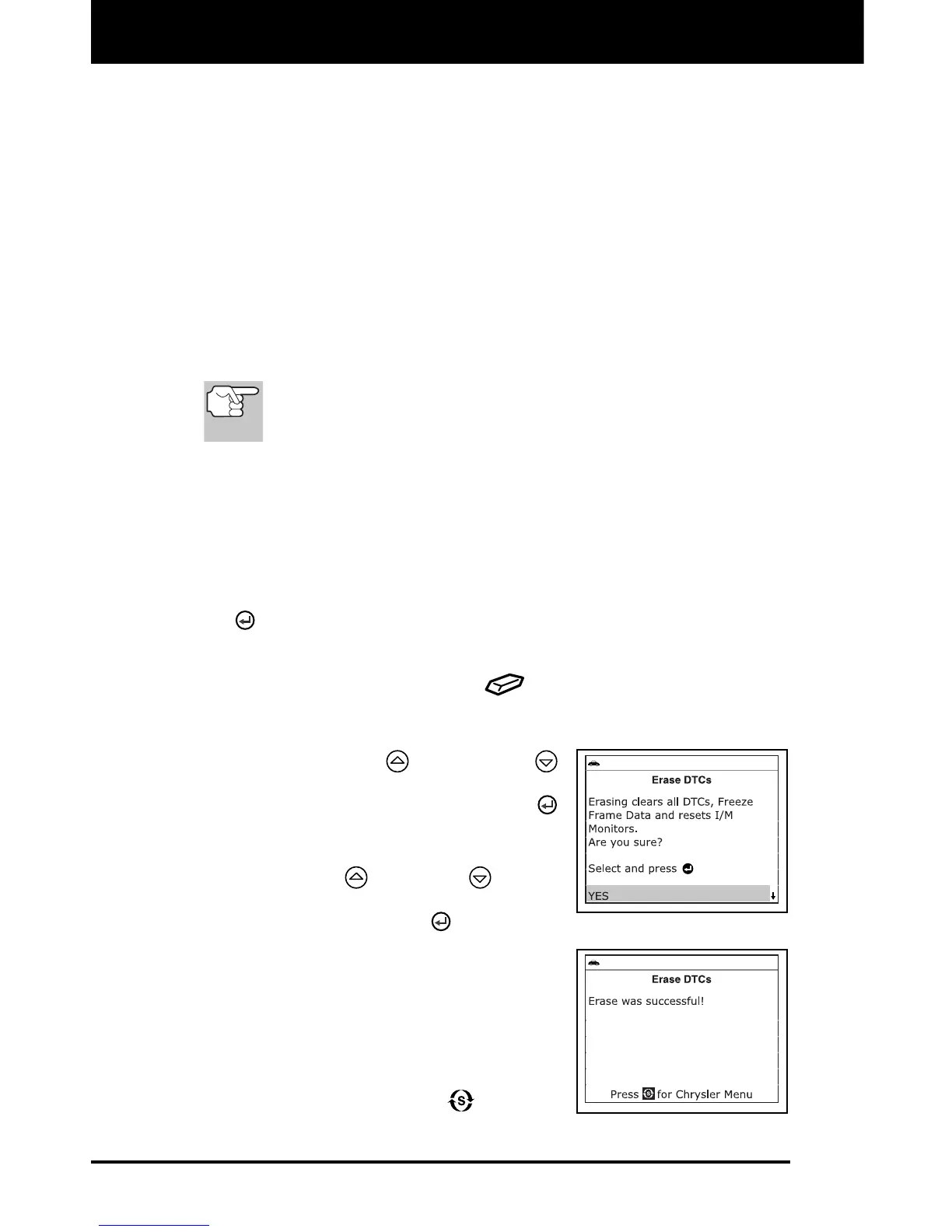
Erase DTC’s from the computer’s memory as follows:
1. Connect the Diagnostic Tool to the vehicle’s DLC. Press the ENTER
button to continue.
2. Turn the ignition ON. DO NOT start the engine.
3. Press and release the ERASE
button. A confirmation message
shows on the LCD display.
If you are sure you want to proceed,
use the UP
and DOWN
buttons, as necessary, to highlight
Yes, then press the ENTER
button to continue.
If you do not want to proceed, use
the UP
and DOWN buttons,
as necessary, to highlight No, then
press the ENTER
button to exit
the erase function.
4. If you chose to erase DTCs, a “One
moment please…” message displays
while the erase function is in progress.
If the erase was successful, a
confirmation message shows on the
Diagnostic Tool’s LCD display. Press
the SYSTEM MENU
button to
return to the Chrysler Menu.


 To Next Page