Borescope Controls
CONTROLS AND INDICATORS
3
CONTROLS AND INDICATORS
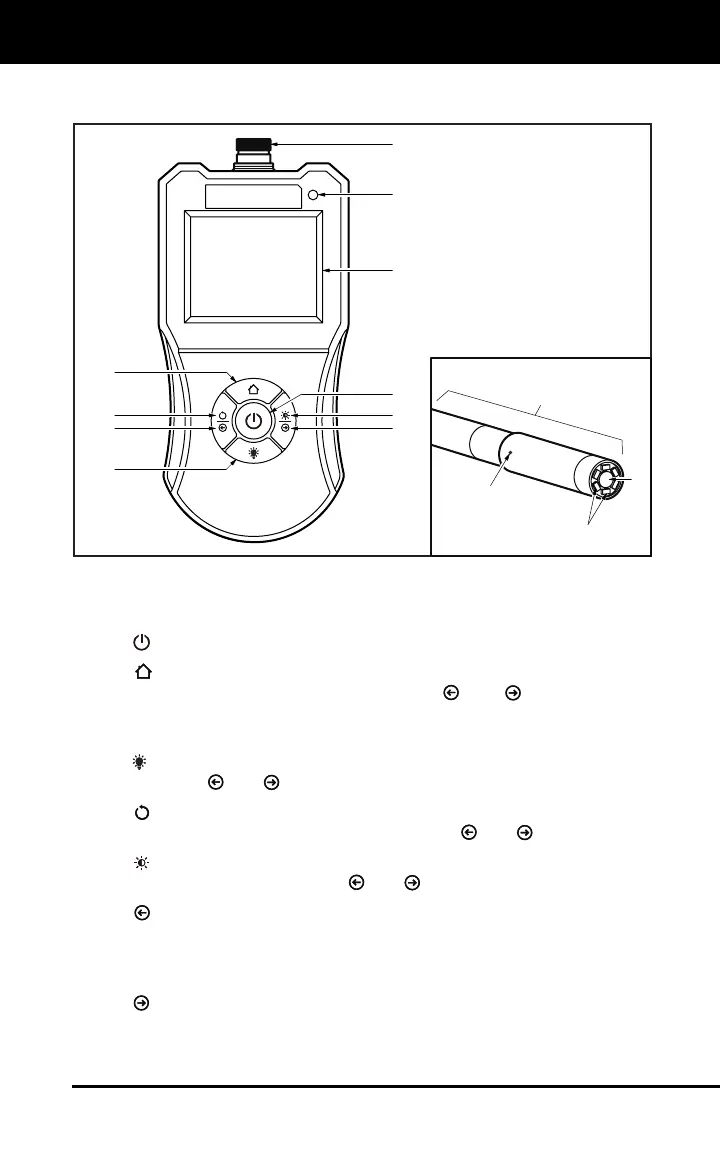
Figure 1. Controls and Indicators
See Figure 1 for the locations of items 1 through 10, below.
1.
POWER button - Turns the Borescope “ON” and “OFF”.
2.
HOME button – When pressed while in display mode, lets you
adjust LCD color balance using the
and buttons. When
pressed while rotating the displayed image or adjusting display
brightness, returns the Borescope to display mode.
3.
LED button – When pressed, lets you adjust LED brightness
using the
and buttons.
4.
ROTATE IMAGE button - When pressed, lets you rotate the
image shown on the LCD display using the
and buttons.
5.
BRIGHTNESS button – When pressed, lets you adjust LCD
display brightness using the
and buttons.
6.
LEFT/DECREASE button – Depending on the selected operating
mode (see items 2 through 5 above), rotates the displayed image to
the left or decreases color balance, LED brightness or LCD display
brightness, as appropriate.
7.
RIGHT/INCREASE button – Depending on the currently
selected operating mode (see items 2 through 5 above), rotates the
displayed image to the right or increases color balance, LED
brightness or LCD display brightness, as appropriate.
4
2
3
6
5
8
10
11
12
13
14
9
1
7


 To Next Page