The device is a handheld borescope, model 3380, designed for real-time visual inspection in small, limited access, or low-light areas. It functions as a non-destructive visual inspection tool, displaying a live video feed from its snake camera on an integrated LCD screen. The borescope does not support the capture or storage of images.
Important Safety Precautions:
- The borescope is intended for use by adults or under adult supervision only and is not designed for medical applications.
- Always operate the device in a clean, well-ventilated area with adequate illumination.
- Do not operate in environments where temperatures exceed 140°F (60°C).
- Avoid using the borescope near flammable liquids, gases, or dust to prevent explosions, as fuel and battery vapors are highly flammable.
- Keep the borescope away from corrosive chemicals, which can damage its protective coating and reduce its lifespan.
- Always wear approved safety eye protection to guard against propelled objects or hot/caustic liquids.
- Do not allow the snake camera to bend at an angle greater than 60 degrees.
- Prevent liquid or foreign matter from entering the borescope. If condensation is present, allow it to evaporate before use.
- Store the borescope in a dry, well-ventilated area.
- Clean the borescope housing with a 70% alcohol solution and a lint-free cloth. Clean the LCD display gently with a clean, dry lint-free cloth.
Technical Specifications:
- Borescope Display Size: 2.7 inches (68.6mm)
- Operating Current: ≤500mA
- Battery Size: 4 AA batteries (Alkaline-type recommended for longer life)
- Snake Camera Image Sensor: CMOS sensor
- Effective Pixels: 720 x 480 pixels
- Focus Distance: 1.18 inches to 3.15 inches (30mm to 80mm)
- View Angle: 60 degrees
- Camera Length: 37.8 inches (960mm)
- Camera LEDs: 6 x 0603; 6 x 0402 (for illumination in low-light areas)
- Camera Lens: IP67 Rated Submersible Lens
Accessories Included:
- 90-Degree Mirror
- Magnet
- Hook
Usage Features:
The borescope features several controls and indicators for ease of use:
- POWER button: Turns the borescope ON and OFF.
- POWER indicator: Lights up when the borescope is turned ON.
- HOME button:
- In display mode, allows adjustment of LCD color balance using the LEFT/DECREASE and RIGHT/INCREASE buttons.
- When rotating the displayed image or adjusting display brightness, returns the borescope to display mode.
- Saves changes and exits "setting" mode for color balance and display brightness.
- LED button:
- Adjusts LED brightness using the LEFT/DECREASE and RIGHT/INCREASE buttons.
- Saves changes and exits "setting" mode for LED brightness.
- ROTATE IMAGE button: Rotates the image on the LCD display using the LEFT/DECREASE and RIGHT/INCREASE buttons.
- BRIGHTNESS button: Adjusts LCD display brightness using the LEFT/DECREASE and RIGHT/INCREASE buttons.
- LEFT/DECREASE button: Depending on the selected operating mode, it rotates the displayed image to the left or decreases color balance, LED brightness, or LCD display brightness.
- RIGHT/INCREASE button: Depending on the selected operating mode, it rotates the displayed image to the right or increases color balance, LED brightness, or LCD display brightness.
- Camera Connector: Point for attaching the snake camera.
- LCD Display: Shows the video feed from the snake camera.
- Snake Camera: The flexible probe that routes the camera to areas of limited access.
- Camera: The lens at the end of the snake camera that supplies the video feed.
- LEDs: Integrated lights on the camera for illumination in low-light conditions.
- Accessory Slot: Attachment point for borescope accessories (mirror, magnet, hook).
Operation:
- Powering On: Press and hold the POWER button for approximately two seconds, then release. The POWER indicator will light up, and the LCD display will show the image from the snake camera.
- Routing the Camera: Carefully guide the snake camera into the inspection area, ensuring it does not bend at an angle greater than 60 degrees.
- Adjustments: Adjust camera LED brightness, LCD display brightness, color balance, and/or image orientation as needed. These settings remain active until changed again or until the unit is powered off.
- Powering Off: After inspection, carefully extract the snake camera. Press and release the POWER button to turn the borescope off.
Adjustments and Settings:
The borescope allows for several adjustments to optimize viewing conditions:
- Adjusting LED Brightness:
- With the borescope ON, press the LED button to enter "setting" mode.
- Use the LEFT/DECREASE button to decrease brightness or the RIGHT/INCREASE button to increase brightness.
- Press the LED button again to save changes and exit "setting" mode.
- Adjusting Display Brightness:
- With the borescope ON, press the BRIGHTNESS button to enter "setting" mode.
- Use the LEFT/DECREASE button to decrease brightness or the RIGHT/INCREASE button to increase brightness.
- Press the HOME button to save changes and exit "setting" mode.
- Adjusting Color Balance:
- With the borescope ON, press the HOME button to enter "setting" mode.
- Use the LEFT/DECREASE button to decrease color balance or the RIGHT/INCREASE button to increase color balance.
- Press the HOME button again to save changes and exit "setting" mode.
- Adjusting Image Orientation:
- With the borescope ON, press the ROTATE IMAGE button to enter "setting" mode.
- Use the LEFT/DECREASE button to rotate the image to the left or the RIGHT/INCREASE button to rotate it to the right.
- Press the HOME button to save changes and exit "setting" mode.
Maintenance Features:
- Battery Replacement:
- Locate the battery cover on the back of the borescope.
- Slide the cover off.
- Replace the four AA-size batteries (Alkaline-type recommended for longer life).
- Reinstall the battery cover.
- Camera Installation:
- Thread the snake camera onto the camera connector.
- Tighten finger-tight. Do not overtighten to prevent thread damage to either the camera connector or the snake camera.
- Cleaning:
- Clean the borescope housing with a 70% alcohol solution and a lint-free cloth.
- Clean the LCD display by wiping gently with a clean, dry lint-free cloth.
Warranty and Servicing:
- Limited One Year Warranty: The manufacturer warrants the unit to be free of defects in materials and workmanship for one year from the original purchase date. If the unit fails within this period, it will be repaired or replaced at no charge, provided it is returned prepaid to the Service Center with proof of purchase. The warranty does not cover installation labor or damage from improper use, accidents, abuse, improper voltage, service, fire, flood, lightning, other acts of God, or alterations/repairs by unauthorized personnel. The warranty is non-transferable.
- Service Procedures: For questions, technical support, or information on updates and optional accessories, contact your local store, distributor, or the Service Center.
- USA & Canada: 1 (800) 544-4124 (6:00 AM-6:00 PM PST, Monday through Saturday)
- All others: (714) 241-6802 (6:00 AM-6:00 PM PST, Monday through Saturday)
- FAX: (714) 241-3979 (24 hr.)
- Web: www.innova.com
- For service, send the unit via UPS (if possible) prepaid to the manufacturer. Allow 3-4 weeks for service/repair.

 Need help?
 General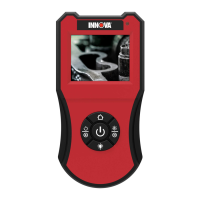

 To Next Page